


Dotted outline on the Selected Elements while Browsing
I have been bothered by this problem since long time ago, when I click on an element on the website, a dotted outline appeared, which you can see in the screenshot. Do anyone have any ideas?
I have been bothered by this problem since long time ago, when I click on an element on the website, a dotted outline appeared, which you can see in the screenshot. Do anyone have any ideas?
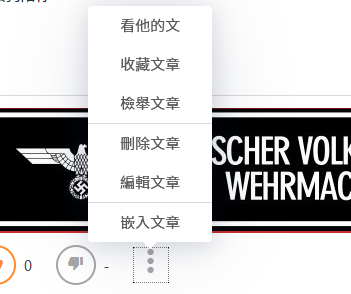
Modified by CToID
Chosen solution
Setting the value of the browser.display.focus_ring_width preference to 0 using the Configuration Editor for Firefox (about:config page), should hide the focus ring.
Hope this helps.
Read this answer in context 👍 1All Replies (2)
Chosen Solution
Setting the value of the browser.display.focus_ring_width preference to 0 using the Configuration Editor for Firefox (about:config page), should hide the focus ring.
Hope this helps.
Wesley Branton said
Setting the value of thebrowser.display.focus_ring_widthpreference to0using the Configuration Editor for Firefox (about:configpage), should hide the focus ring. Hope this helps.
Thank You!!!