


why is a previously available website no longer available
I've been using the website duolingo for month and have always accessed it by a Firebox bookmark. For some odd reason, when trying to access it today, the web url appeared in the browser menu bar, yet the page did not open. I tried to access the site using Safari and the site opened. My browser of preference is Firefox. What should I do to resolve this mystery of inaccessibility? To the best of my knowledge I did not make any preference settings changes in Firefox and I even tried resetting Firefox which also did not work.
Chosen solution
In another thread, the user reported that Norton Safe Web is causing the issue:
https://support.mozilla.org/questions/1252910#answer-1204613
Read this answer in context 👍 1All Replies (7)
Hi HalfABubble, are you going to the home page --
-- or a specific page within the site?
Does the home page load for you?
I notice the site uses a CloudFront server for some of its content. For example, this is the first style sheet address when I load the home page:
https://d35aaqx5ub95lt.cloudfront.net/css/ltr-e3cf191c.css
Can you check to make sure that server isn't being blocked by Firefox's Content Blocking feature or any of your add-ons:
Double-check content blockers: Firefox's Content Blocking feature and extensions that counter ads and tracking may break websites that embed third party content (meaning, from a secondary server).
(A) Do you see a shield icon toward the left end of the address bar, near the lock icon? More info on managing the Tracking Protection feature in this article: Content Blocking.
(B) Extensions such as Adblock Plus, Blur, Disconnect, Ghostery, NoScript, Privacy Badger, uBlock Origin or uMatrix should provide toolbar buttons to manage blocked content in a page. There may or may not be a number on the icon indicating the number of blocked items; you may need to click the button to see what's going on and test whether you need to make an exception for this site.
Hello Jscher2000,
Prompt Reply - Thank You The Home Page does not load There is no shield icon. When viewing the site information:
  Connection = Secure Connection
  Content Blocking = No Blockable content detected on this page
  Permissions = you have not granted granted this site any special permissions
Any other ideas?
If you don't mind getting a little nerdy, could you open the Network Monitor tool in the lower part of the tab, using either:
- "3-bar" menu button > Web Developer > Network
- (menu bar) Tools > Web Developer > Network
- (Windows) Ctrl+Shift+e
Then reload the page in the top part of the tab (Ctrl+r or use the reload button). Firefox should start listing all the files it is requesting, along with information about whether the request was successful.
- 200 = successful fresh or cached retrieval
- 301 or 302 = redirect to different URL
- 304 = server confirmation to use cached file
Do you see a lot of failed requests?
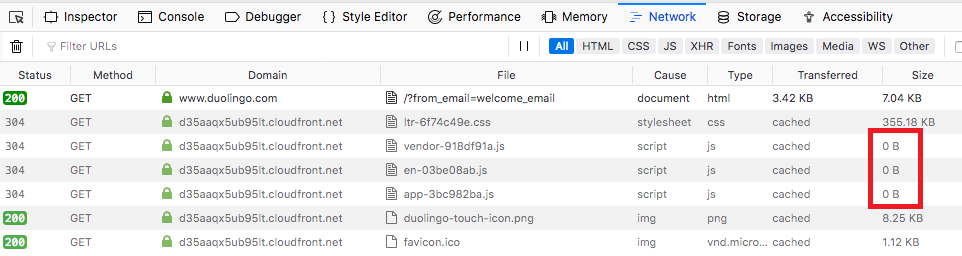
the 'little nerdy' reply - have sent you email (carrferrell) with a screen print of the information displayed using the Network Monitor tool, with a yield of: 200, 304, 304, 304, 304, 200 & 200
Subject Line : Screen Print Result of Network Monitor - duolingo page refresh
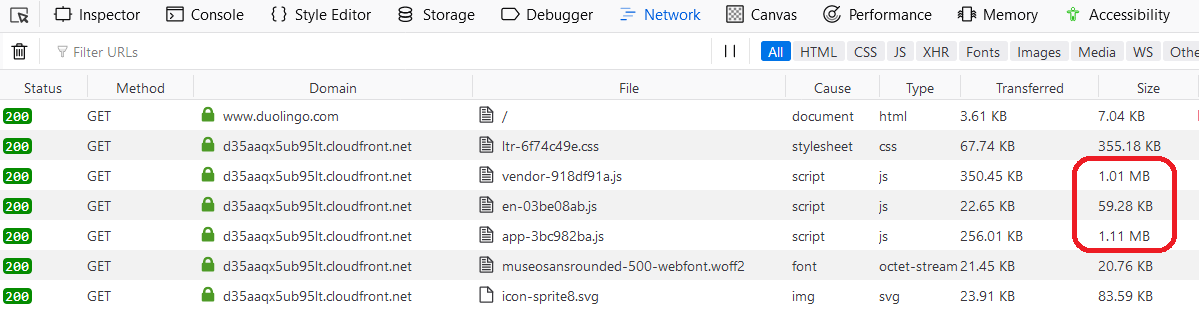
The scripts that show a size of zero bytes should definitely not be so small (comparison screenshots attached). Do you use any security software or add-ons that could be filtering out the contents of those scripts?
Chosen Solution
In another thread, the user reported that Norton Safe Web is causing the issue:
https://support.mozilla.org/questions/1252910#answer-1204613
Spot On - Thank you - I too will send a note to Duolingo.