


Email messages not displaying correctly
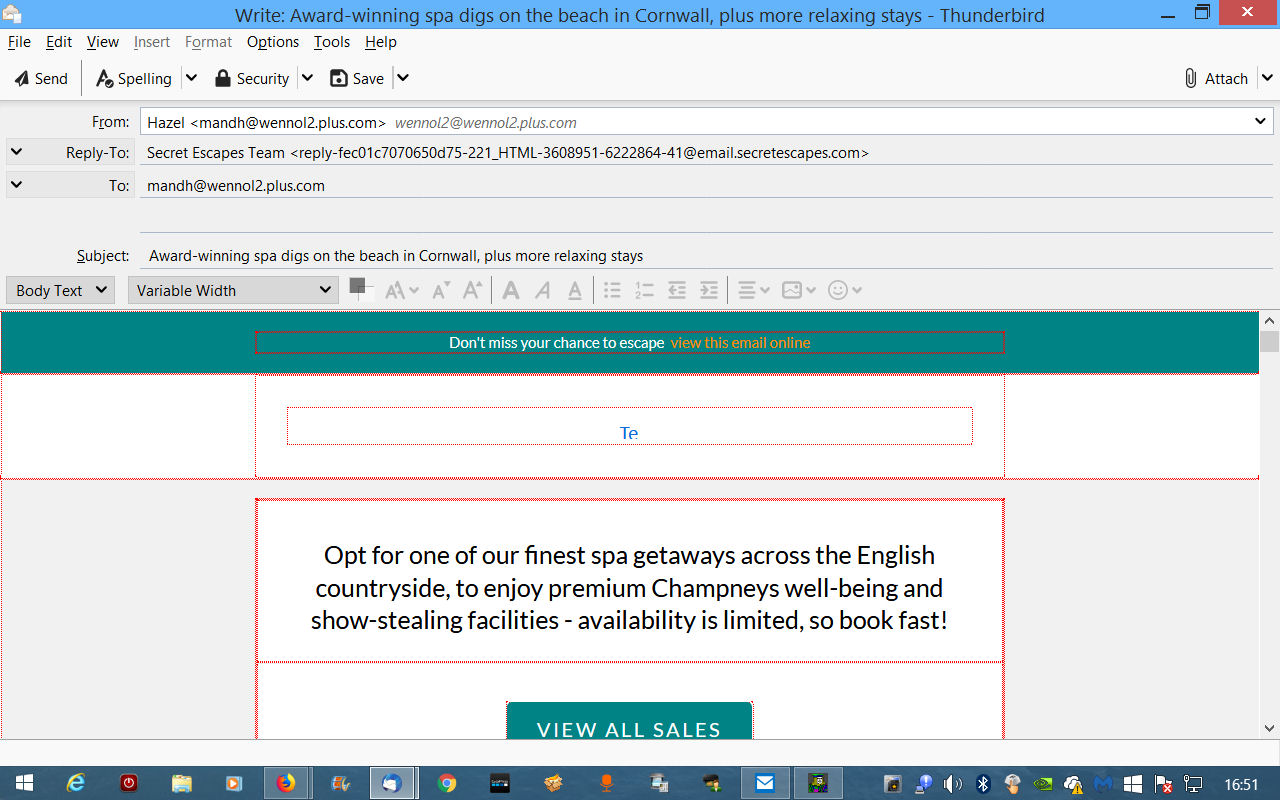
When I open an email the body of the message appears incomplete and surrounded by red lines.
All Replies (5)
Image attached
Modified by Pyr

Hello there Myprex.
We have read your message.
We going to help you with this.
Greetings
Firefox Volunteer.
Hello Myprex.
we have seen your picture of the very striking red lines that appear in your browser on Thunderbird mail yes.
we wondered if these are the only noticeable and common things that are at the moment with you on the computer machine? we would like to hear more about you here.
Firefox Volunteer.
The other error is that in the email the sender's address appears as MY address instead of that of the person who DID send the email. Thank you
You have the email open in write mode through pressing reply or forward I assume.
But the windows is open shows "Write" so you are not in a read mode but and edit mode.
The red lines are the borders of frames that are made visible when writing an email so you can actually see what you are doing. Clearly when you click reply or forward the sender becomes you. So it is not any sort of error.
But how are you "opening" your mail to make it do that. Please step by step (and why you do it that way). I really want to understand. Normally a double click on an email in the list will open it in a new tab, or a single click will display it in the message pane (f8), that appear on the bottom or right of the screen depending on the setting you have.
There is also an option to open in a new window if that is what you prefer Hidden away on the menu  > Options > Display