


Cannot create second gmail account in thunderbird
I've been trying to setup a second Gmail account in Thunderbird.
I've told Thunderbird to accept cookies from: - accounts.google.com - myaccount.google.com - mail.google.com
Thunderbird properly gets the settings from the mozzilla ISP database. I've been able to grand Thunderbird acces to my Gmail account.
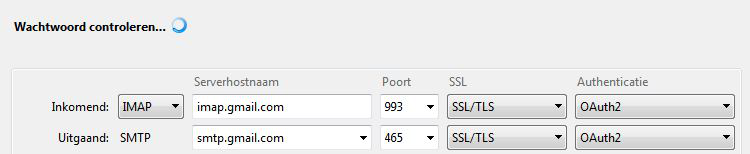
But then the setup proces gets stuck. I keeps checking password (in Dutch: "wachtwoord controleren..") with a blue rotating circle behind the text.
When I go next to manual configuration and press the "gereed"-button (ready-button) I get the text: "Inkomende server bestaat al." (Incoming server already exists)
I've tried this method also: https://accounts.google.com/DisplayUnlockCaptcha Doesn't work.
I'v tried about any solution I could find. Can please somebody help me out.
All Replies (11)
Is this happening with version 60?
Wayne Mery said
Is this happening with version 60?
With 52.9.1 (32-bits) and is says it is up to date
Does really nobody has a clue?
Go to your account setting and remove the existing account, or fix it so it works. The error message is saying it already exists.
Matt said
Go to your account setting and remove the existing account, or fix it so it works. The error message is saying it already exists.
I don't understand. Remove my first working gmail account on thunderbird?
Because the second was never made, at least it doesn't show up in Thunderbird. Not during setup of this second account (remember I got stuck during that setup), nor after closing and restarting Thunderbird.
Please add the troubleshooting information to your post To find the Troubleshooting information:
- Open Help (or click on three-line-icon and select Help)
- Choose Troubleshooting Information
- Use the button Copy to clipboard to select all. Do not check box "Include account names"!
- Paste this in your post.
Toepassingsbasics
   Naam: Thunderbird
   Versie: 52.9.1
   Useragent: Mozilla/5.0 (Windows NT 6.1; WOW64; rv:52.0) Gecko/20100101 Thunderbird/52.9.1
   Profielmap: Map openen
             (Lokaal station)
   Build-ID van de toepassing: 20180709124824
   Ingeschakelde plug-ins: about:plugins
   Buildconfiguratie: about:buildconfig
   Geheugengebruik: about:memory
   Profielen: about:profiles
 E-mail- en nieuwsaccounts
   account1:
     INCOMING: account1, , (none) Local Folders, plain, passwordCleartext
   account2:
     INCOMING: account2, , (pop3) pop3.telfort.nl:110, plain, passwordCleartext
     OUTGOING: , smtp.telfort.nl:25, trySTARTTLS, none, true
   account4:
     INCOMING: account4, , (pop3) pop3.telfort.nl:110, plain, passwordCleartext
     OUTGOING: , smtp.telfort.nl:25, trySTARTTLS, none, true
   account5:
     INCOMING: account5, , (pop3) pop3.telfort.nl:110, plain, passwordCleartext
     OUTGOING: , smtp.telfort.nl:25, trySTARTTLS, none, true
   account6:
     INCOMING: account6, , (pop3) pop3.telfort.nl:110, plain, passwordCleartext
     OUTGOING: , smtp.telfort.nl:25, trySTARTTLS, none, true
   account7:
     INCOMING: account7, , (nntp) news.grnet.gr:119, plain, passwordCleartext
     OUTGOING: , smtp.telfort.nl:25, trySTARTTLS, none, true
   account12:
     INCOMING: account12, , (imap) imap.gmail.com:993, SSL, passwordCleartext
     OUTGOING: , smtp.gmail.com:587, alwaysSTARTTLS, passwordCleartext, true
   account18:
     INCOMING: account18, , (pop3) pop.caiway.nl:110, alwaysSTARTTLS, passwordCleartext
     OUTGOING: , smtp.caiway.nl:587, alwaysSTARTTLS, passwordCleartext, true
   account19:
     INCOMING: account19, , (pop3) pop.caiway.net:110, alwaysSTARTTLS, passwordCleartext
     OUTGOING: , smtp.caiway.net:587, alwaysSTARTTLS, passwordCleartext, true
   account20:
     INCOMING: account20, , (pop3) pop.caiway.net:110, alwaysSTARTTLS, passwordCleartext
     OUTGOING: , smtp.caiway.net:587, alwaysSTARTTLS, passwordCleartext, true
   account21:
     INCOMING: account21, , (pop3) pop.caiway.net:110, alwaysSTARTTLS, passwordCleartext
     OUTGOING: , smtp.caiway.net:587, alwaysSTARTTLS, passwordCleartext, true
   account22:
     INCOMING: account22, , (pop3) pop.caiway.net:110, alwaysSTARTTLS, passwordCleartext
     OUTGOING: , smtp.caiway.net:587, alwaysSTARTTLS, passwordCleartext, true
 Crashrapporten
   https://crash-stats.mozilla.com/report/index/bp-d62a615c-588c-43d4-8ddc-df9820180612 (12-6-2018)
 Extensies
   Correct Identity, 1.4.7, true, {47ef7cc0-2201-11da-8cd6-0800200c9a66}
   Folderpane Tools, 0.6.1, true, {b243fe83-b8a7-47de-855d-21d865243d5d}
   Lightning, 5.4.9.1, true, {e2fda1a4-762b-4020-b5ad-a41df1933103}
   Signature Switch, 1.6.16, true, {2ab1b709-ba03-4361-abf9-c50b964ff75d}
   Toolbar Buttons, 1.1.1-signed.1-signed, true, {03B08592-E5B4-45ff-A0BE-C1D975458688}
   WebMail, 1.5.1, true, {3c8e8390-2cf6-11d9-9669-0800200c9a66}
   WebMail - Hotmail, 1.3.10, true, {a6a33690-2c6a-11d9-9669-0800200c9a66}
Belangrijke aangepaste voorkeuren
Naam: Waarde
     accessibility.browsewithcaret: true
     accessibility.typeaheadfind.flashBar: 0
     browser.cache.disk.capacity: 358400
     browser.cache.disk.filesystem_reported: 1
     browser.cache.disk.smart_size_cached_value: 358400
     browser.cache.disk.smart_size.first_run: false
     browser.cache.disk.smart_size.use_old_max: false
     dom.apps.reset-permissions: true
     extensions.lastAppVersion: 52.9.1
     font.internaluseonly.changed: false
     font.name.monospace.el: Consolas
     font.name.monospace.tr: Consolas
     font.name.monospace.x-baltic: Consolas
     font.name.monospace.x-central-euro: Consolas
     font.name.monospace.x-cyrillic: Consolas
     font.name.monospace.x-unicode: Consolas
     font.name.monospace.x-western: Consolas
     font.name.sans-serif.el: Calibri
     font.name.sans-serif.tr: Calibri
     font.name.sans-serif.x-baltic: Calibri
     font.name.sans-serif.x-central-euro: Calibri
     font.name.sans-serif.x-cyrillic: Calibri
     font.name.sans-serif.x-unicode: Calibri
     font.name.sans-serif.x-western: Calibri
     font.name.serif.el: Cambria
     font.name.serif.tr: Cambria
     font.name.serif.x-baltic: Cambria
     font.name.serif.x-central-euro: Cambria
     font.name.serif.x-cyrillic: Cambria
     font.name.serif.x-unicode: Cambria
     font.name.serif.x-western: Cambria
     font.size.fixed.el: 14
     font.size.fixed.tr: 14
     font.size.fixed.x-baltic: 14
     font.size.fixed.x-central-euro: 14
     font.size.fixed.x-cyrillic: 14
     font.size.fixed.x-unicode: 14
     font.size.fixed.x-western: 14
     font.size.variable.el: 17
     font.size.variable.tr: 17
     font.size.variable.x-baltic: 17
     font.size.variable.x-central-euro: 17
     font.size.variable.x-cyrillic: 17
     font.size.variable.x-unicode: 17
     font.size.variable.x-western: 17
     gfx.crash-guard.d3d11layers.appVersion: 52.9.1
     gfx.crash-guard.d3d11layers.deviceID: 0x0116
     gfx.crash-guard.d3d11layers.driverVersion: 9.17.10.4229
     gfx.crash-guard.d3d11layers.feature-d2d: false
     gfx.crash-guard.d3d11layers.feature-d3d11: true
     gfx.crash-guard.glcontext.appVersion: 45.2.0
     gfx.crash-guard.glcontext.deviceID: 0x0116
     gfx.crash-guard.glcontext.driverVersion: 9.17.10.4229
     gfx.crash-guard.glcontext.gfx.driver-init.direct3d11-angle: true
     gfx.crash-guard.glcontext.gfx.driver-init.webgl-angle: true
     gfx.crash-guard.glcontext.gfx.driver-init.webgl-angle-force-d3d11: false
     gfx.crash-guard.glcontext.gfx.driver-init.webgl-angle-force-warp: false
     gfx.crash-guard.glcontext.gfx.driver-init.webgl-angle-try-d3d11: true
     gfx.crash-guard.status.d3d11layers: 2
     gfx.crash-guard.status.glcontext: 2
     gfx.direct3d.last_used_feature_level_idx: 0
     layers.acceleration.disabled: false
     mail.openMessageBehavior.version: 1
     mail.winsearch.firstRunDone: true
     mailnews.database.global.datastore.id: 9a37f00a-ae0a-4ab1-a28c-fb62776cefc
     mailnews.database.global.views.conversation.columns: {"threadCol":{"visible":true,"ordinal":"1"},"flaggedCol":{"visible":true,"ordinal":"21"},"attachmentCol":{"visible":fals…
     mailnews.database.global.views.global.columns: {"threadCol":{"visible":true,"ordinal":"1"},"flaggedCol":{"visible":true,"ordinal":"21"},"attachmentCol":{"visible":fals…
     media.gmp.storage.version.observed: 1
     network.cookie.cookieBehavior: 0
     network.cookie.prefsMigrated: true
     network.predictor.cleaned-up: true
     places.database.lastMaintenance: 1533832818
     places.history.expiration.transient_current_max_pages: 122334
     plugin.disable_full_page_plugin_for_types: audio/x-wav
     plugin.importedState: true
     plugin.state.java: 2
     plugin.state.npdeployjava: 0
     plugin.state.npezffpi: 0
     plugin.state.npintelwebapiipt: 0
     plugin.state.nppdf: 2
     plugin.state.npwlpg: 0
     print.printer_Canon_MG5300_series_Printer_WS.print_bgcolor: false
     print.printer_Canon_MG5300_series_Printer_WS.print_bgimages: false
     print.printer_Canon_MG5300_series_Printer_WS.print_colorspace:
     print.printer_Canon_MG5300_series_Printer_WS.print_command:
     print.printer_Canon_MG5300_series_Printer_WS.print_downloadfonts: false
     print.printer_Canon_MG5300_series_Printer_WS.print_duplex: 1515870810
     print.printer_Canon_MG5300_series_Printer_WS.print_edge_bottom: 0
     print.printer_Canon_MG5300_series_Printer_WS.print_edge_left: 0
     print.printer_Canon_MG5300_series_Printer_WS.print_edge_right: 0
     print.printer_Canon_MG5300_series_Printer_WS.print_edge_top: 0
     print.printer_Canon_MG5300_series_Printer_WS.print_evenpages: true
     print.printer_Canon_MG5300_series_Printer_WS.print_footercenter:
     print.printer_Canon_MG5300_series_Printer_WS.print_footerleft: &PT
     print.printer_Canon_MG5300_series_Printer_WS.print_footerright: &D
     print.printer_Canon_MG5300_series_Printer_WS.print_headercenter:
     print.printer_Canon_MG5300_series_Printer_WS.print_headerleft: &T
     print.printer_Canon_MG5300_series_Printer_WS.print_headerright: &U
     print.printer_Canon_MG5300_series_Printer_WS.print_in_color: true
     print.printer_Canon_MG5300_series_Printer_WS.print_margin_bottom: 0.5
     print.printer_Canon_MG5300_series_Printer_WS.print_margin_left: 0.5
     print.printer_Canon_MG5300_series_Printer_WS.print_margin_right: 0.5
     print.printer_Canon_MG5300_series_Printer_WS.print_margin_top: 0.5
     print.printer_Canon_MG5300_series_Printer_WS.print_oddpages: true
     print.printer_Canon_MG5300_series_Printer_WS.print_orientation: 0
     print.printer_Canon_MG5300_series_Printer_WS.print_page_delay: 50
     print.printer_Canon_MG5300_series_Printer_WS.print_paper_data: 9
     print.printer_Canon_MG5300_series_Printer_WS.print_paper_height: -1,00
     print.printer_Canon_MG5300_series_Printer_WS.print_paper_name:
     print.printer_Canon_MG5300_series_Printer_WS.print_paper_size_unit: 1
     print.printer_Canon_MG5300_series_Printer_WS.print_paper_width: -1,00
     print.printer_Canon_MG5300_series_Printer_WS.print_plex_name:
     print.printer_Canon_MG5300_series_Printer_WS.print_resolution: 600
     print.printer_Canon_MG5300_series_Printer_WS.print_resolution_name:
     print.printer_Canon_MG5300_series_Printer_WS.print_reversed: false
     print.printer_Canon_MG5300_series_Printer_WS.print_scaling: 1,00
     print.printer_Canon_MG5300_series_Printer_WS.print_shrink_to_fit: true
     print.printer_Canon_MG5300_series_Printer_WS.print_to_file: false
     print.printer_Canon_MG5300_series_Printer_WS.print_unwriteable_margin_bottom: 0
     print.printer_Canon_MG5300_series_Printer_WS.print_unwriteable_margin_left: 0
     print.printer_Canon_MG5300_series_Printer_WS.print_unwriteable_margin_right
Had to post it in two parts because of limit of input field in this forum.
Modified by Webdrifter
lets start with the add-ons. Why are you using the webmail add-on. I used it about 10 years ago to access yahoo, but yahoo and hotmail the two main reasons for using it have both been offering IMAP and POP access to their mail accounts for most of the last decade. I think it is time you retired that one.
Given the complex and closely linked add-on you are using that might interfere with account creation, I would suggest you only add an account while running Thunderbird with add-ons disabled. (it is on the help menu)
Open the outgoing sever (SMTP) entry at the bottom of the listing of accounts. DO you have a gmail account showing there for each of your existing email addresses? is the gmail account named with something unique and not the name of the email address you are trying to add.
Are any of the other account name listed in the account setting the same. if you have somehow got a duplicate then that stops just about everything account related. Normally when you open the account setting it will issue a warning about a duplicate account and highlight a particular account name with the system caret blinking in the name dialog. If that occurs add a 1 to the account it ha flagged and select Ok. That will remove the duplicate status so you can more forward.
I removed webmail add-on. I checked the accounts in the outgoing severs (again) I started Thunderbird up without add-ons.
Got exactly the same problem.