


How do I report a bug in https://addons.mozilla.org/en-US/firefox/addon/wrinkly-peach-paneled/ ?? OR how can I fix it?

Hi,
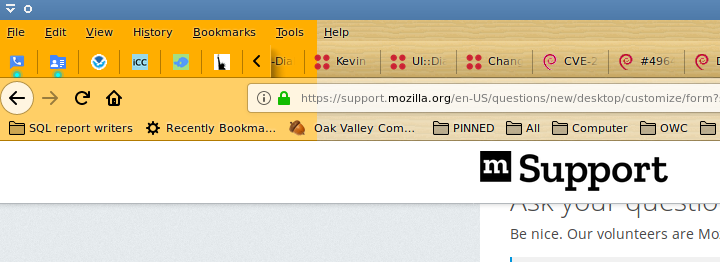
Love this Wrinkly Peach Paneled add-on, but when I drag my FireFox window from my smaller laptop to my larger Pavilion 22bw HDMI connected 2nd monitor, the nice chrome that this add on provides paints too narrow (width wise), in that it only paints as wide as the smaller laptop, and not the full width of the larger 2nd monitor, and so the left side of the menu bars (see image attached) is this ugly orange/yellow, rather than the nice wood style that is on the right side.
What should happen is that the add-on chrome should adjust and paint the full width of FireFox, all the way from left to right, and when a window is moved to a new monitor, it should re-calculate.
(Hope the image posts, as there is still a pinwheel of death spinning below, under "Uploaded Images:")
Thanks!
OS: Debian 9.5 (x86-64);
Cinnamon: 3.2.7;
Linux Kernel: 4.9.0-7-amd64;
Processor: Intel Core 2 Duo P8800;
Graphics Card: AMD/ATI RV710/M92 Mobility Radeon HD 4530/4570/545v
Modified by ForthStar
All Replies (6)
https://addons.mozilla.org/en-US/firefox/addon/wrinkly-peach-paneled/ 9 years since that add-on was last updated. I am surprised that it works at all.
General responnse for issues with add-ons:
- Mozilla hosts add-ons, but support for each add-on is the responsibility of each individual add-on developer.
- Report that Bug to the developer of that add-on.
- IMO, not all add-on developers provide support for their add-on leaving the user "hanging in the wind" when problems are found.
- Support information should be provided on the add-on installation page. Not provided by Joey Twiddle for that add-on.
Thanks.
After seeing your response I googled for 'Joey Twiddle' (the author) and ultimately found a github user with that name so email him (I hope).
I was just playing around and discovered that Disabling and then Enabling (i.e. not clicking Remove) that theme caused it to start working properly! Humm?
Still a bug, but this time it looks like a bug in FireFox, not the theme. Time will tell.
Now I just have to figure out what caused it to break in the first place. It's not the first time I've seen it go bonk. I suppose a reboot might have also fixed it but I didn't notice exactly what occurred before so now that I'm more aware perhaps I can see what drove the issue.
thanks again!
The "wrinkly-peach-paneled" is not an actual Theme.
The "Personas themes" now known as "lightweight themes" which is on https://addons.mozilla.org/firefox/themes/ are basically just background images that can be created very quickly. https://developer.mozilla.org/en-US/Add-ons/Themes/Create_Your_Own_Firefox_Background_Theme
The Real proper themes are actually https://addons.mozilla.org/firefox/complete-themes/ which can take a LOT of work and time to make and maintain by the authors depending on complexity and quality of theme base used to work with. However since Firefox 57.0 and later they are no longer usable.
@James, Thanks!
The author got back to me and so I've got a connection going with him.
Thanks for links and info. different types of themes. That is helpful. BTW, also found personas-plus to test my own image if I want.
ForthStar said
I was just playing around and discovered that Disabling and then Enabling (i.e. not clicking Remove) that theme caused it to start working properly! Humm?
If the problem is that Firefox is not re-drawing the background image automatically, possibly resizing the window after moving it would also trigger that.
jscher2000 said
If the problem is that Firefox is not re-drawing the background image automatically, possibly resizing the window after moving it would also trigger that.
@Jscher2000, I tried moving and resizing, but it didn't fix this issue.
Thanks.