


2 suggestions for improvement of Thunderbird.

Probably barking up the wrong tree, but I cannot quickly find where to submit ideas, so here: I'd find it peachy keen if
1. I could add 'Mark as read' as a direct option to the icon toolbar;
2. I could easily insert one of my signatures within a mail reply (ie above its message history), by way of the insert item on the top menu, or by right click and then using an 'insert'-option on the context menu, like I could when still using Windows Live Mail.
Other than that, Thunderbird is a regular powerhouse and I seriously love it!
Chosen solution
re :1. I could add 'Mark as read' as a direct option to the icon toolbar;
You can add a 'Mark' icon which offers the option.
- Right click on 'Mail Toolbar'
- select 'Customise'
- Left click and hold down the 'Mark' icon', then drag it onto the 'Mail Toolbar'; release to add to 'Mail Toolbar'
- click on 'Done'
Update: See last image - forgot to add :)
Re: 2. I could easily insert one of my signatures within a mail reply (ie above its message history), by way of the insert item on the top menu, or by right click and then using an 'insert'-option on the context menu, like I could when still using Windows Live Mail
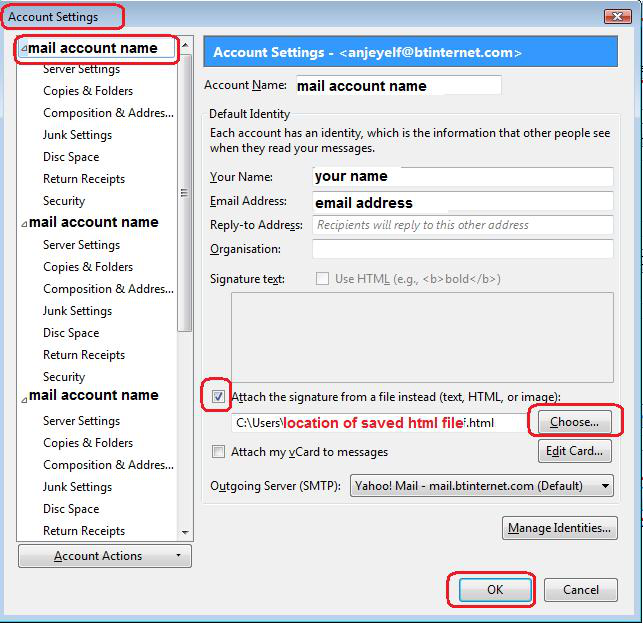
A default signature can be put in the 'Account Settings' > 'Composition & Addressing' for the mail account and there is the option to get it auto put Reply above quote and put signature below reply but above the quote. See first image below.
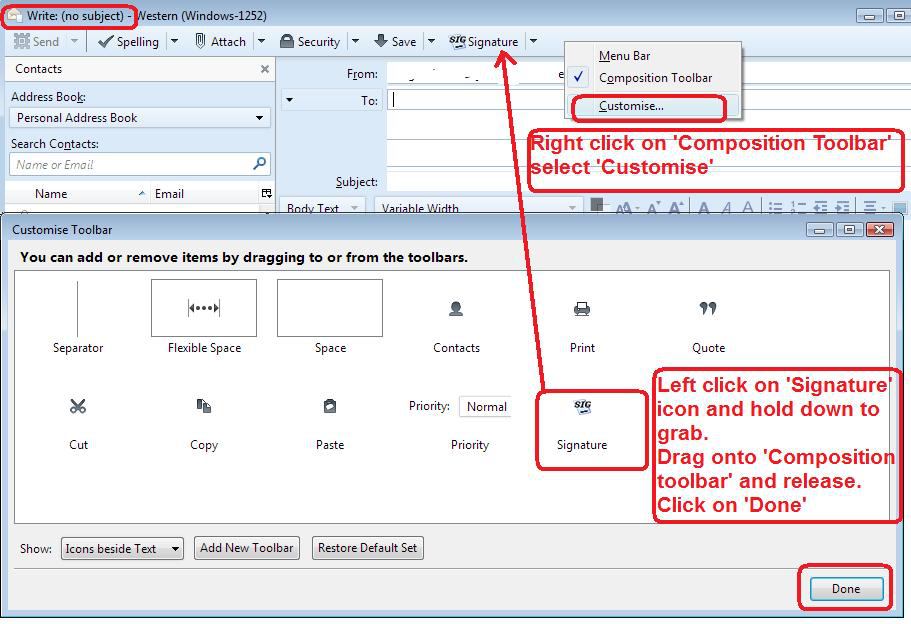
There is an addon extension called 'Signature Switch' which offers you the option of switching from a default signature. This would be added like the above customise option except onto the 'Write' window toolbar. In a new Write message this swap is always in the location desired. Unfortunately, in a 'Reply' it is always added at the bottom after the 'quoted reply' section. I just highlight, cut and paste into desired location. Although many people love this addon and find it very useful and have asked the author to consider making it an option to place above the quoted reply, this has not been done so far. Even so, I still find it a whole lot easier than editing the Account Settings just to swap a signature. See info and images as guide.
Signature switch
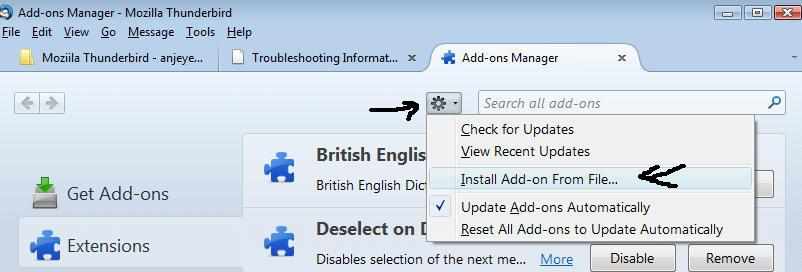
How to add addon extension:
Hope this info helps.
Read this answer in context 👍 1All Replies (3)
Chosen Solution
re :1. I could add 'Mark as read' as a direct option to the icon toolbar;
You can add a 'Mark' icon which offers the option.
- Right click on 'Mail Toolbar'
- select 'Customise'
- Left click and hold down the 'Mark' icon', then drag it onto the 'Mail Toolbar'; release to add to 'Mail Toolbar'
- click on 'Done'
Update: See last image - forgot to add :)
Re: 2. I could easily insert one of my signatures within a mail reply (ie above its message history), by way of the insert item on the top menu, or by right click and then using an 'insert'-option on the context menu, like I could when still using Windows Live Mail
A default signature can be put in the 'Account Settings' > 'Composition & Addressing' for the mail account and there is the option to get it auto put Reply above quote and put signature below reply but above the quote. See first image below.
There is an addon extension called 'Signature Switch' which offers you the option of switching from a default signature. This would be added like the above customise option except onto the 'Write' window toolbar. In a new Write message this swap is always in the location desired. Unfortunately, in a 'Reply' it is always added at the bottom after the 'quoted reply' section. I just highlight, cut and paste into desired location. Although many people love this addon and find it very useful and have asked the author to consider making it an option to place above the quoted reply, this has not been done so far. Even so, I still find it a whole lot easier than editing the Account Settings just to swap a signature. See info and images as guide.
Signature switch
How to add addon extension:
Hope this info helps.

Modified by Toad-Hall
re: 1) I was already aware of this. I conclude there is no more direct option.
re: 2) Thank you! The first part of this answer solves my problem.
And thank you for your time and attention!
Alternative: You could use the keyboard shortcut: Press and hold down 'Alt' key, press 'M' followed by 'K' followed by R' Actually, this is really quick once you have done it a couple of times.
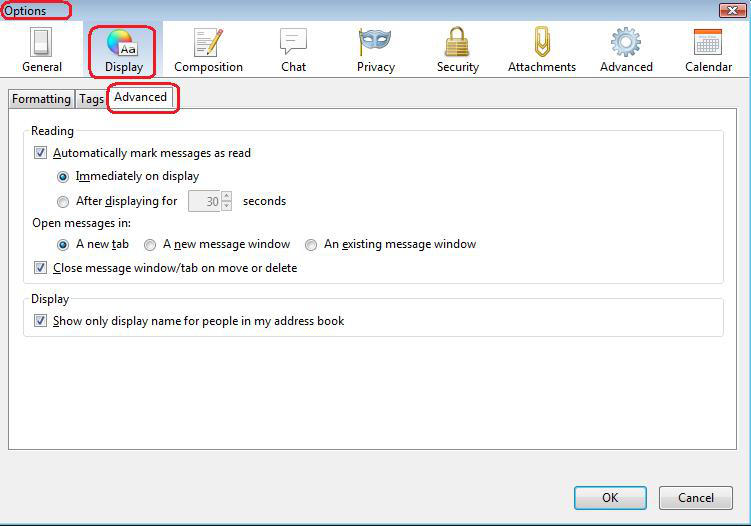
There is also the option of auto marking as read either upon opening or after a delay. 'Menu icon' > ' Options' > 'Options' > 'Display' > 'Advanced' tab see image
Modified by Toad-Hall