


After upgrading firefox I now can't use it. Won't load pages at all and nothing I have tried fixes it. How can I solve this?

I have followed all the different instructions I can find on different help pages but nothing seems to work. I was going to downgrade to an older version of Firefox but there are lots of articles saying not to do this... does anyone know how to make the Firefox upgrade 59.0.2 work? I haven't been able to load any pages for a few weeks and reverted to using Safari, but I prefer Firefox and would love to get it working again. Thanks!
Chosen solution
- # Bulleted list itemHello,
Try disabling graphics hardware acceleration in Firefox. Since this feature was added to Firefox it has gradually improved but there are still a few glitches.
You will need to restart Firefox for this to take effect so save all work first (e.g., mail you are composing, online documents you're editing, etc.,) and then perform these steps:
In Firefox 54 and below:
- Click the menu button
 and select Options (Windows) or Preferences (Mac, Linux).
- Select the Advanced panel and the General tab.
- Uncheck Use hardware acceleration when available.
- Close Firefox completely and then restart Firefox to see if the problem persists.
In Firefox 55 and above:
- Click the menu button and select Options (Windows) or Preferences (Mac, Linux).
- Select the General panel.
- Under Performance, uncheck Use recommended performance settings. Additional settings will be displayed.
- Uncheck Use hardware acceleration when available.
- Close Firefox completely and then restart Firefox to see if the problem persists.
Did this fix your problems? Please report back to us!
If the problem is resolved, you should check for updates for your graphics driver by following the steps mentioned in these Knowledge base articles:
Thank you.
Read this answer in context 👍 1All Replies (3)
Chosen Solution
- # Bulleted list itemHello,
Try disabling graphics hardware acceleration in Firefox. Since this feature was added to Firefox it has gradually improved but there are still a few glitches.
You will need to restart Firefox for this to take effect so save all work first (e.g., mail you are composing, online documents you're editing, etc.,) and then perform these steps:
In Firefox 54 and below:
- Click the menu button and select Options (Windows) or Preferences (Mac, Linux).
- Select the Advanced panel and the General tab.
- Uncheck Use hardware acceleration when available.
- Close Firefox completely and then restart Firefox to see if the problem persists.
In Firefox 55 and above:
- Click the menu button and select Options (Windows) or Preferences (Mac, Linux).
- Select the General panel.
- Under Performance, uncheck Use recommended performance settings. Additional settings will be displayed.
- Uncheck Use hardware acceleration when available.
- Close Firefox completely and then restart Firefox to see if the problem persists.
Did this fix your problems? Please report back to us!
If the problem is resolved, you should check for updates for your graphics driver by following the steps mentioned in these Knowledge base articles:
Thank you.

https://support.mozilla.org/en-US/kb/update-firefox-latest-version?cache=no Did you update Firefox to the latest version 59.0.3
Some problems occur when your Internet security program was set
to trust the previous version of Firefox, but no longer recognizes your
updated version as trusted. Now how to fix the problem: To allow
Firefox to connect to the Internet again;
- Make sure your Internet security software is up-to-date (i.e. you are running the latest version).
- Remove Firefox from your program's list of trusted or recognized programs. For detailed instructions, see
Configure firewalls so that Firefox can access the Internet. {web link}
Thanks so much - this worked!
davidspriggs said
Try disabling graphics hardware acceleration in Firefox. Since this feature was added to Firefox it has gradually improved but there are still a few glitches. You will need to restart Firefox for this to take effect so save all work first (e.g., mail you are composing, online documents you're editing, etc.,) and then perform these steps: In Firefox 54 and below:
- # Bulleted list itemHello,
In Firefox 55 and above:
- Click the menu button
- Select the Advanced panel and the General tab.
- Uncheck Use hardware acceleration when available.
- Close Firefox completely and then restart Firefox to see if the problem persists.
Did this fix your problems? Please report back to us! If the problem is resolved, you should check for updates for your graphics driver by following the steps mentioned in these Knowledge base articles: Thank you.
- Click the menu button
- Select the General panel.
- Under Performance, uncheck Use recommended performance settings. Additional settings will be displayed.
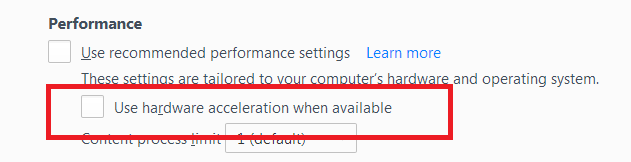
- Uncheck Use hardware acceleration when available.
- Close Firefox completely and then restart Firefox to see if the problem persists.