


Manual update

Just received a message when opening Firefox that said Firefox requires a manual update. Install now. Have never seen one like this before. Is this legit? The browser in on my MacBook Air.
All Replies (3)
It is possible. I have seen a couple of Legit ones but was Win10 Notification. Always update through Help --> About https://support.mozilla.org/en/kb/update-firefox-latest-version Current Version is 59.0.2
Always :
- https://support.mozilla.org/en-US/kb/export-firefox-bookmarks-to-backup-or-transfer
- https://support.mozilla.org/en-US/kb/back-and-restore-information-firefox-profiles
Please run a scan to make sure : https://www.malwarebytes.com/mac/
Please let us know if this solved your issue or if need further assistance.
There hasn't been an update of Firefox released for 30 days (59.0.2 Release Notes), so it seems suspicious. Possibly to convince you to install a dangerous add-on.
Meoria said
Just received a message when opening Firefox that said Firefox requires a manual update. Install now. Have never seen one like this before. Is this legit? The browser in on my MacBook Air.
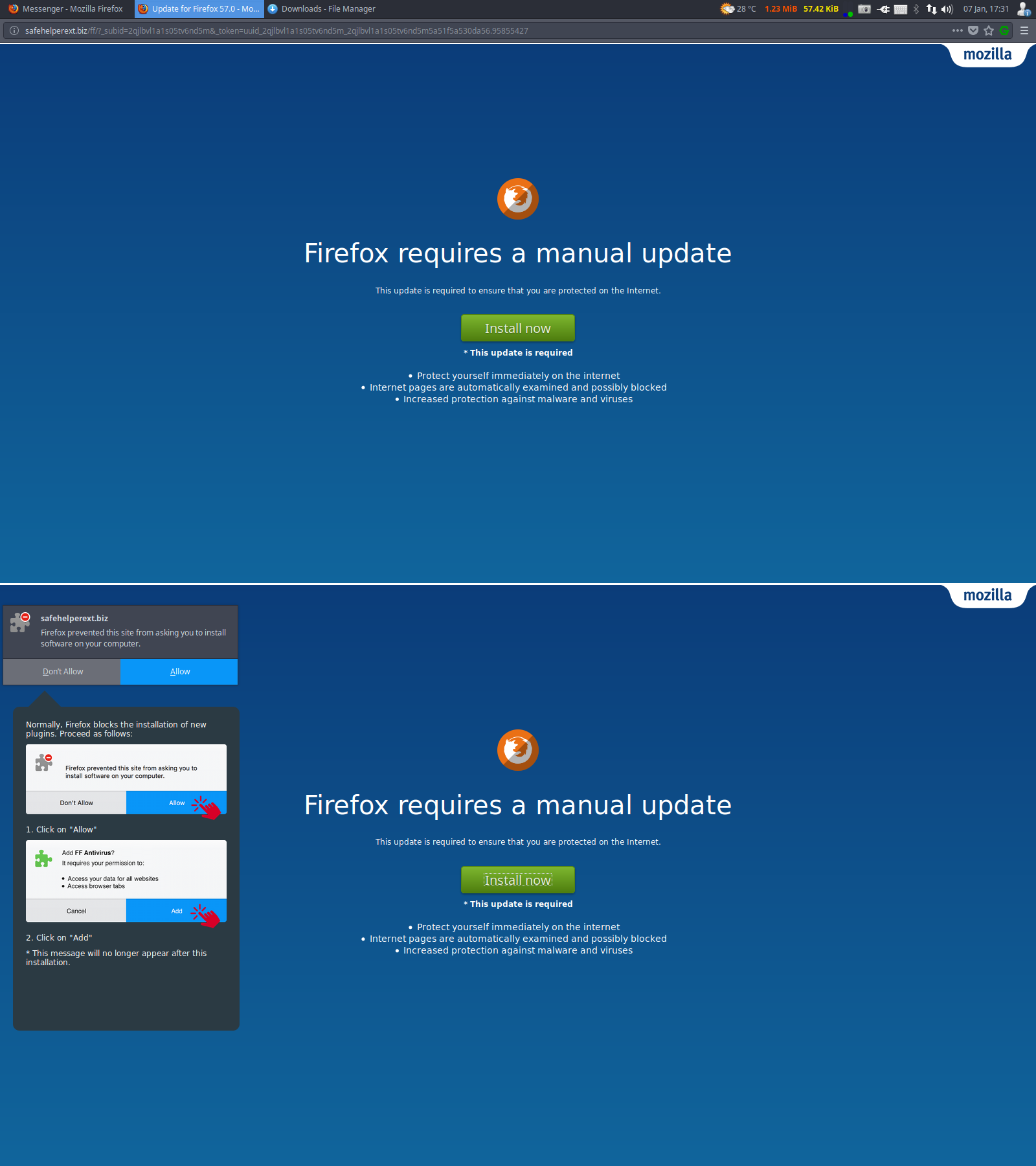
If the screen had a blue background and words "Firefox requires a manual update" then this was FAKE. If a user were to go through with install it would be a malicious extension (often with FF in name) that will do various things like make the Addons manager not accessible until the extension was removed in Safe-mode. Mozilla has already blocked a long list of these fake extensions on addons.mozilla.org/blocked/
Firefox updates have only been done by download from mozilla.org like say www.mozilla.org/firefox/all/ or by internal software update (with a .mar file). Firefox updates are not served on random weird names sites.
The image below is an example of this Fake "Firefox requires a manual update" page.
Modified by James