


I can not send messages from 2 of my email accounts on Thunderbird

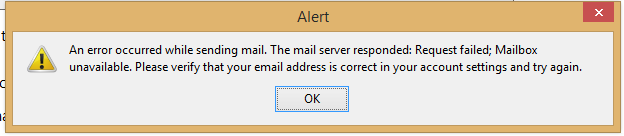
I am receiving mail on these accounts, but get an error message when I try to send a message. The incoming and outgoing ports and settings are the same as a third account that works without any problems. I uploaded a copy of the error message, but it appears tiny below.
Chosen solution
Thunderbird asks for a password when it is needed. If it's not asking, I would surmise that you're not actually using one of the smtp accounts.
You have three incoming accounts, and being with yahoo, you need three outgoing smtp settings, one for each incoming account and each using the appropriate username and password.
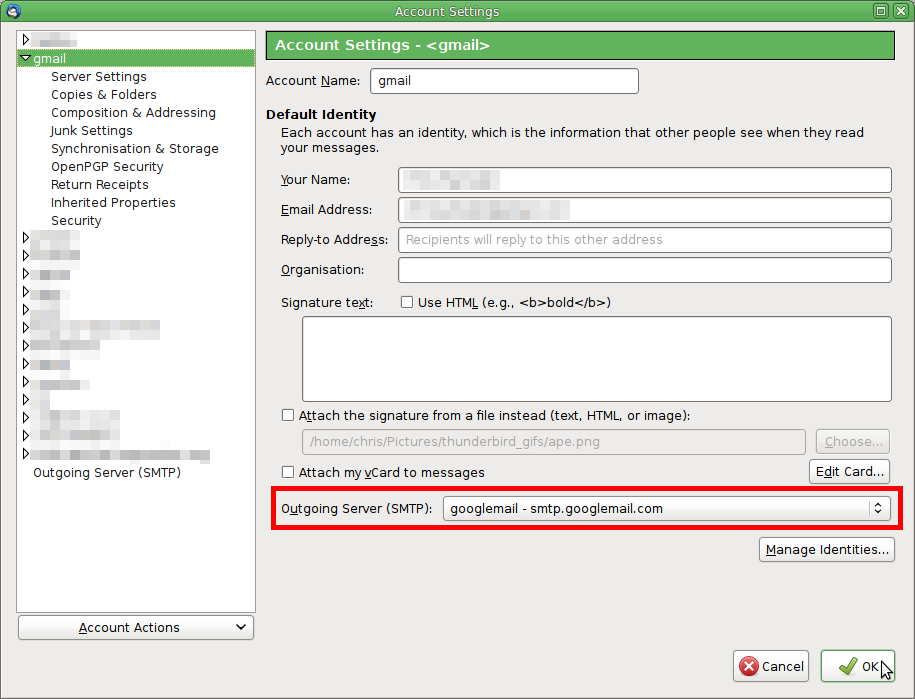
Then in the incoming accounts, in account settings you set each incoming account to use the relevant outgoing server.
Read this answer in context 👍 1All Replies (6)
Please add the troubleshooting information to your post To find the Troubleshooting information:
- Open Help (or click on three-line-icon and select Help)
- Choose Troubleshooting Information
- Use the button Copy to clipboard to select all. Do not check box "Include account names"!
- Paste this in your post.
Here is the troubleshooting information
Application Basics
   Name: Thunderbird
   Version: 52.5.0
   User Agent: Mozilla/5.0 (Windows NT 6.3; WOW64; rv:52.0) Gecko/20100101 Thunderbird/52.5.0
   Profile Folder: Open Folder
             (Local drive)
   Application Build ID: 20171121193617
   Enabled Plugins: about:plugins
   Build Configuration: about:buildconfig
   Memory Use: about:memory
   Profiles: about:profiles
 Mail and News Accounts
   account1:
     INCOMING: account1, , (pop3) inbound.att.net:995, SSL, passwordCleartext
     OUTGOING: , smtp.att.yahoo.com:465, SSL, passwordCleartext, true
   account2:
     INCOMING: account2, , (none) Local Folders, plain, passwordCleartext
   account3:
     INCOMING: account3, , (pop3) inbound.att.net:995, SSL, passwordCleartext
     OUTGOING: , outbound.att.net:465, SSL, passwordCleartext, true
   account4:
     INCOMING: account4, , (pop3) inbound.att.net:995, SSL, passwordCleartext
     OUTGOING: , smtp.att.yahoo.com:465, SSL, passwordCleartext, true
 Crash Reports
   https://crash-stats.mozilla.com/report/index/bp-66b1a89b-688b-48eb-a05d-b01dd0180402 (4/2/2018)
   https://crash-stats.mozilla.com/report/index/bp-ae30f52a-8252-4378-9d44-14bf30171220 (12/19/2017)
   https://crash-stats.mozilla.com/report/index/bp-361b5618-1809-429b-8c0d-981110171216 (12/16/2017)
   https://crash-stats.mozilla.com/report/index/bp-a5a62018-4fac-4726-bff6-4ea300171215 (12/15/2017)
   https://crash-stats.mozilla.com/report/index/bp-518dfe0a-a773-4497-a580-df6310170921 (9/20/2017)
 Extensions
   Lightning, 5.4.5, true, {e2fda1a4-762b-4020-b5ad-a41df1933103}
   Provider for Google Calendar, 3.3, true, {a62ef8ec-5fdc-40c2-873c-223b8a6925cc}
   SoftMaker Enhanced UI, 1.0.31, true, enhanced-ui@softmaker.com
Important Modified Preferences
Name: Value
     accessibility.lastLoadDate: 1522674919
     accessibility.typeaheadfind.flashBar: 0
     browser.cache.disk.capacity: 358400
     browser.cache.disk.filesystem_reported: 1
     browser.zoom.full: true
     extensions.lastAppVersion: 52.5.0
     font.name.monospace.el: Consolas
     font.name.monospace.x-cyrillic: Consolas
     font.name.monospace.x-unicode: Consolas
     font.name.monospace.x-western: Consolas
     font.name.sans-serif.el: Calibri
     font.name.sans-serif.x-cyrillic: Calibri
     font.name.sans-serif.x-unicode: Calibri
     font.name.sans-serif.x-western: Calibri
     font.name.serif.el: Cambria
     font.name.serif.x-cyrillic: Cambria
     font.name.serif.x-unicode: Cambria
     font.name.serif.x-western: Cambria
     font.size.fixed.el: 14
     font.size.fixed.x-cyrillic: 14
     font.size.fixed.x-unicode: 14
     font.size.fixed.x-western: 14
     font.size.variable.el: 17
     font.size.variable.x-cyrillic: 17
     font.size.variable.x-unicode: 17
     font.size.variable.x-western: 17
     mail.openMessageBehavior.version: 1
     mail.winsearch.firstRunDone: true
     mailnews.database.global.datastore.id: c0cbf0d0-a06e-408d-a22e-7f0d59a48cd
     mailnews.database.global.views.conversation.columns: {"threadCol":{"visible":true,"ordinal":"1"},"flaggedCol":{"visible":true,"ordinal":"3"},"attachmentCol":{"visible":false…
     mailnews.database.global.views.global.columns: {"threadCol":{"visible":true,"ordinal":"1"},"flaggedCol":{"visible":true,"ordinal":"3"},"attachmentCol":{"visible":false…
     media.gmp.storage.version.observed: 1
     network.cookie.cookieBehavior: 3
     network.cookie.prefsMigrated: true
     network.predictor.cleaned-up: true
     places.database.lastMaintenance: 1522439889
     places.history.expiration.transient_current_max_pages: 122334
     print.printer_EPSON_XP-830_Series_(Copy_1).print_bgcolor: false
     print.printer_EPSON_XP-830_Series_(Copy_1).print_bgimages: false
     print.printer_EPSON_XP-830_Series_(Copy_1).print_duplex: -437918235
     print.printer_EPSON_XP-830_Series_(Copy_1).print_edge_bottom: 0
     print.printer_EPSON_XP-830_Series_(Copy_1).print_edge_left: 0
     print.printer_EPSON_XP-830_Series_(Copy_1).print_edge_right: 0
     print.printer_EPSON_XP-830_Series_(Copy_1).print_edge_top: 0
     print.printer_EPSON_XP-830_Series_(Copy_1).print_evenpages: true
     print.printer_EPSON_XP-830_Series_(Copy_1).print_footercenter:
     print.printer_EPSON_XP-830_Series_(Copy_1).print_footerleft: &PT
     print.printer_EPSON_XP-830_Series_(Copy_1).print_footerright: &D
     print.printer_EPSON_XP-830_Series_(Copy_1).print_headercenter:
     print.printer_EPSON_XP-830_Series_(Copy_1).print_headerleft: &T
     print.printer_EPSON_XP-830_Series_(Copy_1).print_headerright: &U
     print.printer_EPSON_XP-830_Series_(Copy_1).print_in_color: true
     print.printer_EPSON_XP-830_Series_(Copy_1).print_margin_bottom: 0.5
     print.printer_EPSON_XP-830_Series_(Copy_1).print_margin_left: 0.5
     print.printer_EPSON_XP-830_Series_(Copy_1).print_margin_right: 0.5
     print.printer_EPSON_XP-830_Series_(Copy_1).print_margin_top: 0.5
     print.printer_EPSON_XP-830_Series_(Copy_1).print_oddpages: true
     print.printer_EPSON_XP-830_Series_(Copy_1).print_orientation: 0
     print.printer_EPSON_XP-830_Series_(Copy_1).print_page_delay: 50
     print.printer_EPSON_XP-830_Series_(Copy_1).print_paper_data: 1
     print.printer_EPSON_XP-830_Series_(Copy_1).print_paper_height: 11.00
     print.printer_EPSON_XP-830_Series_(Copy_1).print_paper_name:
     print.printer_EPSON_XP-830_Series_(Copy_1).print_paper_size_unit: 0
     print.printer_EPSON_XP-830_Series_(Copy_1).print_paper_width: 8.50
     print.printer_EPSON_XP-830_Series_(Copy_1).print_resolution: 360
     print.printer_EPSON_XP-830_Series_(Copy_1).print_reversed: false
     print.printer_EPSON_XP-830_Series_(Copy_1).print_scaling: 1.00
     print.printer_EPSON_XP-830_Series_(Copy_1).print_shrink_to_fit: true
     print.printer_EPSON_XP-830_Series_(Copy_1).print_to_file: false
     print.printer_EPSON_XP-830_Series_(Copy_1).print_unwriteable_margin_bottom: 0
     print.printer_EPSON_XP-830_Series_(Copy_1).print_unwriteable_margin_left: 0
     print.printer_EPSON_XP-830_Series_(Copy_1).print_unwriteable_margin_right: 0
     print.printer_EPSON_XP-830_Series_(Copy_1).print_unwriteable_margin_top: 0
     print.printer_EPSON_XP-830_Series.print_bgcolor: false
     print.printer_EPSON_XP-830_Series.print_bgimages: false
     print.printer_EPSON_XP-830_Series.print_duplex: -437918235
     print.printer_EPSON_XP-830_Series.print_edge_bottom: 0
     print.printer_EPSON_XP-830_Series.print_edge_left: 0
     print.printer_EPSON_XP-830_Series.print_edge_right: 0
     print.printer_EPSON_XP-830_Series.print_edge_top: 0
     print.printer_EPSON_XP-830_Series.print_evenpages: true
     print.printer_EPSON_XP-830_Series.print_footercenter:
     print.printer_EPSON_XP-830_Series.print_footerleft: &PT
     print.printer_EPSON_XP-830_Series.print_footerright: &D
     print.printer_EPSON_XP-830_Series.print_headercenter:
     print.printer_EPSON_XP-830_Series.print_headerleft: &T
     print.printer_EPSON_XP-830_Series.print_headerright: &U
     print.printer_EPSON_XP-830_Series.print_in_color: true
     print.printer_EPSON_XP-830_Series.print_margin_bottom: 0.5
     print.printer_EPSON_XP-830_Series.print_margin_left: 0.5
     print.printer_EPSON_XP-830_Series.print_margin_right: 0.5
     print.printer_EPSON_XP-830_Series.print_margin_top: 0.5
     print.printer_EPSON_XP-830_Series.print_oddpages: true
     print.printer_EPSON_XP-830_Series.print_orientation: 0
     print.printer_EPSON_XP-830_Series.print_page_delay: 50
     print.printer_EPSON_XP-830_Series.print_paper_data: 1
     print.printer_EPSON_XP-830_Series.print_paper_height: 11.00
     print.printer_EPSON_XP-830_Series.print_paper_name:
     print.printer_EPSON_XP-830_Series.print_paper_size_unit: 0
     print.printer_EPSON_XP-830_Series.print_paper_width: 8.50
     print.printer_EPSON_XP-830_Series.print_resolution: 360
     print.printer_EPSON_XP-830_Series.print_reversed: false
     print.printer_EPSON_XP-830_Series.print_scaling: 1.00
     print.printer_EPSON_XP-830_Series.print_shrink_to_fit: true
     print.printer_EPSON_XP-830_Series.print_to_file: false
     print.printer_EPSON_XP-830_Series.print_unwriteable_margin_bottom: 0
     print.printer_EPSON_XP-830_Series.print_unwriteable_margin_left: 0
     print.printer_EPSON_XP-830_Series.print_unwriteable_margin_right: 0
     print.printer_EPSON_XP-830_Series.print_unwriteable_margin_top: 0
     privacy.donottrackheader.enabled: true
     security.sandbox.content.tempDirSuffix: {e0b60cfc-c0cd-4a0f-ad34-afd120b557ef}
Graphics
     GPU #1
     Description: Intel(R) HD Graphics 4600
     Vendor ID: 0x8086
     Device ID: 0x0412
     RAM: Unknown
     Drivers: igdumdim64 igd10iumd64 igd10iumd64 igdumdim32 igd10iumd32 igd10iumd32
     Driver Version: 10.18.14.4170
     Driver Date: 3-16-2015
     Features
     Direct2D: false
     DirectWrite: true (6.3.9600.18696)
     WebGL Renderer: Google Inc. -- ANGLE (Intel(R) HD Graphics 4600 Direct3D9Ex vs_3_0 ps_3_0) -- OpenGL ES 2.0 (ANGLE 2.1.0.2a250c8a0e15)
     AzureCanvasBackend: skia
     AzureCanvasAccelerated: 0
     AzureFallbackCanvasBackend: cairo
     AzureContentBackend: skia
JavaScript
Incremental GC: 1
Accessibility
   Activated: 0
   Prevent Accessibility: 0
Library Versions
     Expected minimum version
     Version in use
     NSPR
     4.13.1
     4.13.1
     NSS
     3.28.6
     3.28.6
     NSS Util
     3.28.6
     3.28.6
     NSS SSL
     3.28.6
     3.28.6
     NSS S/MIME
     3.28.6
     3.28.6
When I check the email settings suggested by ATT I do not see any that recommend smtp.att.yahoo.com which you are using on two of your accounts
I suggest you correct the outgoing server (SMTP) entries in your account settings for ATT o use he suggested servers linked to above. As I do not know your email address, I have no idea which setting is correct for you.
I have made the changes suggested and one of the accounts is now working. Both accounts are with bellsouth.net The one not working does not show a saved password for outbound. I have not found a way to enter the password for outbound. I do have a password on the inbound which is working.
April 5. I am still not able to send messages from the one account. I know the password that should be used for "outbound", but there is no outbound password saved for this account; so I have not found a way to change the outbound password. How do I get around this impasse? Scristy
Modified by sscristy

Chosen Solution
Thunderbird asks for a password when it is needed. If it's not asking, I would surmise that you're not actually using one of the smtp accounts.
You have three incoming accounts, and being with yahoo, you need three outgoing smtp settings, one for each incoming account and each using the appropriate username and password.
Then in the incoming accounts, in account settings you set each incoming account to use the relevant outgoing server.
Modified by Zenos
I did not realize that the 3 listings of outgoing smtp settings that all looked alike were actually different in that when you opened the details each had a different account associated with it. When I got the correct listing for the troubled account and tried to send a message, a box popped up asking for the password. I entered the password and the message was sent. Thanks very much for the help. Scristy