


Why can't TB connect to the server if config is correct and firewalls are off?

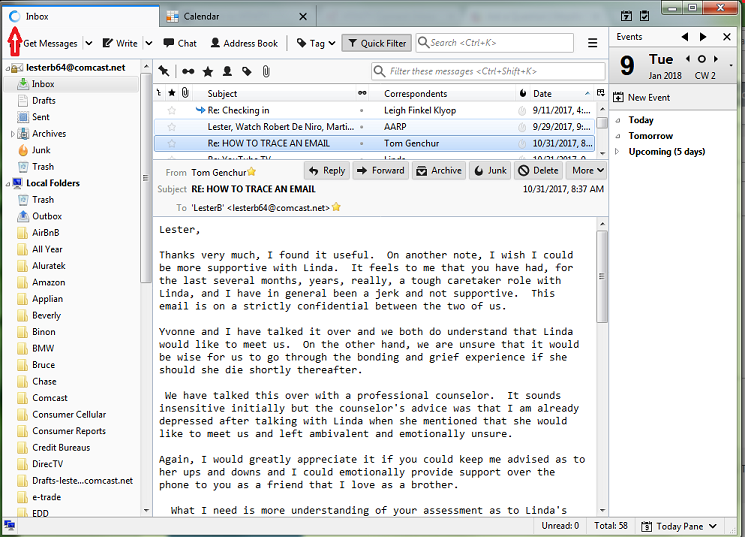
I am not getting any feedback from TB - just a spinning wheel that never stops nor times out.
Chosen solution
Release version: https://www.mozilla.org/firefox/new/
Read this answer in context 👍 1All Replies (20)

You're not supposed to turn your firewall off. This may be a bad idea after all.
What is your anti-virus software?
My anti-virus is G-Data and Malwarebytes. I turned off firewalls just to see if they were blocking TB - they weren't. I always have them turned on. YB just quit working about a week ago.
Try to start Windows in safe mode with networking enabled. - Win10 https://support.microsoft.com/en-us/help/12376/windows-10-start-your-pc-in-safe-mode - Win8 https://support.microsoft.com/en-us/help/17076/windows-8-startup-settings-safe-mode - Win7 https://support.microsoft.com/en-us/help/17419/windows-7-advanced-startup-options-safe-mode#start-computer-safe-mode=windows-7
Still in Windows safe mode, start Thunderbird in safe mode. - https://support.mozilla.org/kb/safe-mode
Does the problem go away?
The spinning wheel went away, but I cannot send email - connection to server times out. I have checked port numbers for Comcast, and they are ok.
I did not try sending email in safe mode - I'll try that now.
In Safe Mode I cannot send nor receive email. The sinning wheel went away, but TB not working.
In Windows safe mode you'd still need networking. If you use WLAN, this may not work. Use a wired connection instead.
I have always been able to use TB with my WLAN for many years. It shouldn't quit now. I don't think wireless is the issue. It is just 'connecting' indefinitely, until it times out.
I have always been able to use TB with my WLAN for many years.
Yes, but not in Windows safe mode. Without a functioning network Thunderbird cannot work.
With an ethernet cable connected I can receive in safe Mode but cannot send. In normal Window, I cannot send nor receive.
With an ethernet cable connected I can receive in safe Mode but cannot send.
What exactly prevents you from sending messages?
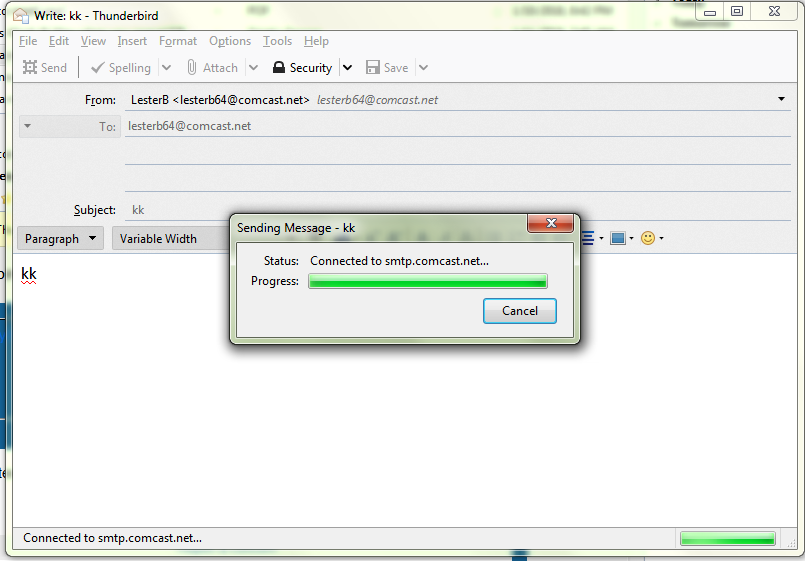
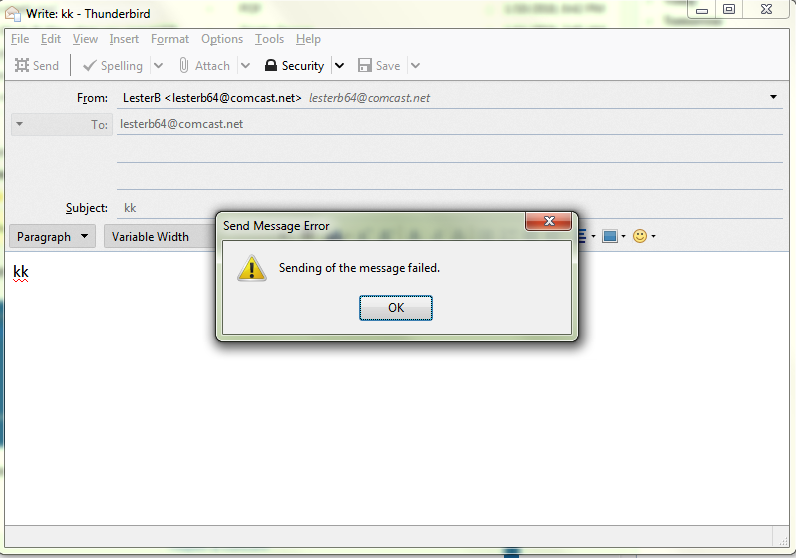
I don't know what prevents me - it says connecting to smtp.comcast.net for a while, then I get 'Message Failed'. (see attached pics) This is what I'm trying to solve.
Are you're still running Windows in safe mode?
Please post your Troubleshooting Information.
At the top right of the Thunderbird window, click the menu button  , then select Help > Troubleshooting Information.
Press the "Copy text to clipboard button" and paste the information into your reply.
, then select Help > Troubleshooting Information.
Press the "Copy text to clipboard button" and paste the information into your reply.
This was done in Safe Mode. I copied the Troubleshooting Info while tryingto send an email. Here it is - I hope it tells you what the issue is!
Application Basics
   Name: Thunderbird
   Version: 58.0b3
   Build ID: 20180104080056
   Update Channel: beta
   User Agent: Mozilla/5.0 (Windows NT 6.1; WOW64; rv:58.0) Gecko/20100101 Thunderbird/58.0
   OS: Windows_NT 6.1
   Multiprocess Windows: 0/0 (Disabled)
   Web Content Processes:
   Stylo: content = false (disabled by build), chrome = false (disabled by build)
   Google Key: Missing
   Mozilla Location Service Key: Missing
   Safe Mode: false
 Mail and News Accounts
   account1:
     INCOMING: account1, , (imap) imap.comcast.net:993, SSL, passwordCleartext
     OUTGOING: , smtp.comcast.net:587, SSL, passwordCleartext, true
   account2:
     INCOMING: account2, , (none) Local Folders, plain, passwordCleartext
Crash Reports for the Last 3 Days
All Crash Reports
Extensions
     Name
     Version
     Enabled
     ID
     Lightning
     6.0b1
     true
     {e2fda1a4-762b-4020-b5ad-a41df1933103}
Graphics
     Features
     Compositing: Basic
     Asynchronous Pan/Zoom: none
     WebGL 1 Driver WSI Info: EGL_VENDOR: Google Inc. (adapter LUID: 0000000000000000)
EGL_VERSION: 1.4 (ANGLE 2.1.0.db3422764a9b) EGL_EXTENSIONS: EGL_EXT_create_context_robustness EGL_ANGLE_d3d_texture_client_buffer EGL_ANGLE_query_surface_pointer EGL_ANGLE_window_fixed_size EGL_ANGLE_keyed_mutex EGL_ANGLE_surface_orientation EGL_NV_post_sub_buffer EGL_KHR_create_context EGL_EXT_device_query EGL_KHR_image EGL_KHR_image_base EGL_KHR_gl_texture_2D_image EGL_KHR_gl_texture_cubemap_image EGL_KHR_gl_renderbuffer_image EGL_KHR_get_all_proc_addresses EGL_KHR_stream EGL_KHR_stream_consumer_gltexture EGL_NV_stream_consumer_gltexture_yuv EGL_ANGLE_flexible_surface_compatibility EGL_ANGLE_create_context_webgl_compatibility EGL_CHROMIUM_create_context_bind_generates_resource EGL_EXT_pixel_format_float EGL_KHR_surfaceless_context EGL_ANGLE_display_texture_share_group EGL_ANGLE_create_context_client_arrays EGL_ANGLE_program_cache_control EGL_EXTENSIONS(nullptr): EGL_EXT_client_extensions EGL_EXT_platform_base EGL_EXT_platform_device EGL_ANGLE_platform_angle EGL_ANGLE_platform_angle_d3d EGL_ANGLE_device_creation EGL_ANGLE_device_creation_d3d11 EGL_ANGLE_experimental_present_path EGL_KHR_client_get_all_proc_addresses EGL_ANGLE_display_robust_resource_initialization
     WebGL 1 Driver Renderer: Google Inc. -- ANGLE (Software Adapter Direct3D11 vs_5_0 ps_5_0)
     WebGL 1 Driver Version: OpenGL ES 2.0 (ANGLE 2.1.0.db3422764a9b)
     WebGL 1 Driver Extensions: GL_ANGLE_client_arrays GL_ANGLE_depth_texture GL_ANGLE_framebuffer_blit GL_ANGLE_framebuffer_multisample GL_ANGLE_instanced_arrays GL_ANGLE_lossy_etc_decode GL_ANGLE_pack_reverse_row_order GL_ANGLE_program_cache_control GL_ANGLE_request_extension GL_ANGLE_robust_client_memory GL_ANGLE_robust_resource_initialization GL_ANGLE_texture_compression_dxt3 GL_ANGLE_texture_compression_dxt5 GL_ANGLE_texture_usage GL_ANGLE_translated_shader_source GL_CHROMIUM_bind_generates_resource GL_CHROMIUM_bind_uniform_location GL_CHROMIUM_color_buffer_float_rgb GL_CHROMIUM_color_buffer_float_rgba GL_CHROMIUM_copy_compressed_texture GL_CHROMIUM_copy_texture GL_CHROMIUM_sync_query GL_EXT_blend_minmax GL_EXT_color_buffer_half_float GL_EXT_debug_marker GL_EXT_discard_framebuffer GL_EXT_disjoint_timer_query GL_EXT_draw_buffers GL_EXT_frag_depth GL_EXT_map_buffer_range GL_EXT_occlusion_query_boolean GL_EXT_read_format_bgra GL_EXT_robustness GL_EXT_sRGB GL_EXT_shader_texture_lod GL_EXT_texture_compression_dxt1 GL_EXT_texture_compression_s3tc_srgb GL_EXT_texture_filter_anisotropic GL_EXT_texture_format_BGRA8888 GL_EXT_texture_rg GL_EXT_texture_storage GL_EXT_unpack_subimage GL_KHR_debug GL_NV_EGL_stream_consumer_external GL_NV_fence GL_NV_pack_subimage GL_NV_pixel_buffer_object GL_OES_EGL_image GL_OES_EGL_image_external GL_OES_compressed_ETC1_RGB8_texture GL_OES_depth32 GL_OES_element_index_uint GL_OES_get_program_binary GL_OES_mapbuffer GL_OES_packed_depth_stencil GL_OES_rgb8_rgba8 GL_OES_standard_derivatives GL_OES_surfaceless_context GL_OES_texture_float GL_OES_texture_float_linear GL_OES_texture_half_float GL_OES_texture_half_float_linear GL_OES_texture_npot GL_OES_vertex_array_object
     WebGL 1 Extensions: ANGLE_instanced_arrays EXT_blend_minmax EXT_color_buffer_half_float EXT_frag_depth EXT_sRGB EXT_shader_texture_lod EXT_texture_filter_anisotropic EXT_disjoint_timer_query OES_element_index_uint OES_standard_derivatives OES_texture_float OES_texture_float_linear OES_texture_half_float OES_texture_half_float_linear OES_vertex_array_object WEBGL_color_buffer_float WEBGL_compressed_texture_s3tc WEBGL_compressed_texture_s3tc_srgb WEBGL_debug_renderer_info WEBGL_debug_shaders WEBGL_depth_texture WEBGL_draw_buffers WEBGL_lose_context
     WebGL 2 Driver WSI Info: -
     WebGL 2 Driver Renderer: WebGL creation failed:
- Refused to create WebGL2 context because of blacklist entry: FEATURE_FAILURE_UNKNOWN_DEVICE_VENDOR
     WebGL 2 Driver Version: -
     WebGL 2 Driver Extensions: -
     WebGL 2 Extensions: -
     Direct2D: Blocked for your graphics card because of unresolved driver issues.
     Off Main Thread Painting Enabled: true
     DirectWrite: true (6.2.9200.22164)
     GPU #1
     Active: Yes
     Vendor ID: 0x0000
     Device ID: 0x0000
     Drivers: vga framebuf vga256 vga64k
     Subsys ID: 00000000
     RAM: Unknown
GPU #2
     Diagnostics
     AzureCanvasAccelerated: 0
     AzureCanvasBackend: skia
     AzureContentBackend: skia
     AzureFallbackCanvasBackend: cairo
     Decision Log
     HW_COMPOSITING: disabled by user: Disabled by pref
     D3D11_COMPOSITING: unavailable by default: Hardware compositing is disabled
     DIRECT2D: unavailable by default: Direct2D requires Direct3D 11 compositing
     D3D11_HW_ANGLE: unavailable by default: D3D11 compositing is disableddisabled by env: D3D11 compositing is disabled
     GPU_PROCESS: unavailable by default: Multi-process mode is not enabled
     WEBRENDER: opt-in by default: WebRender is an opt-in featureunavailable by runtime: ANGLE is disabled
Crash Guard Disabled Features
Workarounds
Failure Log
Media
     Audio Backend: unknown
     Max Channels: 0
     Preferred Channel Layout: unknown
     Preferred Sample Rate: 44100
Output Devices
       Name
       Group
       Vendor
       State
       Preferred
       Format
       Channels
       Rate
       Latency
Input Devices
       Name
       Group
       Vendor
       State
       Preferred
       Format
       Channels
       Rate
       Latency
Important Modified Preferences
   browser.cache.disk.capacity: 358400
   browser.cache.disk.filesystem_reported: 1
   extensions.lastAppVersion: 58.0
   font.name.monospace.el: Consolas
   font.name.monospace.x-cyrillic: Consolas
   font.name.monospace.x-unicode: Consolas
   font.name.monospace.x-western: Consolas
   font.name.sans-serif.el: Calibri
   font.name.sans-serif.x-cyrillic: Calibri
   font.name.sans-serif.x-unicode: Calibri
   font.name.sans-serif.x-western: Calibri
   font.name.serif.el: Cambria
   font.name.serif.x-cyrillic: Cambria
   font.name.serif.x-unicode: Cambria
   font.name.serif.x-western: Cambria
   font.size.fixed.el: 14
   font.size.fixed.x-cyrillic: 14
   font.size.fixed.x-unicode: 14
   font.size.fixed.x-western: 14
   font.size.variable.el: 17
   font.size.variable.x-cyrillic: 17
   font.size.variable.x-unicode: 17
   font.size.variable.x-western: 17
   media.gmp.storage.version.observed: 1
   network.cookie.prefsMigrated: true
   network.predictor.cleaned-up: true
   places.database.lastMaintenance: 1515787101
   places.history.expiration.transient_current_max_pages: 104858
   print.printer_HP_Officejet_Pro_8500_A909g_Series.print_bgcolor: false
'''( Some printer info I removed to make room for the rest if the info)'''
   print.printer_HP_Officejet_Pro_8500_A909g_Series.print_margin_bottom: 0.5
 security.sandbox.content.tempDirSuffix: {ff3d3a8b-bed5-45dc-bbcd-5fc4fe37f7c1}
   storage.vacuum.last.index: 1
   storage.vacuum.last.places.sqlite: 1514597196
Important Locked Preferences
Places Database
JavaScript
Incremental GC: true
Accessibility
   Activated: false
   Prevent Accessibility: 0
   Accessible Handler Used: true
   Accessibility Instantiator:
Library Versions
     Expected minimum version
     Version in use
     NSPR
     4.17
     4.17
     NSS
     3.34.1
     3.34.1
     NSSSMIME
     3.34.1
     3.34.1
     NSSSSL
     3.34.1
     3.34.1
     NSSUTIL
     3.34.1
     3.34.1
Sandbox
   Content Process Sandbox Level: 0
   Effective Content Process Sandbox Level: 1
Internationalization & Localization
     Application Settings
     Requested Locales: ["en-US"]
     Available Locales: ["en-US"]
Thunderbird/58.0
You appear to be running a beta version. Is this intentional?
OUTGOING: , smtp.comcast.net:587, SSL
For Connection security try STARTTLS instead of SSL.
The STARTTLS trick worked! Thanks a million! I don't want to run the beta version, but that is all I can find on the Mozilla Thunderbird web site. Can you point me to a non-beta version? Much appreciated!
Chosen Solution
Release version: https://www.mozilla.org/firefox/new/
Thanks so much!!
Can you point me to the regular release for Thunderbird instead of Firefox?
Sorry, my fault. https://www.mozilla.org/thunderbird/