


Can't send mail - SMTP smtp.googlemail.com was lost in the middle of the transaction
Just moved to new computer with windows 10 and cant send mail, get this message :
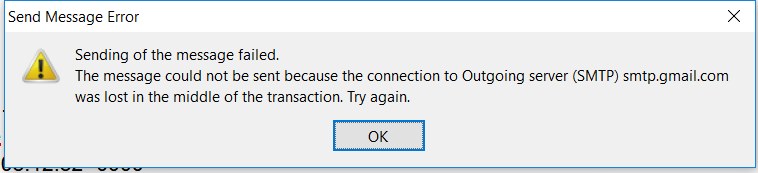
Sending of the message failed. The message could not be sent because the connection to Outgoing server (SMTP) smtp.googlemail.com was lost in the middle of the transaction. Try again.
I can receive mail ok, though do periodically get this error message when trying to receive:
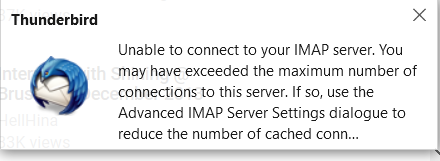
Unable to connect to IMAP server. You may have exceeded the max no. of connections for this server. If so, reduce no. of cached connections).
I have tried all the things in this post: https://support.mozilla.org/en-US/kb/cannot-send-messages
But to no avail...... Please can someone help me!
Thanks in advance!
John
All Replies (15)
Application Basics
   Name: Thunderbird
   Version: 52.5.0
   User Agent: Mozilla/5.0 (Windows NT 10.0; WOW64; rv:52.0) Gecko/20100101 Thunderbird/52.5.0
   Profile Folder: Open Folder
             (Local drive)
   Application Build ID: 20171121193617
   Enabled Plugins: about:plugins
   Build Configuration: about:buildconfig
   Memory Use: about:memory
   Profiles: about:profiles
 Mail and News Accounts
   account1:
     INCOMING: account1, , (imap) imap.googlemail.com:993, SSL, passwordCleartext
     OUTGOING: , smtp.googlemail.com:465, SSL, passwordCleartext, true
   account2:
     INCOMING: account2, , (none) Local Folders, plain, passwordCleartext
Crash Reports
 Extensions
   CompactHeader, 2.1.3, true, {58D4392A-842E-11DE-B51A-C7B855D89593}
Important Modified Preferences
Name: Value
     accessibility.typeaheadfind.flashBar: 0
     browser.cache.disk.capacity: 358400
     browser.cache.disk.filesystem_reported: 1
     browser.cache.disk.smart_size_cached_value: 358400
     browser.cache.disk.smart_size.first_run: false
     browser.cache.disk.smart_size.use_old_max: false
     dom.apps.reset-permissions: true
     extensions.lastAppVersion: 52.5.0
     font.internaluseonly.changed: false
     font.name.monospace.el: Consolas
     font.name.monospace.tr: Consolas
     font.name.monospace.x-baltic: Consolas
     font.name.monospace.x-central-euro: Consolas
     font.name.monospace.x-cyrillic: Consolas
     font.name.monospace.x-unicode: Consolas
     font.name.monospace.x-western: Consolas
     font.name.sans-serif.el: Calibri
     font.name.sans-serif.tr: Calibri
     font.name.sans-serif.x-baltic: Calibri
     font.name.sans-serif.x-central-euro: Calibri
     font.name.sans-serif.x-cyrillic: Calibri
     font.name.sans-serif.x-unicode: Calibri
     font.name.sans-serif.x-western: Calibri
     font.name.serif.el: Cambria
     font.name.serif.tr: Cambria
     font.name.serif.x-baltic: Cambria
     font.name.serif.x-central-euro: Cambria
     font.name.serif.x-cyrillic: Cambria
     font.name.serif.x-unicode: Cambria
     font.name.serif.x-western: Cambria
     font.size.fixed.el: 14
     font.size.fixed.tr: 14
     font.size.fixed.x-baltic: 14
     font.size.fixed.x-central-euro: 14
     font.size.fixed.x-cyrillic: 14
     font.size.fixed.x-unicode: 14
     font.size.fixed.x-western: 14
     font.size.variable.el: 17
     font.size.variable.tr: 17
     font.size.variable.x-baltic: 17
     font.size.variable.x-central-euro: 17
     font.size.variable.x-cyrillic: 17
     font.size.variable.x-unicode: 17
     font.size.variable.x-western: 17
     gfx.blacklist.direct2d.failureid: FEATURE_FAILURE_DL_BLACKLIST_g984
     gfx.direct3d.last_used_feature_level_idx: 1
     mail.openMessageBehavior.version: 1
     mail.winsearch.firstRunDone: true
     mailnews.database.global.datastore.id: b57fe066-0a55-4858-ae61-b0188fda91e
     media.gmp.storage.version.observed: 1
     network.cookie.prefsMigrated: true
     network.predictor.cleaned-up: true
     places.database.lastMaintenance: 1511967869
     places.history.expiration.transient_current_max_pages: 122334
     plugin.importedState: true
     print.printer_HP_Deskjet_D1500_series.print_bgcolor: false
     print.printer_HP_Deskjet_D1500_series.print_bgimages: false
     print.printer_HP_Deskjet_D1500_series.print_colorspace:
     print.printer_HP_Deskjet_D1500_series.print_command:
     print.printer_HP_Deskjet_D1500_series.print_downloadfonts: false
     print.printer_HP_Deskjet_D1500_series.print_duplex: 6815828
     print.printer_HP_Deskjet_D1500_series.print_edge_bottom: 0
     print.printer_HP_Deskjet_D1500_series.print_edge_left: 0
     print.printer_HP_Deskjet_D1500_series.print_edge_right: 0
     print.printer_HP_Deskjet_D1500_series.print_edge_top: 0
     print.printer_HP_Deskjet_D1500_series.print_evenpages: true
     print.printer_HP_Deskjet_D1500_series.print_footercenter:
     print.printer_HP_Deskjet_D1500_series.print_footerleft: &PT
     print.printer_HP_Deskjet_D1500_series.print_footerright: &D
     print.printer_HP_Deskjet_D1500_series.print_headercenter:
     print.printer_HP_Deskjet_D1500_series.print_headerleft: &T
     print.printer_HP_Deskjet_D1500_series.print_headerright: &U
     print.printer_HP_Deskjet_D1500_series.print_in_color: true
     print.printer_HP_Deskjet_D1500_series.print_margin_bottom: 0.5
     print.printer_HP_Deskjet_D1500_series.print_margin_left: 0.5
     print.printer_HP_Deskjet_D1500_series.print_margin_right: 0.5
     print.printer_HP_Deskjet_D1500_series.print_margin_top: 0.5
     print.printer_HP_Deskjet_D1500_series.print_oddpages: true
     print.printer_HP_Deskjet_D1500_series.print_orientation: 0
     print.printer_HP_Deskjet_D1500_series.print_page_delay: 50
     print.printer_HP_Deskjet_D1500_series.print_paper_data: 9
     print.printer_HP_Deskjet_D1500_series.print_paper_height: 11.00
     print.printer_HP_Deskjet_D1500_series.print_paper_name:
     print.printer_HP_Deskjet_D1500_series.print_paper_size_type: 0
     print.printer_HP_Deskjet_D1500_series.print_paper_size_unit: 1
     print.printer_HP_Deskjet_D1500_series.print_paper_width: 8.50
     print.printer_HP_Deskjet_D1500_series.print_plex_name:
     print.printer_HP_Deskjet_D1500_series.print_resolution: 2097184
     print.printer_HP_Deskjet_D1500_series.print_resolution_name:
     print.printer_HP_Deskjet_D1500_series.print_reversed: false
     print.printer_HP_Deskjet_D1500_series.print_scaling: 1.00
     print.printer_HP_Deskjet_D1500_series.print_shrink_to_fit: true
     print.printer_HP_Deskjet_D1500_series.print_to_file: false
     print.printer_HP_Deskjet_D1500_series.print_unwriteable_margin_bottom: 0
     print.printer_HP_Deskjet_D1500_series.print_unwriteable_margin_left: 0
     print.printer_HP_Deskjet_D1500_series.print_unwriteable_margin_right: 0
     print.printer_HP_Deskjet_D1500_series.print_unwriteable_margin_top: 0
     security.sandbox.content.tempDirSuffix: {a6244307-96e1-4a5d-8ee6-631f4444fd99}
Graphics
     GPU #1
     Description: Intel(R) HD Graphics 620
     Vendor ID: 0x8086
     Device ID: 0x5916
     RAM: Unknown
     Drivers: igdumdim64 igd10iumd64 igd10iumd64 igd12umd64 igdumdim32 igd10iumd32 igd10iumd32 igd12umd32
     Driver Version: 22.20.16.4749
     Driver Date: 7-24-2017
     Features
     Direct2D: false
     DirectWrite: true (10.0.16299.15)
     WebGL Renderer: Google Inc. -- ANGLE (Intel(R) HD Graphics 620 Direct3D9Ex vs_3_0 ps_3_0) -- OpenGL ES 2.0 (ANGLE 2.1.0.2a250c8a0e15)
     AzureCanvasBackend: skia
     AzureCanvasAccelerated: 0
     AzureFallbackCanvasBackend: cairo
     AzureContentBackend: skia
JavaScript
Incremental GC: 1
Accessibility
   Activated: 0
   Prevent Accessibility: 0
Library Versions
     Expected minimum version
     Version in use
     NSPR
     4.13.1
     4.13.1
     NSS
     3.28.6
     3.28.6
     NSS Util
     3.28.6
     3.28.6
     NSS SSL
     3.28.6
     3.28.6
     NSS S/MIME
     3.28.6
     3.28.6
PS have checked that WIndows defender is not blocking smtp by temporarily disabling it too.
UPDATE - he sending error seems to be intermittent, as it actually worked for a bit this afternoon.... but now not working again.
Still getting this problem. Does anyone have any suggestions, as I can't send or receive mail most of the time now :-(
I have attached a couple of images of the errors, and will re-paste the diagnostic text info, as it may have changed.
Many thanks in advance people!
Application Basics
   Name: Thunderbird
   Version: 52.6.0
   User Agent: Mozilla/5.0 (Windows NT 10.0; WOW64; rv:52.0) Gecko/20100101 Thunderbird/52.6.0
   Profile Folder: Open Folder
             (Local drive)
   Application Build ID: 20180123185941
   Enabled Plugins: about:plugins
   Build Configuration: about:buildconfig
   Memory Use: about:memory
   Profiles: about:profiles
 Mail and News Accounts
   account2:
     INCOMING: account2, , (none) Local Folders, plain, passwordCleartext
   account3:
     INCOMING: account3, , (imap) imap-mail.outlook.com:993, SSL, passwordCleartext
     OUTGOING: , smtp-mail.outlook.com:587, alwaysSTARTTLS, passwordCleartext, true
   account4:
     INCOMING: account4, , (imap) imap.gmail.com:993, SSL, OAuth2
     OUTGOING: , smtp.gmail.com:465, SSL, OAuth2, true
Crash Reports
 Extensions
   CompactHeader, 2.1.5, true, {58D4392A-842E-11DE-B51A-C7B855D89593}
Important Modified Preferences
Name: Value
     accessibility.typeaheadfind.flashBar: 0
     browser.cache.disk.capacity: 358400
     browser.cache.disk.filesystem_reported: 1
     browser.cache.disk.smart_size_cached_value: 358400
     browser.cache.disk.smart_size.first_run: false
     browser.cache.disk.smart_size.use_old_max: false
     dom.apps.reset-permissions: true
     extensions.lastAppVersion: 52.6.0
     font.internaluseonly.changed: false
     font.name.monospace.el: Consolas
     font.name.monospace.tr: Consolas
     font.name.monospace.x-baltic: Consolas
     font.name.monospace.x-central-euro: Consolas
     font.name.monospace.x-cyrillic: Consolas
     font.name.monospace.x-unicode: Consolas
     font.name.monospace.x-western: Consolas
     font.name.sans-serif.el: Calibri
     font.name.sans-serif.tr: Calibri
     font.name.sans-serif.x-baltic: Calibri
     font.name.sans-serif.x-central-euro: Calibri
     font.name.sans-serif.x-cyrillic: Calibri
     font.name.sans-serif.x-unicode: Calibri
     font.name.sans-serif.x-western: Calibri
     font.name.serif.el: Cambria
     font.name.serif.tr: Cambria
     font.name.serif.x-baltic: Cambria
     font.name.serif.x-central-euro: Cambria
     font.name.serif.x-cyrillic: Cambria
     font.name.serif.x-unicode: Cambria
     font.name.serif.x-western: Cambria
     font.size.fixed.el: 14
     font.size.fixed.tr: 14
     font.size.fixed.x-baltic: 14
     font.size.fixed.x-central-euro: 14
     font.size.fixed.x-cyrillic: 14
     font.size.fixed.x-unicode: 14
     font.size.fixed.x-western: 14
     font.size.variable.el: 17
     font.size.variable.tr: 17
     font.size.variable.x-baltic: 17
     font.size.variable.x-central-euro: 17
     font.size.variable.x-cyrillic: 17
     font.size.variable.x-unicode: 17
     font.size.variable.x-western: 17
     gfx.blacklist.direct2d.failureid: FEATURE_FAILURE_DL_BLACKLIST_g984
     gfx.direct3d.last_used_feature_level_idx: 1
     mail.openMessageBehavior.version: 1
     mail.winsearch.firstRunDone: true
     mailnews.database.global.datastore.id: b57fe066-0a55-4858-ae61-b0188fda91e
     media.gmp.storage.version.observed: 1
     network.cookie.prefsMigrated: true
     network.predictor.cleaned-up: true
     places.database.lastMaintenance: 1519248989
     places.history.expiration.transient_current_max_pages: 122334
     plugin.importedState: true
     print.printer_HP_Deskjet_D1500_series.print_bgcolor: false
     print.printer_HP_Deskjet_D1500_series.print_bgimages: false
     print.printer_HP_Deskjet_D1500_series.print_colorspace:
     print.printer_HP_Deskjet_D1500_series.print_command:
     print.printer_HP_Deskjet_D1500_series.print_downloadfonts: false
     print.printer_HP_Deskjet_D1500_series.print_duplex: 6815828
     print.printer_HP_Deskjet_D1500_series.print_edge_bottom: 0
     print.printer_HP_Deskjet_D1500_series.print_edge_left: 0
     print.printer_HP_Deskjet_D1500_series.print_edge_right: 0
     print.printer_HP_Deskjet_D1500_series.print_edge_top: 0
     print.printer_HP_Deskjet_D1500_series.print_evenpages: true
     print.printer_HP_Deskjet_D1500_series.print_footercenter:
     print.printer_HP_Deskjet_D1500_series.print_footerleft: &PT
     print.printer_HP_Deskjet_D1500_series.print_footerright: &D
     print.printer_HP_Deskjet_D1500_series.print_headercenter:
     print.printer_HP_Deskjet_D1500_series.print_headerleft: &T
     print.printer_HP_Deskjet_D1500_series.print_headerright: &U
     print.printer_HP_Deskjet_D1500_series.print_in_color: true
     print.printer_HP_Deskjet_D1500_series.print_margin_bottom: 0.5
     print.printer_HP_Deskjet_D1500_series.print_margin_left: 0.5
     print.printer_HP_Deskjet_D1500_series.print_margin_right: 0.5
     print.printer_HP_Deskjet_D1500_series.print_margin_top: 0.5
     print.printer_HP_Deskjet_D1500_series.print_oddpages: true
     print.printer_HP_Deskjet_D1500_series.print_orientation: 0
     print.printer_HP_Deskjet_D1500_series.print_page_delay: 50
     print.printer_HP_Deskjet_D1500_series.print_paper_data: 9
     print.printer_HP_Deskjet_D1500_series.print_paper_height: 11.00
     print.printer_HP_Deskjet_D1500_series.print_paper_name:
     print.printer_HP_Deskjet_D1500_series.print_paper_size_type: 0
     print.printer_HP_Deskjet_D1500_series.print_paper_size_unit: 1
     print.printer_HP_Deskjet_D1500_series.print_paper_width: 8.50
     print.printer_HP_Deskjet_D1500_series.print_plex_name:
     print.printer_HP_Deskjet_D1500_series.print_resolution: 2097184
     print.printer_HP_Deskjet_D1500_series.print_resolution_name:
     print.printer_HP_Deskjet_D1500_series.print_reversed: false
     print.printer_HP_Deskjet_D1500_series.print_scaling: 1.00
     print.printer_HP_Deskjet_D1500_series.print_shrink_to_fit: true
     print.printer_HP_Deskjet_D1500_series.print_to_file: false
     print.printer_HP_Deskjet_D1500_series.print_unwriteable_margin_bottom: 0
     print.printer_HP_Deskjet_D1500_series.print_unwriteable_margin_left: 0
     print.printer_HP_Deskjet_D1500_series.print_unwriteable_margin_right: 0
     print.printer_HP_Deskjet_D1500_series.print_unwriteable_margin_top: 0
     security.sandbox.content.tempDirSuffix: {a6244307-96e1-4a5d-8ee6-631f4444fd99}
Graphics
     GPU #1
     Description: Intel(R) HD Graphics 620
     Vendor ID: 0x8086
     Device ID: 0x5916
     RAM: Unknown
     Drivers: igdumdim64 igd10iumd64 igd10iumd64 igd12umd64 igdumdim32 igd10iumd32 igd10iumd32 igd12umd32
     Driver Version: 22.20.16.4749
     Driver Date: 7-24-2017
     Features
     Direct2D: false
     DirectWrite: true (10.0.16299.15)
     WebGL Renderer: Google Inc. -- ANGLE (Intel(R) HD Graphics 620 Direct3D9Ex vs_3_0 ps_3_0) -- OpenGL ES 2.0 (ANGLE 2.1.0.2a250c8a0e15)
     AzureCanvasBackend: skia
     AzureCanvasAccelerated: 0
     AzureFallbackCanvasBackend: cairo
     AzureContentBackend: skia
JavaScript
Incremental GC: 1
Accessibility
   Activated: 0
   Prevent Accessibility: 0
Library Versions
     Expected minimum version
     Version in use
     NSPR
     4.13.1
     4.13.1
     NSS
     3.28.6
     3.28.6
     NSS Util
     3.28.6
     3.28.6
     NSS SSL
     3.28.6
     3.28.6
     NSS S/MIME
     3.28.6
     3.28.6

Try to start Windows in safe mode with networking enabled. - Win10 https://support.microsoft.com/en-us/help/12376/windows-10-start-your-pc-in-safe-mode
Still in Windows safe mode, start Thunderbird in safe mode. - https://support.mozilla.org/kb/safe-mode
Does the problem go away?
Hi There. Thanks for your response. Yes, it seems to go away in safe mode.... ...does that give us any indication as to what might be causing it then? thanks John
Windows safe mode disables anti-virus software, which is most likely the culprit.
Create an exception in your anti-virus software for the Thunderbird profile folder, so that the anti-virus real-time scanner will not scan it. http://kb.mozillazine.org/Profile_folder_-_Thunderbird
Don't let your anti-virus software scan incoming and outgoing messages.
Don't let your anti-virus software scan attachments.
Don't let your anti-virus software intercept your secure connection to the server.
Remove any add-ons your anti-virus software may have installed in Thunderbird.
Keep it working. http://kb.mozillazine.org/Keep_it_working_-_Thunderbird
And last but not least, backup your Thunderbird profile on a regular basis. https://support.mozilla.org/kb/profiles-where-thunderbird-stores-user-data#w_backing-up-a-profile
Hello.
Many thanks for your reply, I am truly appreciative of your efforts to help me, and what you are saying makes complete sense!
However, I am using windows defender, and have made an exception for the profile folder, but there are no options within the anti-virus to disable email scanning etc..... so I tried Avast and AVG other night (which are a bit more configurable) but still had the same problems.
Is there a way to configure Defender perhaps?... or maybe there is an anti-virus which someone could recommend which might work better?
Many thanks
John
I am using windows defender, and have made an exception for the profile folder,
That should do it.
I tried Avast and AVG other night (which are a bit more configurable) but still had the same problems.
I'd prefer Defender over Avast or AVG.
I have made an exception for the profile folder, and although it seems a bit better, i still get the same intermittent problems. Really not sure what else I can fo to tweak Defender?
The saga continues.... !!!!!
Thanks for your help though mate, it's much appreciated.
cheers John
Is there any other 'security' software you're running?
not that I am aware of!
See if this article helps. https://wiki.mozilla.org/Thunderbird:Testing:Memory_Usage_Problems
Hey thanks again. I will check that article when i get some time.
Also one other thing to note is that it only happens on the gmail account in tbird..... the hotmail one works fine?
So could well be something specific to gmail?
many thanks John.