


In order to use FileLink and/or DropBox on Thunderbird do I need toinstall an add-on which requires the payment of a monthly fee?

I used to have FileLink and DropBox on Thunderbird (although I haven't used either of them for quite a while). For one of them I had something called Hightail installed. It now seems that in order to use either FileLink or DropBox I must install an add-on which requires the payment of a monthly fee. Is this correct? If it is not, please tell me how I can get these two features working. Thanks
Chosen solution
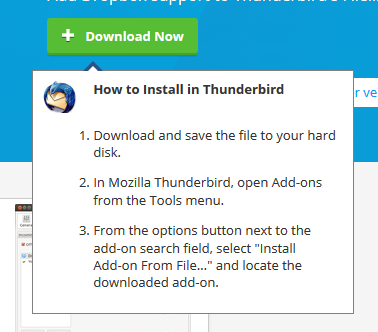
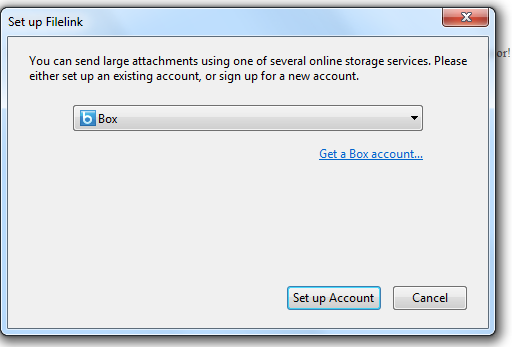
Thank you christ1. I downloaded "Dropbox for Filelink". However, the installation instructions for Dropbox for Filelink (picture below) do not work. There is no "Add-ons" option in the Tools" menu, as far as I can tell. When as a test I tried to send myself a large attachment the suggestion of using FileLink instead appeared but I then learned that to use it I had to purchase a "Box" account (picture below), which is only free for the first 14 days.
Read this answer in context 👍 0All Replies (3)

It now seems that in order to use either FileLink or DropBox I must install an add-on which requires the payment of a monthly fee.
It's not either FileLink or DropBox. FileLink is a Thunderbird feature, and it can use Dropbox as a storage provider with an add-on. https://addons.mozilla.org/en-US/thunderbird/addon/dropbox-for-filelink
No payment is needed for that.
Also see https://support.mozilla.org/kb/filelink-large-attachments
Modified by christ1
Chosen Solution
Thank you christ1. I downloaded "Dropbox for Filelink". However, the installation instructions for Dropbox for Filelink (picture below) do not work. There is no "Add-ons" option in the Tools" menu, as far as I can tell. When as a test I tried to send myself a large attachment the suggestion of using FileLink instead appeared but I then learned that to use it I had to purchase a "Box" account (picture below), which is only free for the first 14 days.



There is no "Add-ons" option in the Tools" menu,
There certainly is.
"Box" is a different storage provider and has got nothing to do with Dropbox. You apparently haven't installed the add-on yet. Check this article about installing add-ons for Thunderbird. https://support.mozilla.org/kb/installing-addon-thunderbird