


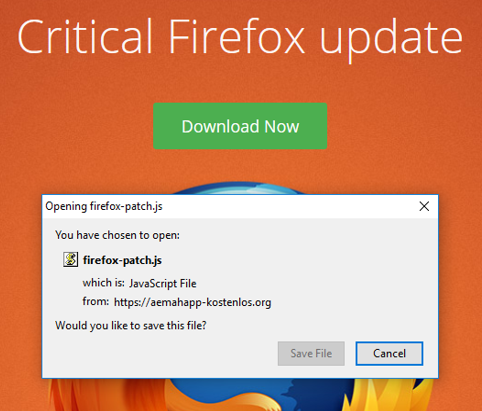
Getting a pop-up message to download a "Critical Firefox update" but URL doesn't seem right/Mozilla originated.

When I click on Firefox icon on my computer to access internet, the attached file shows the pop-up message I get. Since URL isn't specific to Mozilla/Firefox, am questioning validity of message.
If I go to the Mozilla website, homepage gives me message that my computer has latest version loaded.
So please verify if the pop-up message is legit or some malware. Thank you
All Replies (2)
Chosen Solution
hi, this is a scam tactic that is trying to trick you into installing malware, so don't download or execute this kind of stuff just because of a popup or redirect on a website! updates are handled automatically by firefox so you don't have to download anything for that (and you can always initiate a manual check for updates in the firefox menu ≡ > help ? > about firefox).
we suspect this is coming form "malvertising" (=ads placed on legitimate websites that redirect you to this fraudulent message), so using an adblocking addon like https://addons.mozilla.org/firefox/addon/ublock-origin/ would also help with that.
Thank you!