


Page Permissions is broken

I simply cannot be bothered to change page permissions on every web page I visit -- and let's be honest, neither can you.
Removing the ability to manage permissions on all pages from one interface is counter to everything that Firefox was supposed to stand for, and will be the reason I stop using it. One further example of how bass-ackward this change is -- what the frack is the "default" setting? I know that you can give me an answer to that question here, but the answer is simply not available anywhere inside Firefox, or truly here in the help forums either. There is no way to determine what the "default" setting is. The only way to make *sure* that websites aren't using my camera, or location, is to go ONE BY ONE to every web page I visit and manually change the setting? No.
You are doing a grave disservice to everyone who uses Firefox and doesn't know that these settings are now, basically, out of their control. Please, stop this.
Chosen solution
Hi, personally I think you have a good point! However, the people who answer questions here, for the most part, are other Firefox users volunteering their time (like me), not Mozilla employees or Firefox developers.
I suspect it might be a lost cause, but if you want to leave feedback for Firefox developers, you can go to the Firefox Help menu and select Submit Feedback... or use this link. Your feedback gets collected at http://input.mozilla.org/, where a team of people read it and gather data about the most common issues.
There is a little more background info for reference here - https://bugzilla.mozilla.org/show_bug.cgi?id=933917
Read this answer in context 👍 0All Replies (3)

Chosen Solution
Hi, personally I think you have a good point! However, the people who answer questions here, for the most part, are other Firefox users volunteering their time (like me), not Mozilla employees or Firefox developers.
I suspect it might be a lost cause, but if you want to leave feedback for Firefox developers, you can go to the Firefox Help menu and select Submit Feedback... or use this link. Your feedback gets collected at http://input.mozilla.org/, where a team of people read it and gather data about the most common issues.
There is a little more background info for reference here - https://bugzilla.mozilla.org/show_bug.cgi?id=933917
neighbor said
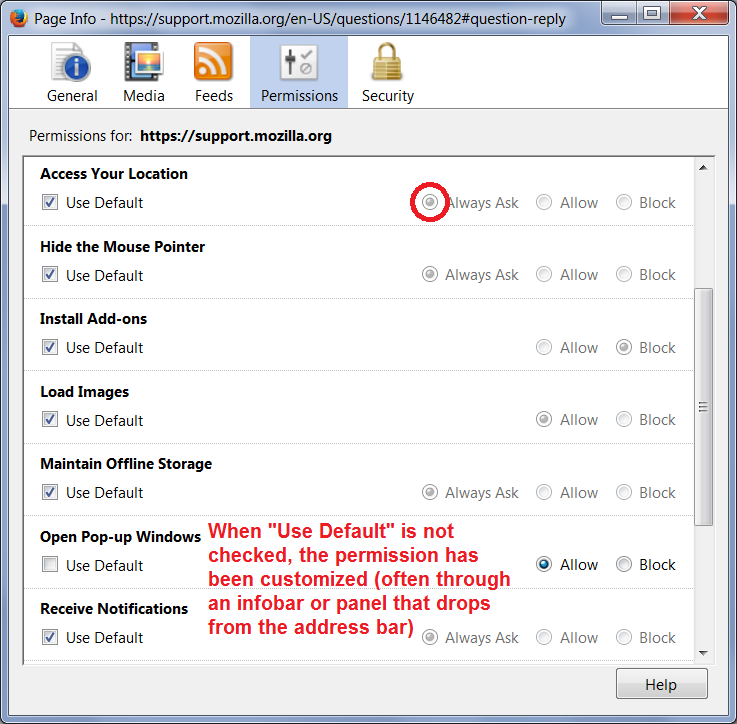
... what the frack is the "default" setting? I know that you can give me an answer to that question here, but the answer is simply not available anywhere inside Firefox, or truly here in the help forums either. There is no way to determine what the "default" setting is. The only way to make *sure* that websites aren't using my camera, or location, is to go ONE BY ONE to every web page I visit and manually change the setting? No.
On the Permissions tab of the Page Info dialog, the default setting is indicated by a gray dot when the "Use default" checkbox is checked. I've attached a screenshot illustrating what I mean.
Plugins are set up differently and do not show the gray dot. You would need to check the Add-ons page. However, the general rule is:
- Generally: Default plugin permission is "Ask to Activate" ("Always Ask")
- Exception: Flash defaults to "Always Activate" ("Allow")
neighbor said
There is no way to determine what the "default" setting is.
You determine what your default setting is.
The only way to make *sure* that websites aren't using my camera, or location, is to go ONE BY ONE to every web page I visit and manually change the setting? No.
This way you are in control: you get to decide which site is allowed to use your camera etc..
And you only have to do this once on every site ........