


Weird toolbar behavior

One of the toolbars, beginning with "most visited" shows 8 sites I visit, followed by 6 repeats of the same site: TinyURL.com - shorte... When I try to delete this site, nothing happens--or at least nothing appears to happen. I suspect that there are so many repeats of this site that even though I seem to have deleted it ten times or more, there are still six of these links visible on that toolbar. I wonder if this is part of what's causing Firefox to be slow and hand repeatedly?
Look at the toolbar in the attached screen-grab and you will see those repeats on the right-hand side of it.
All Replies (8)

Your screenshot did not appear can you try again on your next reply please.
If this is just the Firefox most visited folder and you are visiting those sites it is probably not unusual.
If it is something you do not want listing Firefox has a couple of forget features, but be careful using that as it may remove things you wish it not to. If you use URL shortening you could end up removing records of site with shortened addresses that you wanted to keep. Carefully read the list of what is removed before you try that.
- Delete browsing, search and download history on Firefox_how-do-i-remove-a-single-website-from-my-history
- Forget button - quickly delete your browsing history on Firefox
On the other hand you may have some odd toolbar, adware or even malware.
Hi John99,
I do have a few shortened URLs, but not as many as I'm seeing on the toolbar. And I keep a record of the ones I need on a Word doc. I hope you're not saying that those short URLs will not work unless they remain on my Firefox page!
I'm attaching that screen grab once more.
David Wolf
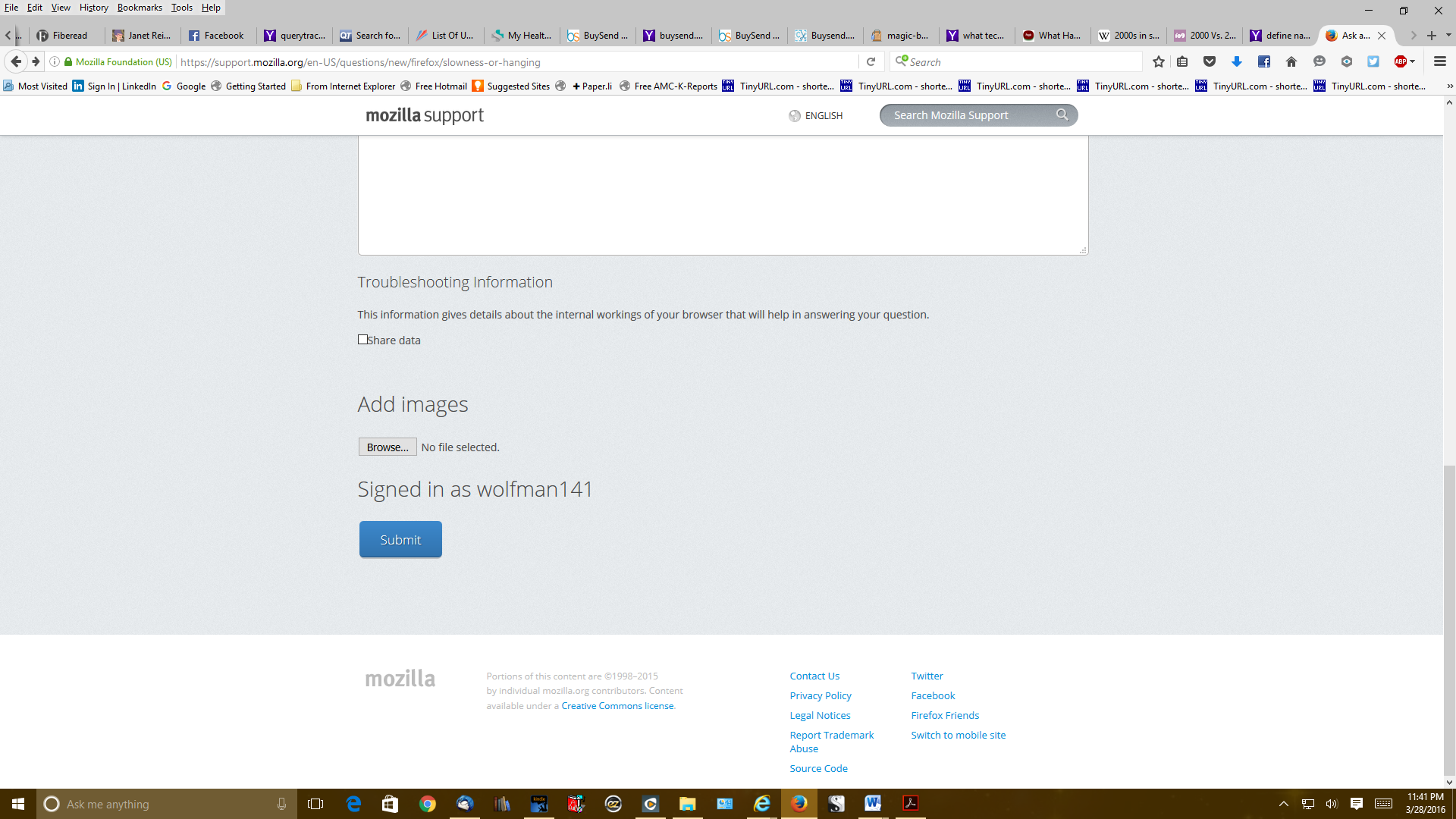
Whoa--this is very strange. I just looked at my toolbar again, and the offending URLs are now all gone!! Did you do that?
David
Oops--ignore my previous message: I was looking at my other browser. Firefox still has all those unwanted URLs.
Hi wolfman141,
We are not controlling your computer !
Thanks for the screenshot. That toolbar is the standard Firefox bookmarks toolbar. And and the icons belong to those bookmarks. Once the toolbar is full it overflows and you get an arrow with the remaining bookmarks on a drop down list.
It looks like you just added a load of bookmarks then deleted them again.
Maybe some other addon or feature is involved here. Were you trying to add or Sync bookmarks at the time ?
Okay, so I clicked on the arrows and saw a whole bunch more. I just deleted 23 of them and now they are finally gone. Hopefully, they won't come back. And FYI, I checked one of them and it was just a link to their site. It did not contain an actual URL that I shortened using their product. If they don't come back, I will assume that the problem is solved--though not sure if it will solve the problem of Firefox hanging and going slow. We'll see... Dave
If you suspect adware or malware scan with all the tools suggested in this article.
If Firefox is slow it is probably worth using Windows Task Manager to check the Memory & CPU usage.
You can check for problems with the places.sqlite database (bookmarks and history) in the Firefox profile folder.
See also: