


Bring back permanent drop down triangle in URL bar

Upgraded to 43.0.2 - how do I bring back the permanent down triangle in the URL bar? It now fades away when the mouse is out of the address bar. It makes it harder to go directly to your list of most used sites.
Now I have to put my mouse somewhere in the URL bar and the move it to the right - it may sound simple but it's a real PITA. Why fix something that isn't broken?
AND FOR SOMEONE'S SAKE! Permanently remove the "VISIT..." in the search bar. stop cluttering stuff up.
By trying to make things better you are actually making them worse.
I'm now going to disable auto-update so these awful updates don't surprise me.
All Replies (2)
Chosen Solution
Hi foxyfur, you can use custom style rules to modify the appearance of the address bar and the autocomplete drop-down. Let me start with the new "Visit..." / "Search..." item.
That top item is for your information: it describes what is going to happen if you press Enter or click the Go button.
- If there are no spaces in what you typed, usually that first row will show where "autofill" will take you if you press Enter or click Go.
- If there are spaces in what you typed, that first row will show what search engine will be used if you press Enter or click Go.
However, if you want to skip over that and use the first suggested site from history or bookmarks, it is still one down-arrow-press from where you are typing.
If you find it more annoying than useful, you can remove that line in two ways:
(1) Roll back the changes to the bar using a preference
This prevents Firefox from showing search engine suggestions on the bar, so for anyone wanting to display those, this would not be a good approach.
(A) In a new tab, type or paste about:config in the address bar and press Enter/Return. Click the button promising to be careful.
(B) In the search box above the list, type or paste URLB and pause while the list is filtered
(C) Double-click the browser.urlbar.unifiedcomplete preference to switch it from true to false
(2) Hide the top line of the bar using a custom style rule
You can apply custom style rules to Firefox's user interface using either the Stylish extension or a userChrome.css file. For example, you can install the Stylish extension and a userstyle I postd:
- Stylish extension: https://addons.mozilla.org/firefox/addon/stylish/
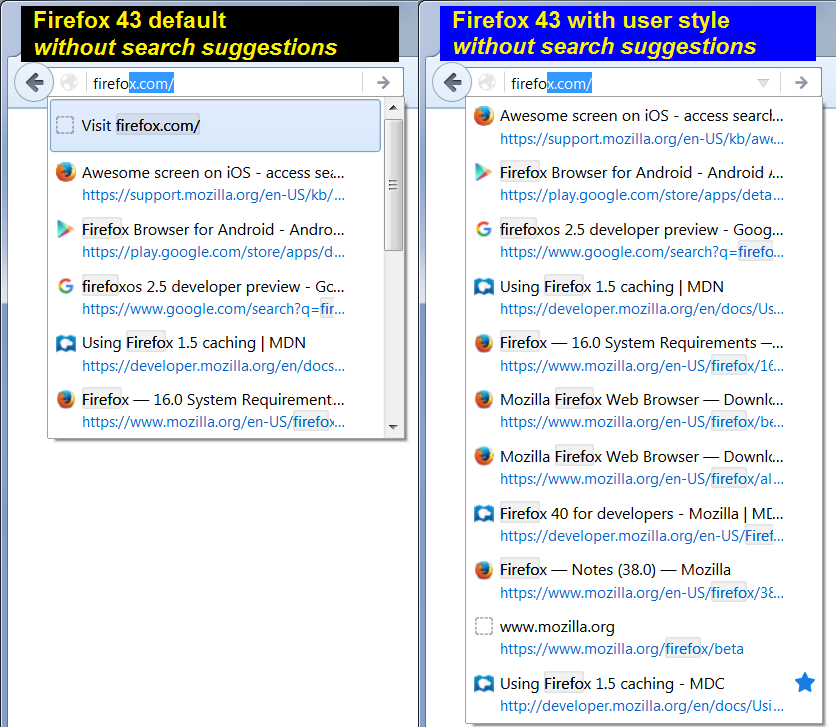
- URL Bar Tweaks - hides that top item and keeps the triangle visible: https://userstyles.org/styles/122394/url-bar-tweaks-remove-visit-search-scroll-bar
Sample screen shot attached for reference.
That user style also addresses the triangle, but if you use the #1 approach above, then an alternate style rule to tackle the triangle is as follows:
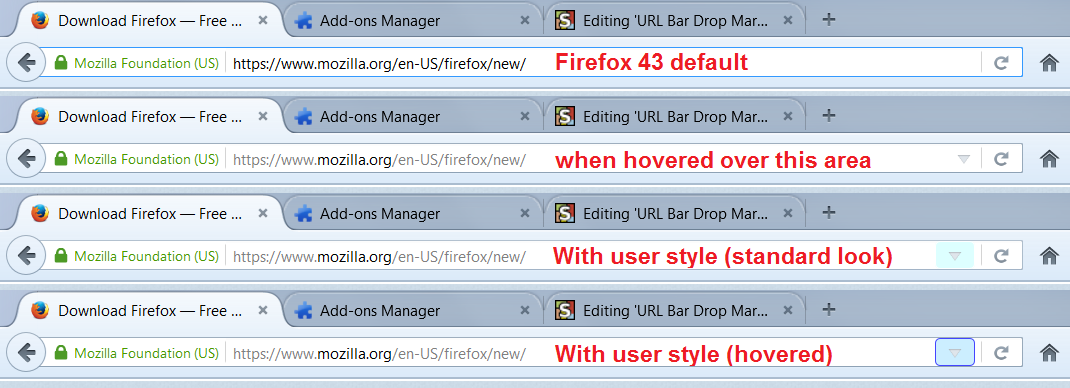
- URL Bar Dropmarker Double-wide - keeps the triangle visible and creates a larger target to click when you hover the bar (requested in a different thread): https://userstyles.org/styles/122133/url-bar-dropmarker-double-wide
Sample screen shot attached for reference.
Thanks for your helpful reply.
This does solve the problem for ME but does Firefox expect all of it's users to know this or even execute the commands if they are given to them?
My parent's use Firefox all the time but they couldn't do this and neither would my brother who is my age.
What I'm trying to say is it's easy for IT inclined people to apply these solutions and changes but maybe folks who use FIrefox because they like it and the visual clues (like the little permanent triangle) may miss it and not know how to bring it back. Maybe GUI's should go back to be designed for the masses but with the options for customization by the experts instead of the opposite.
Modified by foxyfur