


New version just installed on Windows 7: My folders are shown, but I can't access them. (bug 1211291)

I get a generic Thunderbird Mail inbox screen, my folders are all on the left, but I can't access them. Nor can I send an email. This happened when I turned on my computer this morning...I restarted Windows and it was alright. Since then, a newer version of T-bird was automatically installed and now I've got the problem again. And, I've restarted my computer again but still have the problem. Essentially, T'bird is non-functional at this point.
Modified by Wayne Mery
All Replies (9)
Just want to say...I uninstalled T-bird and reinstalled it. Same thing -- can't write emails, can't see anything in my inbox or any of my other folders, can't even get many of the few options on the generic Thunderbird Mail inbox screen to open.
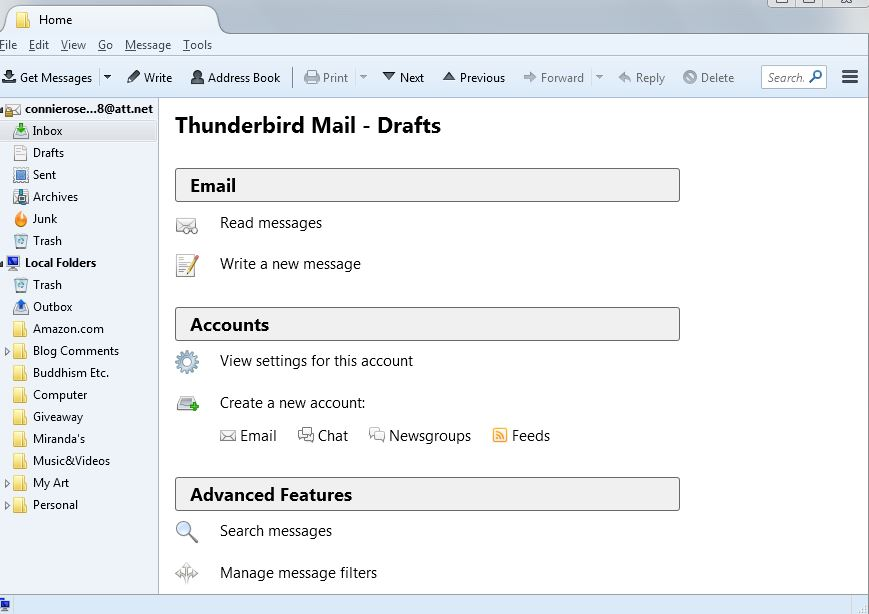
Just another comment on what's not working...I have to go to the server to read my mail -- it WON'T show up in Thunderbird.
Here's all my info...
Application Basics
   Name: Thunderbird
   Version: 38.3.0
   User Agent: Mozilla/5.0 (Windows NT 6.1; WOW64; rv:38.0) Gecko/20100101 Thunderbird/38.3.0
   Profile Folder: Show Folder
             (Local drive)
   Application Build ID: 20150928051427
   Enabled Plugins: about:plugins
   Build Configuration: about:buildconfig
   Memory Use: about:memory
 Mail and News Accounts
   account1:
     INCOMING: account1, , (pop3) inbound.att.net:995, SSL, passwordCleartext
     OUTGOING: outbound.att.net:465, SSL, passwordCleartext, true
   account2:
     INCOMING: account2, , (none) Local Folders, plain, passwordCleartext
 Crash Reports
   http://crash-stats.mozilla.com/report/index/bp-86730415-4423-4a3e-b8e2-314d02140523 (5/23/2014)
   http://crash-stats.mozilla.com/report/index/bp-88e5e4e7-5bdd-472a-8402-7df352140402 (4/1/2014)
 Extensions
   Lightning, 4.0.3, true, {e2fda1a4-762b-4020-b5ad-a41df1933103}
Important Modified Preferences
Name: Value
     browser.cache.disk.capacity: 358400
     browser.cache.disk.smart_size_cached_value: 358400
     browser.cache.disk.smart_size.first_run: false
     browser.cache.disk.smart_size.use_old_max: false
     extensions.lastAppVersion: 38.3.0
     font.internaluseonly.changed: false
     font.name.monospace.el: Consolas
     font.name.monospace.tr: Consolas
     font.name.monospace.x-baltic: Consolas
     font.name.monospace.x-central-euro: Consolas
     font.name.monospace.x-cyrillic: Consolas
     font.name.monospace.x-unicode: Consolas
     font.name.monospace.x-western: Consolas
     font.name.sans-serif.el: Calibri
     font.name.sans-serif.tr: Calibri
     font.name.sans-serif.x-baltic: Calibri
     font.name.sans-serif.x-central-euro: Calibri
     font.name.sans-serif.x-cyrillic: Calibri
     font.name.sans-serif.x-unicode: Calibri
     font.name.sans-serif.x-western: Gill Sans MT
     font.name.serif.el: Cambria
     font.name.serif.tr: Cambria
     font.name.serif.x-baltic: Cambria
     font.name.serif.x-central-euro: Cambria
     font.name.serif.x-cyrillic: Cambria
     font.name.serif.x-unicode: Cambria
     font.name.serif.x-western: Cambria
     font.size.fixed.el: 14
     font.size.fixed.tr: 14
     font.size.fixed.x-baltic: 14
     font.size.fixed.x-central-euro: 14
     font.size.fixed.x-cyrillic: 14
     font.size.fixed.x-unicode: 14
     font.size.fixed.x-western: 14
     font.size.variable.el: 17
     font.size.variable.tr: 17
     font.size.variable.x-baltic: 17
     font.size.variable.x-central-euro: 17
     font.size.variable.x-cyrillic: 17
     font.size.variable.x-unicode: 17
     font.size.variable.x-western: 17
     mail.openMessageBehavior.version: 1
     mail.winsearch.firstRunDone: true
     mailnews.database.global.datastore.id: 4a77737c-2caa-482c-9704-90d318eedfc
     network.cookie.prefsMigrated: true
     network.predictor.cleaned-up: true
     places.database.lastMaintenance: 1442781659
     places.history.expiration.transient_current_max_pages: 104649
     plugin.importedState: true
     print.printer_Canon_MP640_series_Printer.print_bgcolor: false
     print.printer_Canon_MP640_series_Printer.print_bgimages: false
     print.printer_Canon_MP640_series_Printer.print_colorspace:
     print.printer_Canon_MP640_series_Printer.print_command:
     print.printer_Canon_MP640_series_Printer.print_downloadfonts: false
     print.printer_Canon_MP640_series_Printer.print_duplex: 0
     print.printer_Canon_MP640_series_Printer.print_edge_bottom: 0
     print.printer_Canon_MP640_series_Printer.print_edge_left: 0
     print.printer_Canon_MP640_series_Printer.print_edge_right: 0
     print.printer_Canon_MP640_series_Printer.print_edge_top: 0
     print.printer_Canon_MP640_series_Printer.print_evenpages: true
     print.printer_Canon_MP640_series_Printer.print_footercenter:
     print.printer_Canon_MP640_series_Printer.print_footerleft: &PT
     print.printer_Canon_MP640_series_Printer.print_footerright: &D
     print.printer_Canon_MP640_series_Printer.print_headercenter:
     print.printer_Canon_MP640_series_Printer.print_headerleft: &T
     print.printer_Canon_MP640_series_Printer.print_headerright: &U
     print.printer_Canon_MP640_series_Printer.print_in_color: true
     print.printer_Canon_MP640_series_Printer.print_margin_bottom: 0.5
     print.printer_Canon_MP640_series_Printer.print_margin_left: 0.5
     print.printer_Canon_MP640_series_Printer.print_margin_right: 0.5
     print.printer_Canon_MP640_series_Printer.print_margin_top: 0.5
     print.printer_Canon_MP640_series_Printer.print_oddpages: true
     print.printer_Canon_MP640_series_Printer.print_orientation: 0
     print.printer_Canon_MP640_series_Printer.print_page_delay: 50
     print.printer_Canon_MP640_series_Printer.print_paper_data: 1
     print.printer_Canon_MP640_series_Printer.print_paper_height: 11.00
     print.printer_Canon_MP640_series_Printer.print_paper_name:
     print.printer_Canon_MP640_series_Printer.print_paper_size_type: 0
     print.printer_Canon_MP640_series_Printer.print_paper_size_unit: 0
     print.printer_Canon_MP640_series_Printer.print_paper_width: 8.50
     print.printer_Canon_MP640_series_Printer.print_plex_name:
     print.printer_Canon_MP640_series_Printer.print_resolution: 0
     print.printer_Canon_MP640_series_Printer.print_resolution_name:
     print.printer_Canon_MP640_series_Printer.print_reversed: false
     print.printer_Canon_MP640_series_Printer.print_scaling: 1.00
     print.printer_Canon_MP640_series_Printer.print_shrink_to_fit: false
     print.printer_Canon_MP640_series_Printer.print_to_file: false
     print.printer_Canon_MP640_series_Printer.print_unwriteable_margin_bottom: 0
     print.printer_Canon_MP640_series_Printer.print_unwriteable_margin_left: 0
     print.printer_Canon_MP640_series_Printer.print_unwriteable_margin_right: 0
     print.printer_Canon_MP640_series_Printer.print_unwriteable_margin_top: 0
Graphics
     Adapter Description: ATI Mobility Radeon HD 3400 Series
     Vendor ID: 0x1002
     Device ID: 0x95c4
     Adapter RAM: 256
     Adapter Drivers: atiumd64 atidxx64 atiumdag atidxx32 atiumdva atiumd6a atitmm64
     Driver Version: 8.641.1.1000
     Driver Date: 8-24-2009
     Adapter Description (GPU #2): Mobile Intel(R) 4 Series Express Chipset Family
     Vendor ID (GPU #2): 0x8086
     Device ID (GPU #2): 0x2a42
     Adapter RAM (GPU #2): Unknown
     Adapter Drivers (GPU #2): igdumd64 igd10umd64 igdumdx32 igd10umd32
     Driver Version (GPU #2): 8.641.1.1000
     Driver Date (GPU #2): 8-24-2009
     Direct2D Enabled: false
     DirectWrite Enabled: false (6.2.9200.17461)
     ClearType Parameters: Gamma: 2200 Pixel Structure: R ClearType Level: 50 Enhanced Contrast: 300
     WebGL Renderer: false
     AzureCanvasBackend: skia
     AzureSkiaAccelerated: 0
     AzureFallbackCanvasBackend: cairo
     AzureContentBackend: cairo
JavaScript
Incremental GC:
Accessibility
   Activated:
   Prevent Accessibility:
Library Versions
And now the program won't even open...
reports indicate this is caused by the Calendar addon.
For Windows, 1. install older version from http://releases.mozilla.org/pub/mozilla.org/thunderbird/releases/38.2.0/win32/en-US/Thunderbird%20Setup%2038.2.0.exe 2. remove calendar addon, restart thunderbird 3. update thunderbird at help | About 4. reinstall calendar addon
Thanks for the help, Wayne. Meanwhile, I switched to EMClient on Sunday. I don't like it when Mozilla keeps changing things -- on FF as well as T'Bird -- necessitating changing things in Windows that have been working just fine for years. That's not about you, of course. And I do appreciate your assistance.
Thanks for the feedback.
FWIW, a simpler set of steps is uninstall calendar addon, then reinstall (if you need the calendar)
Anyone also encounter this problem when updating to Thunderbird 38.4.0?