Why doesn't the "add new tab" button show to the right of my used tabs?

Everything was working fine. BUT Then one of your updates, that I don't ask for, and don't want came about, and NOW, I have the problem listed above. Why can't you just leave everybody ALONE. People like to be left alone. (Think about it)
All Replies (1)
The new tab button should still in the same place. Possibly your toolbar layout has become corrupted.
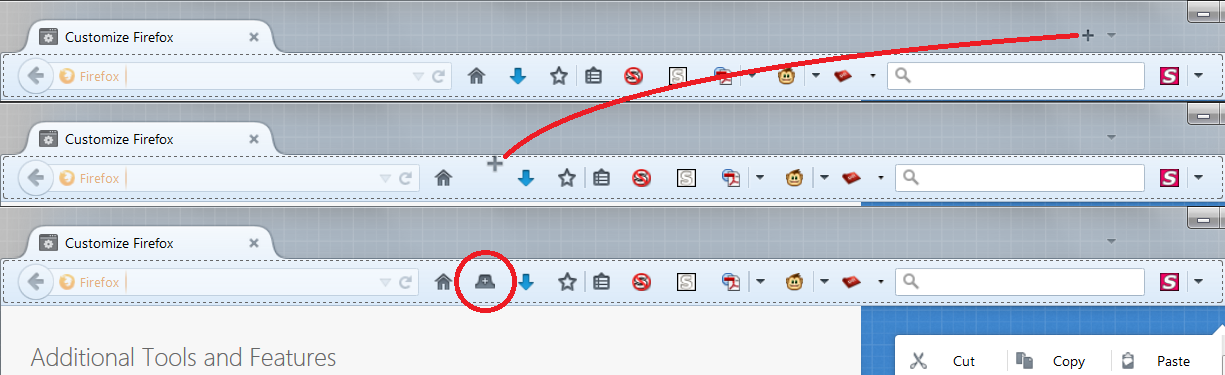
Before resetting that, do you want to use the Customize feature to see whether you can locate the button somewhere else and drag it back to its normal location?
Customize Firefox controls, buttons and toolbars
The new tab button looks a bit different on other bars, as illustrated in the attached screen shot.
If the button cannot be found, there is a "Restore Defaults" button at the bottom of the Customize tab. After using that, you can move your Add-on buttons back to their preferred locations.
Any luck?
Or if the new tab button is visible in Customize mode but NOT visible normally, one of your add-ons might be interfering. Could you test in Firefox's Safe Mode? That's a standard diagnostic tool to deactivate extensions and some advanced features of Firefox. More info: Use Troubleshoot Mode in Firefox.
If Firefox is not running: Hold down the Shift key when starting Firefox.
If Firefox is running: You can restart Firefox in Safe Mode using either:
- "3-bar" menu button > "?" button > Restart with Add-ons Disabled
- Help menu > Restart with Add-ons Disabled
and OK the restart.
Both scenarios: A small dialog should appear. Click "Start in Safe Mode" (not Refresh).
Any improvement?