

This thread was archived.
Please ask a new question if you need help.

Archived
setting home page(s)

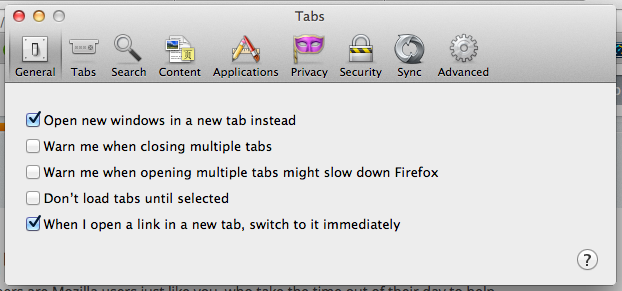
Within "preferences" (under the "firefox" dropdown) my "general" tab, does nothing. When I click "general" the options from whatever other menu remain onscreen while the "general" button appears to be pressed.
see image: "general" selected- "tabs" shown
What gives?
Within "preferences" (under the "firefox" dropdown) my "general" tab, does nothing. When I click "general" the options from whatever other menu remain onscreen while the "general" button appears to be pressed.
see image: "general" selected- "tabs" shown
What gives?
All Replies (2)

You zoom looks like it was turn to 150 %. Press <Control> Zero to reset.
Start Firefox in Safe Mode to check if one of the extensions (Firefox/Tools > Add-ons > Extensions) or if hardware acceleration is causing the problem.
- Switch to the DEFAULT theme: Firefox/Tools > Add-ons > Appearance
- Do NOT click the Reset button on the Safe Mode start window