

This thread was archived.
Please ask a new question if you need help.

Archived
How to change font for the whole browser?

Hello, I have download firefox today and I cant seem to see or figure out where anything is . Everything is in a cursive font and I can't understand anything. HERES AN EXAMPLE - http://i.imgur.com/j483utZ.png

I have also tried going to to options and then changing the default font but still nothing. I have also tried to uninstall and re-install firefox. What should I do?
Hello, I have download firefox today and I cant seem to see or figure out where anything is . Everything is in a cursive font and I can't understand anything. HERES AN EXAMPLE - http://i.imgur.com/j483utZ.png
I have also tried going to to options and then changing the default font but still nothing. I have also tried to uninstall and re-install firefox. What should I do?
All Replies (2)
Hello mishkache!
Got to option>content>Font&color>advance and change the setting to TIME NEW ROMAN
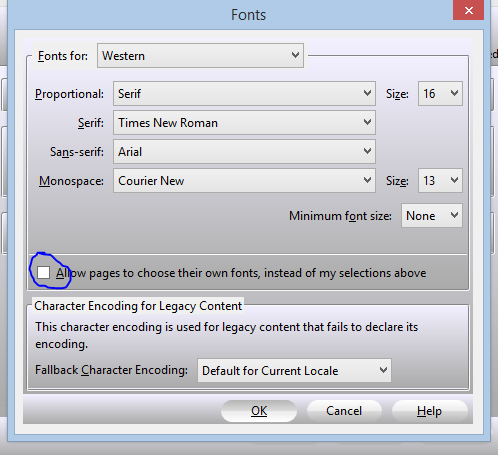
This can be a problem with the font that is used to display the text.
You can do a font test to see if you can identify corrupted font(s).
You can try different default fonts and temporarily disable website fonts to test the selected default font.
- Tools > Options > Content : Fonts & Colors > Advanced
- [ ] "Allow pages to choose their own fonts, instead of my selections above"