


I can't see anything

When I'm opening firefox , the content is black , without tab or page or something...
All Replies (5)
Start Firefox in Safe Mode to check if one of the extensions (Firefox/Tools > Add-ons > Extensions) or if hardware acceleration is causing the problem.
- Switch to the DEFAULT theme: Firefox/Tools > Add-ons > Appearance
- Do NOT click the Reset button on the Safe Mode start window
I can't acces anything , I can't see the menu button or something

hello tynerru, first please try updating your graphics driver, or in case this doesn't solve the issue or there is no new version available at the moment, start firefox into safemode by pressing the shift key while the application is launching & disable hardware acceleration in the firefox menu ≡ > options > advanced > general (that setting will take a restart of the browser to take effect).
Troubleshoot extensions, themes and hardware acceleration issues to solve common Firefox problems
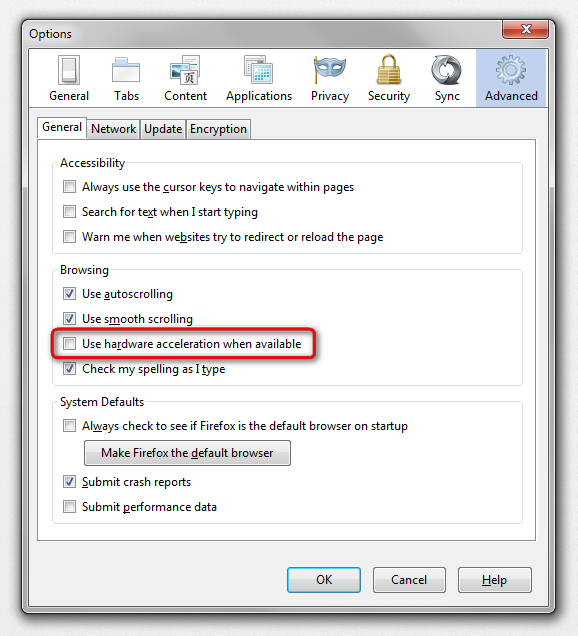
Try to disable Direct2D and leave hardware acceleration enabled
- gfx.direct2d.disabled = true
That way you still have the benefit from hardware acceleration, but may not suffer from rendering issues.
You can open the about:config page via the location/address bar. You can accept the warning and click "I'll be careful" to continue.
I solved the problem. Thank you guys !