


As of today I get "This connection is untrusted" message for EVERY website, including all the ones that I've bookmarked and been using for years.

It's not an exception problem, as I get it on all the websites I try to visit and all of these have worked for years.
All Replies (20)
Try checking the date and time of your computer.
Checking date and time was the first thing I did. doesn't solve the problem.
a possible solution depends on different factors:
- what is the error code shown under technical details on the error page?
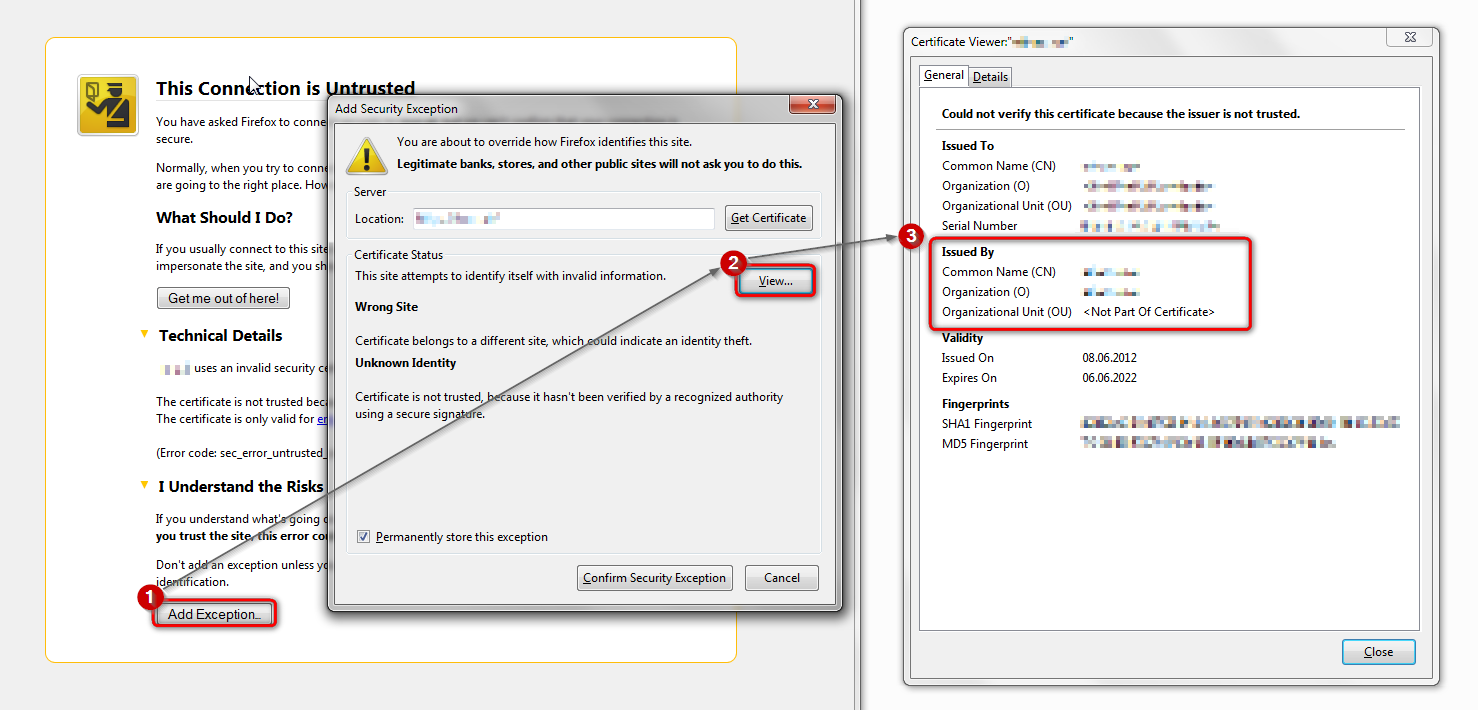
in case the error code equals sec_error_unknown_issuer, please attempt to add an exception on the bottom of the error page & inspect the certificate (see the screenshot attached for instructions):
- which issuer information does the certificate contain?
thank you!
"This Connection is Untrusted" error message appears - What to do
I am not given the option to add an exception at the bottom of my screen as it is in your screenshot.
This is all I get: This Connection is Untrusted
You have asked Firefox to connect securely to www.yahoo.com, but we can't confirm that your connection is secure.
Normally, when you try to connect securely, sites will present trusted identification to prove that you are going to the right place. However, this site's identity can't be verified. What Should I Do?
If you usually connect to this site without problems, this error could mean that someone is trying to impersonate the site, and you shouldn't continue.
www.yahoo.com uses an invalid security certificate. The certificate is not trusted because no issuer chain was provided. (Error code: sec_error_unknown_issuer)
is the button showing up under the "i know the risk" section on another site like https://www.youtube.com/ ?
Yes, on Youtube it does, but on certain other sites (Yahoo, Facebook) it doesn't.
Actually, when I make youtube an exception , the site loads all messed up. I can't actually do anything on the site.
ok, then please look for the issuer information you'll find there & report back.
edit: please don't create an exception for real but just inspect the certificate!
Modified by philipp
I've tried re-installing Firefox, but that doesn't solve the problem, either. It's starting to look like I need to use a different browser.
Who is the issuer of the certificate?
You can retrieve the certificate and check details like who issued certificates and expiration dates of certificates.
- Click the link at the bottom of the error page: "I Understand the Risks"
Let Firefox retrieve the certificate: "Add Exception" -> "Get Certificate".
- Click the "View..." button and inspect the certificate and check who is the issuer of the certificate.
You can see more Details like intermediate certificates that are used in the Details pane.
If "I Understand the Risks" is missing then this page may be opened in an (i)frame and in that case try the right-click context menu and use "This Frame: Open Frame in New Tab".
- Note that some firewalls monitor (secure) connections and that programs like Sendori or FiddlerRoot can intercept connections and send their own certificate instead of the website's certificate.
- Note that it is not recommended to add a permanent exception in cases like this, so only use it to inspect the certificate.
There is no "I understand the risks" link to click. All I get is what I posted in the above.
Hi JimiDurso, on a site where you already added an exception:
Click the padlock icon in the address bar > More Information > View Certificate
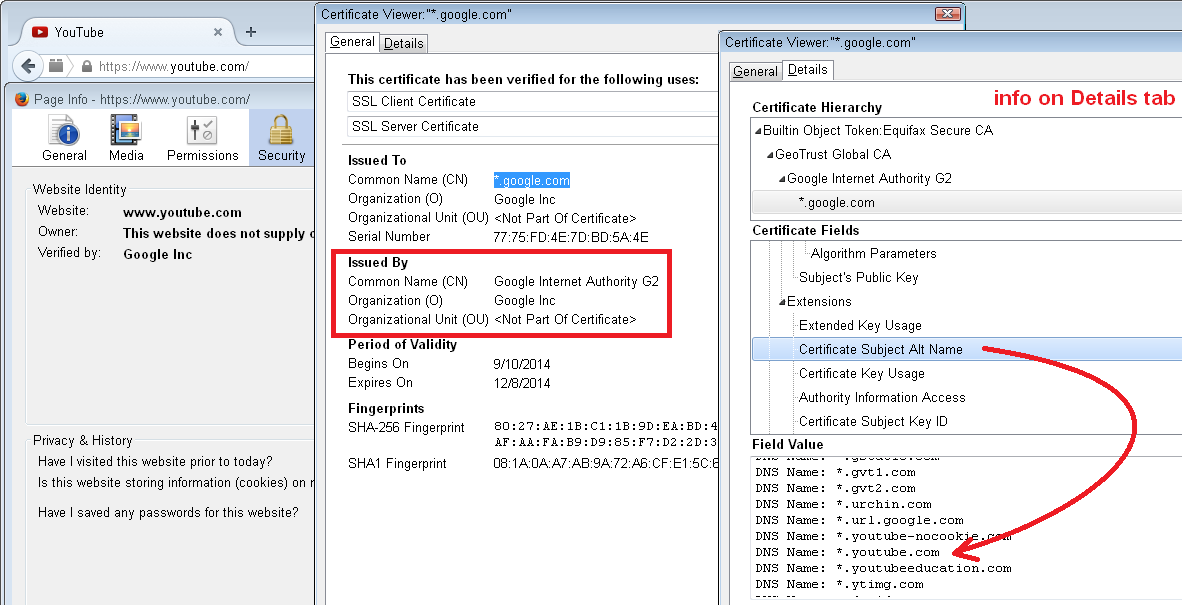
Hi JimiDurso, here's a screenshot showing what I see in the certificate viewer on YouTube.
(You'll note that the certificate is for *.google.com but has a Subject Alternative Name field that includes YouTube among many other domains.)
Hey jscher, Thanks, but now what do I do with this (and it doesn't solve my problems w/ Facebook, Yahoo, and possibly others)?
Hi JimiDurso, the research we need you to do is compare the certificate you are getting see what is shown under "Issued by". Often the issuer will help us figure out whether you need to do one of the following:
- Configure Firefox to work with your security software
- Remove malware from your computer that currently is intercepting your secure connections
Here's what it says under "issued by": DO_NOT_TRUST_FiddlerRoot Created by http://www.fiddler2.com Let me know what I can do to fix this. Thanks so much. Twang!
Go into the Windows Control Panel, Uninstall a Program, and after the list loads, click the "Installed on" column heading to group by date.
Find "Browser Safeguard" or a similarly named program and make a note of what else installed on that date in case it also is suspicious. Then remove "Browser Safeguard".
There is no program by that name or anything similar. The only things that have been installed recently are Firefox (when I tried reinstalling) Java and Adobe (updates) and Opera (the new browser I'm using to access websites).
I even typed "Browser Safeguard" into a program search. Nothing came up.