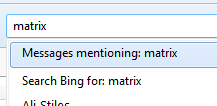
Suddenly a search for an archived email searches not only the selected folder, but also all other folders, and the internet - how do I get rid of this feature?

It used to be simple to find archived emails, by designating a search term (eg, "Susan"), selecting a search field (eg "From") and searching within a folder (eg "accounts").
Suddenly, presumably as a result of some upgrade, there is no way to limit the search field, so "Susan" appearing in any part of any message will yield a hit.
Also, the default search strategy includes all folders (even when I already know which folder to search) as well as the internet.
I cannot seem to find any option to remove this whole-world search feature, and I cannot find any place in Preferences to adjust this search strategy, nor any way to apply limits prior to running the search (meaning that I have to wait for the whole world search to complete before I can delimit the search to a particular folder, each time).
Can someone tell me how to remove this whole-world search feature, and restore the one that only searches the folder and field I designate?
All Replies (1)
Apparently you have more choice than you are aware of. Thunderbird has three ways to sear messages.
I am guessing from what you say that you want to find (Ctrl + Shift + F) instead of global search (Ctrl+K) or quick filter (Ctrl + Shift + K)
Note that global search offers options
 First your messages
Then the internet
Then people in your address book
First your messages
Then the internet
Then people in your address book
Yes I know your a mac user, but they tell me macs have a CTRL key these days an you do not need to use3 command