


lost email

If I begin typing while before I begin a new message, sometimes a message will disappear and I can never find it again. For example an "A" will move it to the archives. But whatever letter I press, the message disappears. It's not in archives and not in trash. How do I find it again?
All Replies (7)

Check account settings > copies & folders for where archived messages are set to go. Is that where your messages are going?
Right after this happens, can you give the "undo" command and put the message back where it was?
You are right if I push "A" it goes to Archives and is easy to retrieve.
But as I said, I don't know what letter I push, but the message disappears. It does not go to Archives and not to the Trash. Nor in any other folder..... I already checked.
Do you think it's possible to retrieve the message. It is important to me.
Sorry about misunderstanding. You did write that "A" moves messages to archives, but you also wrote that whatever letter you press makes the message disappear. So it wasn't clear to me.
All the keyboard shortcuts are listed here: https://support.mozilla.org/en-US/kb/keyboard-shortcuts-thunderbird?redirectslug=keyboard-shortcuts&redirectlocale=en-US#w_list-of-keyboard-shortcuts
The only other single-letter shortcut that I see that could be what you are pressing is "J". Have you checked your junk/spam folder?
It's not in my junk folder either. It is not in any folder in the left column of Mozilla. I've checked everywhere.
It is possible that the email is lost by pressing "shift" with a letter, as one would do when beginning a sentence. But the shift key seems to only be used in conjunction with the F keys at the top of the keyboard, such as "shift-F6." I've looked over the list of shortcuts and have not found any which could make the message completely disappear.
If you have any other suggestions, I would greatly appreciate your help in recovering that email, as well as others I have inadvertently lost over the years. Thanks for your help.
andy66 said
It's not in my junk folder either. It is not in any folder in the left column of Mozilla. I've checked everywhere. It is possible that the email is lost by pressing "shift" with a letter, as one would do when beginning a sentence. But the shift key seems to only be used in conjunction with the F keys at the top of the keyboard, such as "shift-F6." I've looked over the list of shortcuts and have not found any which could make the message completely disappear. If you have any other suggestions, I would greatly appreciate your help in recovering that email, as well as others I have inadvertently lost over the years. Thanks for your help.
If you suspect a combination with the <shift> key and you cannot find the messages anywhere, then the likely explanation is that you are accidentally pressing <shift>+<delete>, which "permanently" deletes messages.
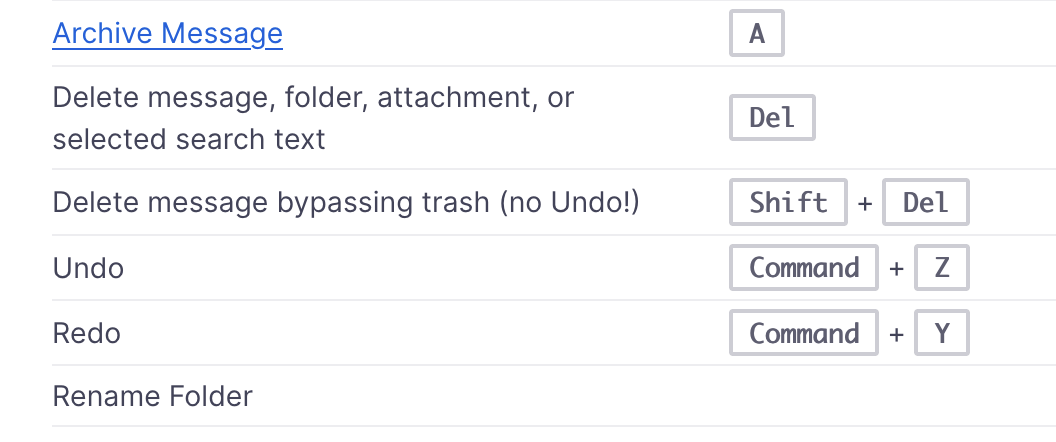
I also saw that in the list of shortcuts. But I would think it impossible, as the only thing I've ever done just prior to losing a message is begin typing, thinking that I was typing in another active window. Then I would discover that the active window was Mozilla, and one or more messages would be gone. My delete key is 4 inches to the right of the L, so that couldn't happen accidentally.
Is there an easy way to disable all keyboard shortcuts? I saw the add-on that can be used, but that seems complicated.
Anyhow, thanks Rick, for trying. I'll just have to be more careful in the future.
I do not know if or how keyboard shortcuts can be disabled. There would be trade-offs. I believe that some things can be done only through keyboard shortcuts.