


update my email account
I keep getting an alert saying I need to update my email account. How do I do that? (BOTH of my email accounts work fine on my home computer, but neither works on my classroom computer. I'm a teacher).
All Replies (6)

I keep getting an alert saying I need to update my email account.
Please post a screenshot. https://support.mozilla.org/kb/how-do-i-create-screenshot-my-problem
Here's the screen shot of the notice that keeps popping up (for months).
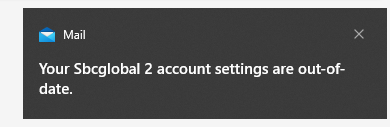

The screen shot you uploaded shows icon of Mail (of Microsoft), not Thunderbird.
Modified by Yu5tiqX9og
No response yet.
Dear YU5. True, but sbcglobal is the part after the "@" symbol in my Thunderbird email addresses. My full Thunderbird would be like this: my name@sbcglobal.net
1.
Bruce Ratcliffe said
Dear YU5. True, but sbcglobal is the part after the "@" symbol in my Thunderbird email addresses. My full Thunderbird would be like this: my name@sbcglobal.net
I am sorry that I do not understand what you mean. Thunderbird is just an email client, not an email service provider. Although Thunderbird can access emails from the address "my name@sbcglobal.net", Thunderbird does not own "sbcglobal.net".
2. What I mean in my previous reply is: that alert is generated by Mail (of Microsoft), not generated by Thunderbird. You should update you email account in Mail (of Microsoft), not in Thunderbird. And here is forum for Thunderbird, not forum for Mail (of Microsoft).