


Incoming emails say that my email package can't display html formatted messages. How do I configure Thunderbird to do that?

Incoming emails from a specific source say that my email package can't display html formatted messages. How do I configure Thunderbird to do that? Regards Andrew
All Replies (4)
Assuming the email contains both HTML and Plain Text content. You can check that by selecting email and using one of the following methods:
- Via Message Header area - More > View source
- Via 'Menu Bar' toolbar : View > Message Source
- Via Keyboard: 'Ctrl' + 'U'
If sender created email using HTML but only used Sending Format - Plain text, then email would only contain the Plain Text and thus remove all formatting. In Thunderbird that setting is here:
- Settings > Composition
- scroll down to 'Sending Format'
- There are various options but 'Both HTML and Plain Text' or 'Automatic' are ideal options.
Thunderbird can display any email in 'Original HTML', 'Simple HTML' or Plain Text. Settings for this are on 'Menu Bar' toolbar
- 'View' > 'Message Body as' > 'Original HTML', 'Simple HTML' or Plain Text.
re:Incoming emails from a specific source say that my email package can't display html formatted messages.
Please post an image showing that message.
Maybe you are referring to 'Remote content' ? Do you see a yellow banner below the Message Header but above the email in Message Pane ? That has nothing to do with HTML. By default Thunderbird blocks 'Remote content' for your privacy and security. Here is info on 'Remote content'
@Toad-Hall
Thanks for your quick response.
Here's a screenshot. The third email down is the source that displays the message.
I'll upload this now then check further info you requested if still needed.
Regards Andrew
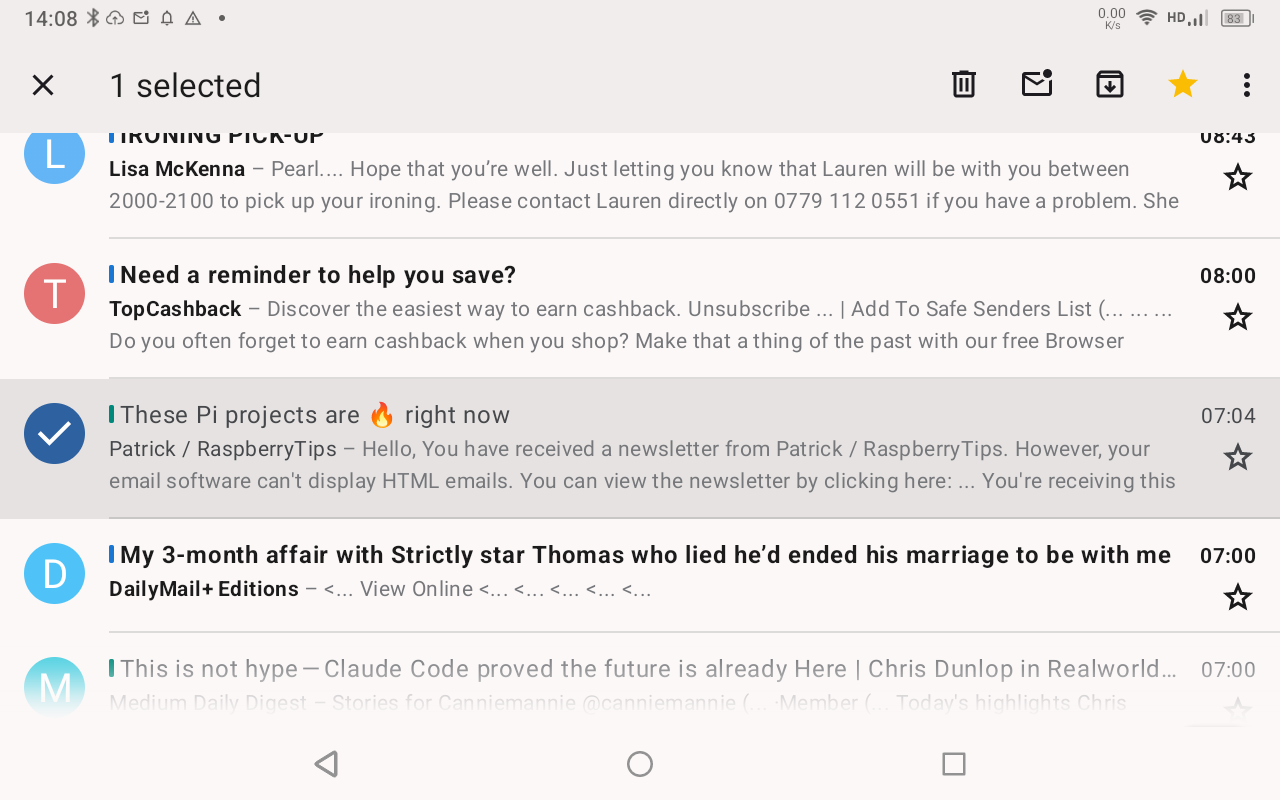
Is this Thunderbird on android?
Yes, it is. Android 13 on my Blackview Tab 80 tablet.