


Insecure connection issue on some sites

I have performed a clean install of Windows 10 a few days ago and ever since then I have had an Insecure connection issue and the error code sec_error_unknown_issuer and at first it only happened on Google but now it's starting to happen on a few other sites. I have looked at a couple of pages on this error such as reinstalling certificates for Kaspersky and looking and Microsoft Family settings on Windows 10 and deleting the cert8.db from my profile folder and still no luck. I have even tried refreshing Firefox and creating a new profile and still doesn't work. And I looked at bypassing the warning where I can click on advanced and add an exception but there is no add exception button. It doesn't do this on Microsoft Edge or Google Chrome so I don't understand what's causing the problem. I would appreciate help with this.
Chosen Solution
Alright so I just talked to someone on the Kaspersky Live chat and found the fix for it. You need to go Tools>Options>Advanced>View Certificates and then click the authorities tab and click Import... then go to C:\ProgramData\Kaspersky Lab\AVP16.0.0\Data\Cert and open the (fake)Kaspersky Anti-Virus Personal Root Certificate.cer file and put a check mark in This certificate can identify websites and then install the certificate and restart Firefox.
Thanks for helping me figure out what was causing this to happen.
All Replies (10)
Do you use Kaspersky? If so, check out the Kaspersky section of this article and see whether that workaround makes a difference: Troubleshoot security error codes on secure websites.
If not, it must be something else...
You could inspect a sample certificate to see whether that points to the culprit. If you want to try that now, here's how I suggest starting:
Load my test page at: https://jeffersonscher.com/res/jstest.php
You likely will get an error page. Expand the "Advanced" button and look for an Add Exception button.
Note: You don't need to complete the process of adding an exception -- I suggest not adding one until we know this isn't a malware issue -- but you can use the dialog to view the information that makes Firefox suspicious.
Click Add Exception, and the certificate exception dialog should open.
Click the View button. If View is not enabled, try the Get Certificate button first.
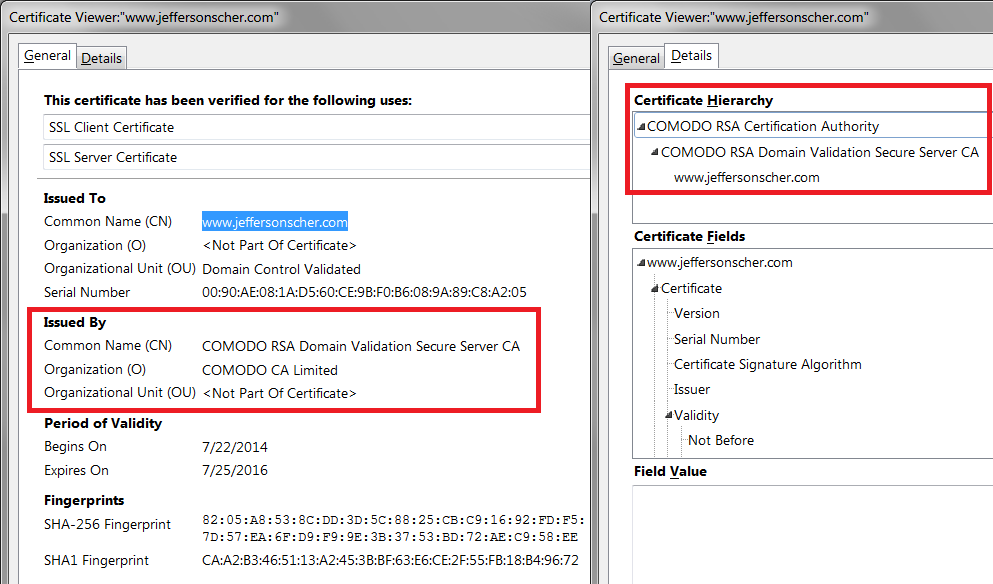
This should pop up the Certificate Viewer. Look at the "Issued by" section, and on the Details tab, the Certificate Hierarchy. What do you see there? I have attached a screen shot for comparison.
So it turns out it did have something to do with Kaspersky because it was issued by Kaspersky Anti-Virus Personal Root Certificate and I had a feeling that it had something to do with Kaspersky because as soon as I posted this question I got a message from Kaspersky saying "Cannot Guarantee authenticity of the domain to which encrypted connection is established . And it said for the application Mozilla Firefox or firefox.exe, or something about Firefox but I can't remember exactly what it was and it the reason was Self-signed certificate. But I did go on the support page link that you posted before I posted this question and reinstalled the certificates and turned off scan encrypted connections and restarted my computer and it still gave me the error. I have even disabled Kaspersky and still didn't work. So I do know it has something to do with Kaspersky but thanks for helping me figure that out.
Usually if you adjust the settings for the filtering feature to scan HTTP but not HTTPS requests then the problem goes away. But a more permanent solution is to import the Kaspersky certificate.
What I don't understand is why most users seem to get set up automatically when they install or update Kaspersky, and a small minority struggle with this problem. Assuming you installed Kaspersky before Firefox, could your re-run the Kaspersky installer to see whether it detects Firefox and fixes this issue?
If you can't inspect the certificate via Advanced (I Understand the Risks) then try this:
Open the "Add Security Exception" window by pasting this chrome URL in the Firefox location/address bar and check the certificate:
- chrome://pippki/content/exceptionDialog.xul
In the location field of this window type or paste the URL of the website with the https:// protocol prefix (https://xxx.xxx).
- retrieve the certificate via the "Get certificate" button
- click the "View..." button to inspect the certificate in the Certificate Viewer
You can inspect details like the issuer and the certificate chain in the Details tab of the Certificate Viewer. Check who is the issuer of the certificate. If necessary then please attach a screenshot that shows the Certificate Viewer.
Alright so a weird glitch just happened. For some reason it started up protecting my computer and picked up with my current license key and I tried again to see if the problem was gone after reinstalling Kaspersky and it is not but then it started saying the it can't guarantee authenticity of OneDrive and eventually it said the same thing for Windows. I don't know what Windows has to do with anything but a few minutes later I got a message from Windows saying Kaspersky was turned off and I opened Kaspersky and it said my license expired when I still have 19 days left before I need to renew and then it crashed and I opened it again and it picked up with my license and I tried one more but it did not work. And when I open the Add Security Exception window and type in any site that is impacted on this the issuer is Kaspersky. And on period of validity would have an expiration date and for Google that would be May 10th 2016, and Yahoo would be October 30th 2017 which I have never seen Firefox say that the period of validity would last for an entire year like that so I don't know if there is a glitch going on with something making it say that. But when I click Add Exception it will add it but still give me the error.
You won't be able to add an exception for google.com because the site uses HSTS (forced HTTPS) and Firefox doesn't allow an exception for HSTS sites. (I don't remember about Yahoo!)
If you check the Certificate Manager, how many Kaspersky certificates do you find?
"3-bar" menu button (or Tools menu) > Options > Advanced > Certificates mini-tab > "View Certificates" button
Then check the Authorities tab. You would only want one Kaspersky certificate here, the most recent one.
I tested out a few sites an now I can't get on YouTube, I can't go on Microsoft's website, I couldn't even go on Kaspersk's forum site but I did have an add exception button and it added it and worked just fine. I just posted about this issue on their forum now and I have a link to it here:
I don't have any certificates listed.
ZeldaYoshi said
I just posted about this issue on their forum now and I have a link to it here: http://forum.kaspersky.com/index.php?showtopic=345246
Thanks. It will be nice to get updated instructions on how to import their certificate with the 2016 version.
Chosen Solution
Alright so I just talked to someone on the Kaspersky Live chat and found the fix for it. You need to go Tools>Options>Advanced>View Certificates and then click the authorities tab and click Import... then go to C:\ProgramData\Kaspersky Lab\AVP16.0.0\Data\Cert and open the (fake)Kaspersky Anti-Virus Personal Root Certificate.cer file and put a check mark in This certificate can identify websites and then install the certificate and restart Firefox.
Thanks for helping me figure out what was causing this to happen.