


fire fox opens as a black screen

After an auto update Firefox now opens as a black screen.
All Replies (3)
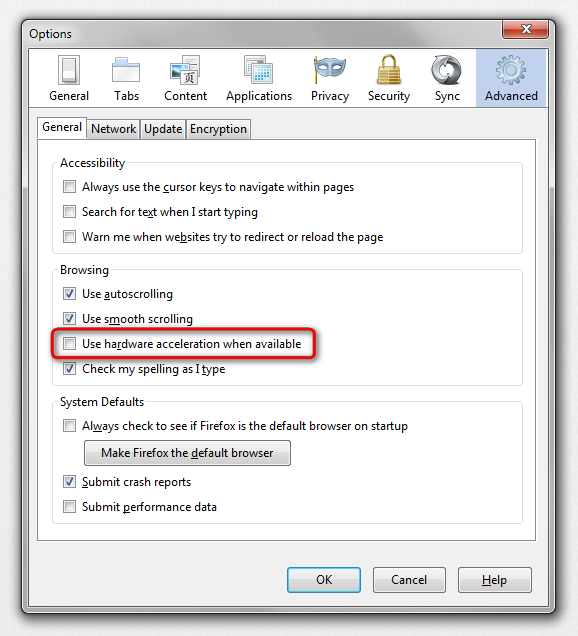
Sorry, please disable hardware acceleration as a temporary workaround. This is an incompatibility between Firefox 33 and some older graphics card/chipset drivers. Step-by-step directions in this thread: https://support.mozilla.org/questions/1025438
hello bkktyntro, other users with this problem all had an embedded intel hd3000 graphics card with an old driver present. in case this also applies to you, here would be a link to update the driver, which in turn should also address the black firefox problem: https://downloadcenter.intel.com/Detail_Desc.aspx?DwnldID=23764 (for win7 64 bit)
in case this doesn't solve the issue or does not apply to your system, start firefox into safemode by pressing the shift key while the application is launching & disable hardware acceleration in the firefox menu ≡ > options > advanced > general (that setting will take a restart of the browser to take effect).
Troubleshoot extensions, themes and hardware acceleration issues to solve common Firefox problems

Mozilla has released a Firefox 33.0.1 update that fixes the black screen problem, so you should update Firefox to the latest version.
If you can't use the Firefox menus, you can download and install the latest version of Firefox using Internet Explorer or another browser. Just go to https://www.mozilla.org/firefox/all/ and choose the installer for your language.
See Firefox shows a black screen or blank screen after updating to 33 for more information.