


i would like to open thunderbird from within ie 11, but it is not on the dropdown list

thunderbird 24.4.0 ie 11.0.7 win 8.1 Shifted to thunderbird as work around for my pop sever. Like it a lot.
Often wish to send copy/paste in emails. Must now go to desktop and run thunderbird . OK but awkward. Thanks, jim
All Replies (7)
If you are looking at a webpage in IE and want to eg: send the page link in an email. File > Send > Page by email.
Make sure Thunderbird is set up as the default email client on your computer. Control Panel > Default Programs
Thank you. But while all seems to go as you suggest, the File>Send> "Page by email and Link by email" can be seen -dimmer- and fail to function.
I have done the Control Panel> Programs>Default several times as well. Do you know how to check to see what the default for email actually is?
My guess it is not going in or changing for some reason- I am using the first i.e. "set you defaults" , am clicking on the box to set it and then ok to exit. Thanks again, jim
In Thunderbird go to the Menu Bar and select Tools-Options-Advanced-General
Check the box for Always check to see if Thunderbird is the default mail client on startup
No Menu Bar? Press the alt key.
Two methods of accessing:
In IE: Go to TOOLS > INTERNET OPTIONS > PROGRAMS Tab> INTERNET PROGRAMS >SET PROGRAMS >SET PROGRAM ACCESS AND COMPUTER DEFAULTS select 'CUSTOM' click on downward pointing arrow on right side
CHOOSE A DEFAULT EMAIL PROGRAM and select Thunderbird. Make sure "Enable access to this program" is checked.
click on OK
You can also locate this via:
Control Panel > Default programs > Set program access and computer defaults
select 'CUSTOM' click on downward pointing arrow on right side
CHOOSE A DEFAULT EMAIL PROGRAM and select Thunderbird. Make sure "Enable access to this program" is checked.
click on OK
Thank you airmail. But that box was and is checked. jim
Thank you both. Tried all ways Still will only show non-functioning lighter tabs
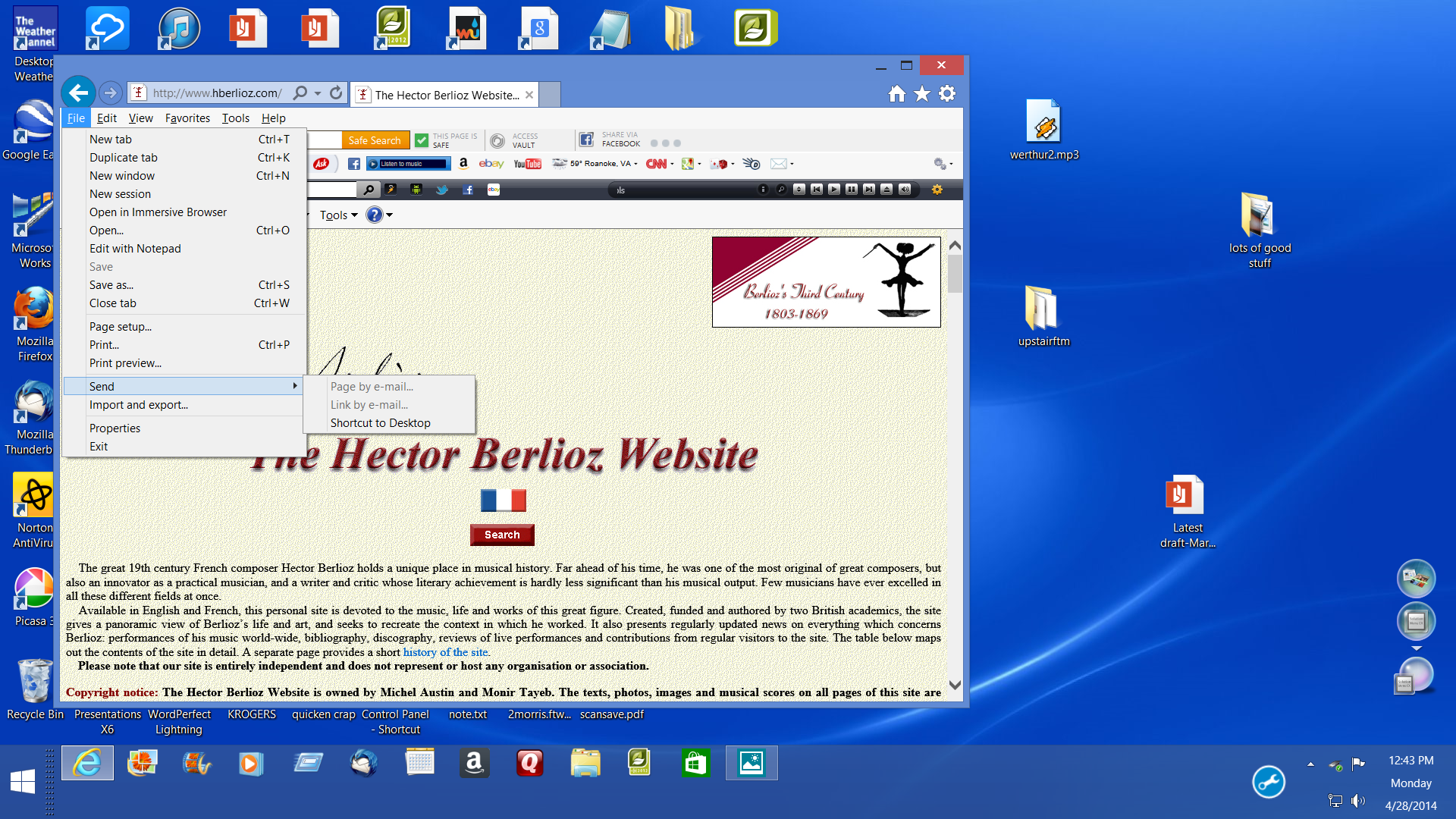
Resolved: Here is what I found: Both the default program must be first changed Plus the lower "Set Programs.." entry. Moz. Thunderbird will now be an available button. turn it on. The shaded file>send selections are now active. A strange confusion does exist:
If you revisit the above "set programs", you will see "use your default" button on and ALSO a Thunderbird button (empty).
Do not change again as it seems Thunderbird is now the default. (Your new email with page or link may be in hiding behind the web page you are dealing with on your screen.) Thanks for everyone's interest and aid. jim