


SSL is not working with IMAP server for thunderbird version 24.3 , however working with thunderbird beta release 28.1

Hi Team,
I am trying to integrate IMAP over SSL on port 993 with thunderbird 24.3 , but getting error "configuration error : invalid username and password" , but IMAP over SSL works on beta release 28.0b1 . Is there any known defect of SSL on thunderbird 24.3 .Please provide your feedback asap.
Thanks, Shalu
All Replies (15)

It works just fine in TB 24. Note, the latest version is 24.4.0.
Compare your settings in both, 24.3.0 and 28.0. What exactly means 'integrate IMAP over SSL'? Are you trying to set-up the account?
Thanks Christ for reply. yes,I am trying to create a new account on Thunderbird 24.3 with IMAP on with following setting Incoming mail server - port -993 , SSL -"SSL\TLS" , Password- Normal password Outgoing mail server - port -25 ,SSL-"None" , Password- Normal password
@ Same settings got worked with Thunderbird beta release.
Can you post the Troubleshooting Information for both, your TB 24.3.0 and TB 28.0?
AppMenu button - Help - Troubleshooting Information
Just post the 'Mail and News Accounts' section, and indicate which information belongs to which version of TB.
Application Basics
Name Thunderbird Version 28.0 User Agent Mozilla/5.0 (Windows NT 6.1; WOW64; rv:28.0) Gecko/20100101 Thunderbird/28.0 Profile Folder C:\Users\shkhande\AppData\Roaming\Thunderbird\Profiles\rpb6hw1v.default (Local drive) Application Build ID 20140305121112 Enabled Plugins about:plugins Build Configuration about:buildconfig Memory Use about:memory Mail and News Accounts
ID Name Incoming server Outgoing servers Name Connection security Authentication method Name Connection security Authentication method Default? account2 Local Folders (none) Local Folders plain passwordCleartext account17 user1@ucbu-aricent-vm408.cisco.com (imap) ucbu-aricent-vm408.cisco.com:993 SSL passwordCleartext ucbu-aricent-vm408.cisco.com:25 plain passwordCleartext true
Application Basics
Name Thunderbird Version 24.3.0 User Agent Mozilla/5.0 (Windows NT 6.1; WOW64; rv:24.0) Gecko/20100101 Thunderbird/24.3.0 Profile Folder Show Folder (Local drive) Application Build ID 20140131124303 Enabled Plugins about:plugins Build Configuration about:buildconfig Crash Reports about:crashes Memory Use about:memory Mail and News Accounts
ID Incoming server Outgoing servers Name Connection security Authentication method Name Connection security Authentication method Default? account2 (none) Local Folders plain passwordCleartext account18 (imap) ucbu-aricent-vm408.cisco.com:993 SSL passwordCleartext ucbu-aricent-vm408.cisco.com:25 plain passwordCleartext true
With TB 28.0, there is account17, and with TB 24.3.0, there is account18.
Are you using the same profile for both versions of Thunderbird? If so, then you've set-up the same account twice, which seems to cause some problems.
In general, using the same profile with different versions of Thunderbird is asking for trouble.
Yea, i am using the same account for both version. First i tried with 28 and then uninstall this version. Then install the 24.3 version for the same account.
I was talking about the same profile. Your profile for TB 28.0 is located at C:\Users\shkhande\AppData\Roaming\Thunderbird\Profiles\rpb6hw1v.default according to the Troubleshooting Information.
Can you check the profile location for TB 24.3.0?
AppMenu button - Help - Troubleshooting Information - Profile Folder - Show Folder
Hi ,
I tried to integrate another account with 24.3 , initally it gives me teh error attached in 1.png. Then after pressing "advanced setting" button and then ok button. The profile is poiniting to "C:\Users\shkhande\AppData\Roaming\Thunderbird\Profiles\rpb6hw1v.default" location.
Application Basics Name Thunderbird Version 24.3.0 User Agent Mozilla/5.0 (Windows NT 6.1; WOW64; rv:24.0) Gecko/20100101 Thunderbird/24.3.0 Profile Folder (Local drive) Application Build ID 20140131124303 Enabled Plugins about:plugins Build Configuration about:buildconfig Crash Reports about:crashes Memory Use about:memory Mail and News Accounts ID Incoming server Outgoing servers Name Connection security Authentication method Name Connection security Authentication method Default? account2 (none) Local Folders None Normal password account19 (imap) ucbu-aricent-vm408.cisco.com:993 SSL/TLS Normal password ucbu-aricent-vm408.cisco.com:25 None Normal password true
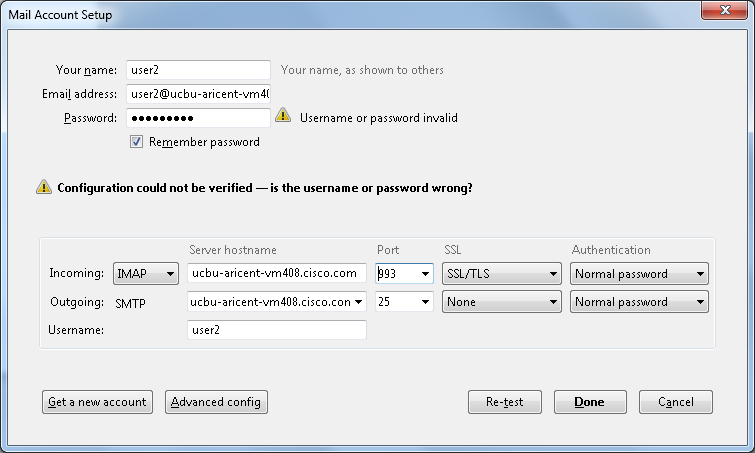
I think your profile is screwed. Create a new profile using profile manager, and start the new profile via profile manager.
Then set-up your account once again.
https://support.mozilla.org/en-US/kb/using-multiple-profiles
Since the IMAP account uses SSL/TLS, I'd expect SSL/TLS works for SMTP too.
Hi Christ ,
I have created a new profile with new user but got the same SSL issue with TLB 24.3. I have found one difference in TLB 24.3 and TLB 28.1 ,i.e TLB 24.3 supports TLS1. 0 whereas TLB29.1 supports TLS 1.2 . Trace the wireshark capture for both the TLB . After "Encryption Altert" , TLB 24.3 won't work but 28.1 was able to send and receive packets.
Good point. You can try to set the pref security.tls.version.max to a value of 3 in Thunderbird 24.3.0. This will set TLS 1.2 as the minimum required / maximum supported encryption protocol.
http://kb.mozillazine.org/Security.tls.version.*#Possible_values_and_their_effects
HI,
I have changed configuration in thunderbird 24.3 & 24.4 to security.tls.version.max =3 and it got worked with our Imap server. Difference which i analysed is that in TLs 1.0 version , thundervird 24.4 sends "CAPABILITY " ommand without Tag , so wanted to know if there is any known defect of TLS 1.0 for "CAPABILITY " command.Please let me know.
I believe full TLS 1.2 support comes only with TB 27. But TB 27 is a beta release. So full TLS 1.2 support for Thunderbird will only be available with the next official release, which will be TB 31.
Setting the pref in TB 24 is a workaround, and there may still be issues with it. If you want to know more search Bugzilla for related bugs.
Hi,
Just wanted to know why with TLS 1.0 , TLB don't send "CAPABILITY" command with Tag.Though TLS 1.1 and TLS 1.2 send "CAPABILTIY" command with Tag.
I have no idea. You may ask in a developer forum.