


After moving a large number of emails into a new folder, many of the emails that are unrelated in both time and topic grouped themselves into threads

I recently moved a large number of emails (filtered by sender) into a new folder that I created in Thunderbird. The emails have arranged themselves in threads that are unrelated by any discernible factor. Some emails that are 7 years in dfference are threaded together. Also, the date/received sorting function is not properly sorting, ie the newest emails are not at either end of the sorting, nor within the threads. Again, no discernible pattern. I checked on gmail, where the emails are hosted, and none of these issues is apparent. This is a significant issues for finding emails, especially since when I enter a search term in the filter and there are no results, but then results generate when i use the search function.
Chosen Solution
ok right click the folder, select properties and then repair. Just in case that helps.
All Replies (8)
Sorting: Clicking on any of the heading in a mail list sorts by that heading clicking again reverses the sort.
Threading: A complex subject, but based on References and Message Id fields in the email header. Often turned to rubbish bu people clicking on an old mail and replying and then "cleaning it out" like a new one. Except it is not.
Detailed Threading sorting control View menu (ALT+V) > sort by and you have access to ascending, descending, threaded unthreaded and all relevant headings.
I understand sorting, and I have been clicking on the heading, and it is still sorting incorrectly. Here is an image so that you can see how the sortind isnt working correctly. Now I realize that these are emails within threads, but still, the sorting is not working and I cannot find a pattern, inside or outside of threads http://i1065.photobucket.com/albums/u.../ScreenShot2014-04-05at75649PM_zpsc5d11cab.png

My threading issue is also not a result of replies and cleaning out. Everything was in order until I moved the emails out of the bulk folder and into a designated folder.
When I click View > Sort by > Grouped by Sort then all of the emails are in the correct order but not in threads. Not a deal-breaker, and I am glad that the setting only affects the one folder, but I am not keen on the fact that of all of the proper solutions, this one happens to work. Seems to me that something is fundamentally wrong or bugged.
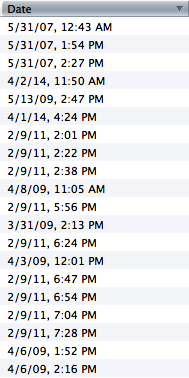
That image shows me nothing useful at all, just a jumbled listing of dates.
If you click on View > Sort by > Date Then View > Sort by > Threaded.
Is that what your seeking.
I really have no idea what you expect to see or what your seeing. What I can say is using group by sorting is only really useful in date sorts and may well be causing your apparent issue.
Hey Matt
What I am showing in that image is that the Date column has been set in descending order but, as you noted, the dates are all jumbled, they are not in order.
All of my folders and inboxes are formatted in the way that you instructed (View > Sort by > Date Then View > Sort by > Threaded). However, this folder is not adhering to these "instructions" properly. The emails are in threads, yes, but the emails that are within the threads were never originally threaded together, they only became threaded together after the whole group of emails were put into the folder. Emails are threaded together that are 5+ years old and are definitely not accidental replies to old threads.
What I would like to see is the emails in this folder to be sorted by date in descending order and in their respective threads, as all of my other folders are arranged.
Also, when I move the threads into the root inbox folder, they divide properly into their respective threads. When I drop them back into the subfolder, they thread together again. When I double click to open the uppermost email in the hierarchy, it only displays that original thread's emails, not the email that are improperly part of the thread.
Chosen Solution
ok right click the folder, select properties and then repair. Just in case that helps.
wow, it worked! i scoured different preferences and properties menus and never came across the repair function.
thanks matt
So a bad index was the culprit... not seen that symptom of a index issue before. But it's working yay.