


Firefox has crashed 62 times from the same website, so why is nothing being done to fix this at all?

I have tried a new profile, I have tried uninstalling and reinstalling. I am running 27.0.1, so do not tell me I need to upgrade.
What I want to know is why not one person cares enough to actually fix this compatibility issue? Is it just a bug that I have to live with?
All Replies (5)
We're sorry to hear that Firefox is crashing. In order to assist you better, please follow the steps below to provide us crash IDs to help us learn more about your crash.
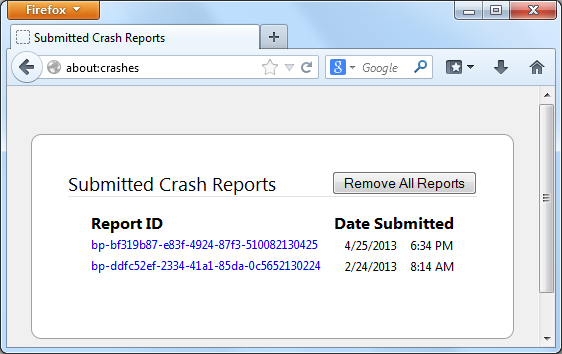
- Enter about:crashes in the Firefox address bar and press Enter. A Submitted Crash Reports list will appear, similar to the one shown below.
- Copy the 5 most recent Report IDs that start with bp- and paste them into your response here.
Thank you for your help!
More information and further troubleshooting steps can be found in the Troubleshoot Firefox crashes (closing or quitting unexpectedly) article.
Note that your about:downloads shows that you have an outdated Shockwave Flash 10.1 r53 plugin.
You can find the latest Flash player versions for Firefox on this page:
This is still on Twitter? The 5 reports you previously posted from crashes on Feb. 13th seemed to be related to rendering images. However, in the bugs linked to those crash reports I didn't see an explanation as to which images cause the problem or what workarounds there might be. Hopefully the new crash report links will shed more light.
Every time I try to submit a crash report, 'there was a problem'. So I have no crash reports.
Okay, hmm. Maybe someone can extract some additional information out of the old reports.
Meanwhile, I'll just mention how you could block images from sites in case you want to try that.
Right-click the image and choose View Image Info. This will open the Page Info dialog to the Media panel.
Then look for the checkbox (about halfway down the panel) to block images from that server. Then close the dialog using the X in the upper right corner.
To undo this, open the Page Info dialog using one of these:
- right-click somewhere on the page > View Page Info
- Tools menu > View Page Info
- click the padlock icon in the address bar > More Information
Click the Media icon at the top, then click in the list of URLs and arrow down until the checkbox shows a check. If that's the site you want to unblock, uncheck it. Otherwise, keep scrolling down the list until you find it.