


Attempting to open Facebook on Firefox freezes my entire computer and I cannot do anything at that point...help!

I was using Firefox yesterday with no problem on Facebook. Today, I try to load facebook and everytime I try, my computer completely freezes. All other links and pages are fine, but this one. What can I do to fix this problem? I unistalled and reinstalled Firefox, I have restored the factory settings on it, not sure what else to do.
bp-011ec542-2827-454e-923e-7b5662130928
bp-b9a1e4bc-35ba-400a-902f-01c282130928
hopefully that helps too.
Modified by cor-el
All Replies (3)

Hello,
Try Firefox Safe Mode to see if the problem goes away. Safe Mode is a troubleshooting mode, which disables most add-ons.
(If you're not using it, switch to the Default theme.)
- On Windows you can open Firefox 4.0+ in Safe Mode by holding the Shift key when you open the Firefox desktop or Start menu shortcut.
- On Mac you can open Firefox 4.0+ in Safe Mode by holding the option key while starting Firefox.
- On Linux you can open Firefox 4.0+ in Safe Mode by quitting Firefox and then going to your Terminal and running: firefox -safe-mode (you may need to specify the Firefox installation path e.g. /usr/lib/firefox)
- Or open the Help menu and click on the Restart with Add-ons Disabled... menu item while Firefox is running.
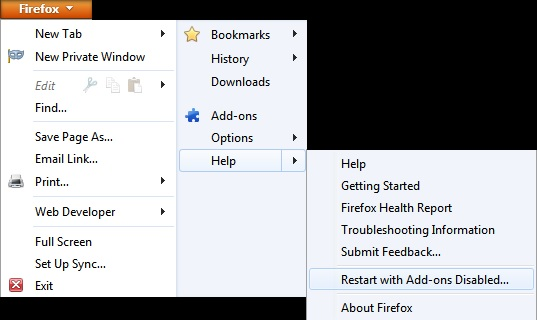
Once you get the pop-up, just select "'Start in Safe Mode"
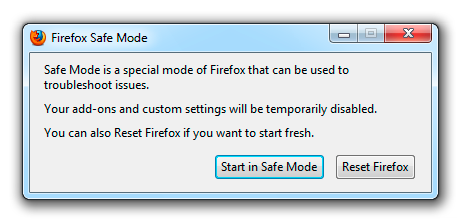
If the issue is not present in Firefox Safe Mode, your problem is probably caused by an extension, and you need to figure out which one. Please follow the Troubleshoot extensions, themes and hardware acceleration issues to solve common Firefox problems article for that.
To exit the Firefox Safe Mode, just close Firefox and wait a few seconds before opening Firefox for normal use again.
When you figure out what's causing your issues, please let us know. It might help other users who have the same problem.
Thank you.
Thanks for the advice. I opened firefox in safe mode and tried opening facebook, but the problem was still there. My whole computer froze trying to open up that website. So the problem is still there.
That looks like a problem with the Flash plugin.
You can check for problems with current Flash plugin versions and try these:
- disable a possible RealPlayer Browser Record Plugin extension for Firefox and update the RealPlayer if installed
- disable protected mode in the Flash plugin (Flash 11.3+ on Windows Vista and later)
- disable hardware acceleration in the Flash plugin