


Why do I have over 74,000 files in over 4000 folders taking up over 1GB in my Cache Folder (I also have a much smaller Cache2 folder)?

As far as I know, I have done nothing to create all these files. They slow down disc scans and as far as I know I only need one. Can I simply delete all but one, or is there some reason for them being there?
What about the Cache(2) folder?
Chosen solution
They should be deleted. If Firefox crashes the cache files for that session may not be deleted. The folders may not get deleted at all. Certainly clear out your cache files. If you clear them while Firefox is running, then you will be able to clear all but the ones that Firefox is actually using for the session.
After you have cleared out your cache of old files and folders, it would help if you cleared your Internet Explorer cached files also.
To help reduce the problem, clear your cache files when Firefox ends.
Read this answer in context 👍 0
All Replies (7)
Chosen Solution
They should be deleted. If Firefox crashes the cache files for that session may not be deleted. The folders may not get deleted at all. Certainly clear out your cache files. If you clear them while Firefox is running, then you will be able to clear all but the ones that Firefox is actually using for the session.
After you have cleared out your cache of old files and folders, it would help if you cleared your Internet Explorer cached files also.
To help reduce the problem, clear your cache files when Firefox ends.
thanks
I cleared everything out as you suggested while I was in Firefox . I deleted the empty folders. Iset options to clear the cache when I closed Firefox. When I restarted Firefox I had the sixteen folders 0 through F back with subfolders in them as shown in the attached screenshots. Not nearly as out of control as before, but ....
What did I miss?
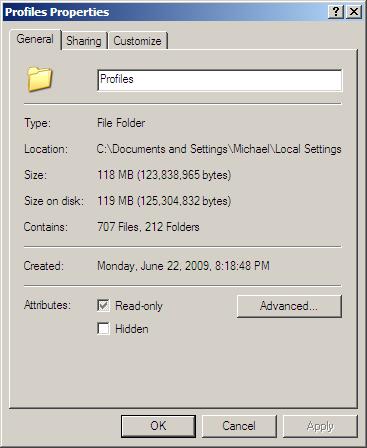
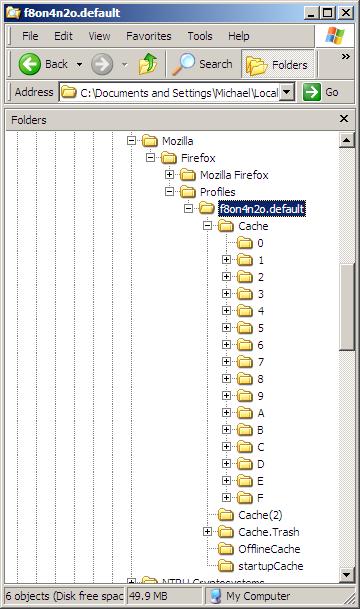
Sorry I knew I was going to phrase that wrong. It would be perhaps better to clear cache with Firefox down. If Firefox is up the files in use in cache would be protected. Those folders are going to be used right away anyway it won't really matter.
But I forgot two things, you can clear your Firefox cache at any time from Firefox with
- Tools > Advanced > Network > "Clear Now" but as you've noticed it does not remove the folders.
The other thing was to set up IE so that it too clears Internet Files when it finishes. From Help (F1) --> search: clear cache
To delete temporary Internet files in IE
- It's a good idea to delete temporary Internet files periodically to free drive space.
- Click the Tools button (Gear) in Internet Explorer , and then click Internet options.
- Click the General tab, and then, under Browsing history, click Delete.
- In the Delete Browsing History dialog box, select Temporary Internet files, click Delete, and then click OK.
Modified by David McRitchie
Thanks. But I don't use IE. Is it still necessary to deal with it? Also, I have Firefox set to clear my cache & temporary internet files when it closes, but I've never found that it does.
When you say clear the cache when Firefox is down do mean just go in and delete everything manually? Do I need to keep anything? You suggested as much when you said, "If you clear them while Firefox is running, then you will be able to clear all but the ones that Firefox is actually using for the session". Will I then have to go in and create a profile from scratch?
You reduced your empty folders to about 10, you're set you've solved your problem, they will accumulate in the future. Not worth bothering about them, you'll see them in one day anyway.
Firefox has in the past opened the internet folder that IE adds to, it should not have been doing that and it is unlikely that Firefox is doing that now. It is difficult to get completely away from IE, but if you never use it then it shouldn't affect Firefox.
Even though I do have Firefox clear out the temporary cache files, I also clear out the cache files with a .bat file before I run my backups. I'm certainly not going to recommend that where people without experience would likely cause major damage to their files. A lot better for me if I do it myself then have something like ccleaner wipe them out for me along with some files I keep on purpose.
Excuse me for continuing, but when I wrote you yesterday, I had 707 files in 212 folders totaling 118 MB. I currently have 1065 files in 541 folders totaling 138 MB.
What is going on? Are these all profiles? Why don't I have just one? If they are not profiles, what are they? Is there any way to stop this proliferation?
I also don't understand your reference to 10 empty folders. And why doesn't Firefox clear out my TIFs?
Thanks.