


Why won't Firefox load some pages correctly?

On my everydayhealth.com site where I keep my fitness journal, suddenly the graphics are gone and all I have is a page with text and numbers on it. After it switches to this text page, at the very top it will say "Location TemplateTop not found in page 40811."
On another site I shop all the time, sephora.com, when I would click on a makeup area I want to go it would give me an oops page and tell me I have ventured into some unknown beauty territory.
I thought NoScript was causing this so I disabled it. Since doing that my Sephora site seems to be working. And initially my diet journal seemed to come back too. But then the journal page again flipped to this text and numbers page with that message at the top. Sephora seems to still be working.
All Replies (5)
This is the worst forum I have ever used and I used A LOT of them. For one thing you wait and wait for an answer. For another thing, if I hadn't bookmarked this page last night when I posted I have no idea how I'd of found it again. This morning I was trying to read some of my newsletters which require clicking a link to open the remainder of the information. In every single instance I received nothing but an information page telling me the site could not be accessed. I could access other sites, but nothing to do with any of these newsletters. They were various newsletters through the everydayhealth.com site. I had to uninstall NoScript and now everything seems to work but I don't have the protection. I might as well go back to IE8 if this is going to be the case. Can someone please at least answer me?

NoScript can break a lot of sites that expect you to have JavaScript enabled (which isn't an unfair assumption--there's pretty much no browser in existence besides maybe some older mobile phone browsers that don't ship with it enabled).
If you're going to opt out of enabling JavaScript, it's really up to you to be able to identify when you need to add an exception, and this isn't Mozilla's fault in any way. Likewise, if I site doesn't properly handle JavaScript being turned off, this has nothing to do with Mozilla--it's their code causing the problem. There is no way that Firefox would be able to solve this.
It's also worth pointing out that JavaScript really isn't a security threat, if that's the reason you have it disabled. As far as I'm aware, most people that install it use it because of privacy concerns (trying to prevent advertisers from tracking their actions), not because they're concerned about security. If there were an unfixed vulnerability in Firefox, there's a fairly good chance that a hacker would be able to exploit it whether or not you used NoScript.
If you need to find a question you've asked on the support forum, you can click "My Contributions" in the filter list after logging in.
I'll take the last first. I logged in and I see no "My Contributions" on the page, and no filter list. Could you please direct me more specifically?
I do NOT have java disabled. It's enabled and always has been. I am using the same sites and doing the same things I've always done -- and I've had NoScript from the beginning. It never caused any problems before. This just started happening. I know there was an update just recently, a few days ago. Could there have been something about the update that caused this?
I notice when I click on Tools, it shows a little icon and an item called Java Console in the drop-down box. When I click on it nothing happens. What is this for?
More specifically, after logging in, go to the support forum at (https://support.mozilla.com/en-US/questions), then you should see the "My Contributions" link.
Despite their similar names, Java and JavaScript are two completely separate things. Java is used for Java applets, and JavaScript is used for interactivity in pages. NoScript prevents JavaScript (and Java) code from executing in pages unless its explicitly allowed.
JavaScript in particular is a technology that many web developers rely on, and expect browsers to have enabled. While developers should properly handle the use case where someone has JavaScript disabled, many don't, either because they don't want to spend a bunch of time coding for what probably amounts to 0.1% of their users (most of whom will allow JavaScript on pages they trust), they simply forgot to handle it, or their site would be impossible without it.
I'm not familiar enough with NoScript to walk you through it, but what you need to do is add exceptions for the sites that aren't working properly. Try their FAQ or forum.
Again, this problem almost definitely has nothing to do with Firefox itself--you should get in touch with the owners of the sites in question, or with the NoScript folks.
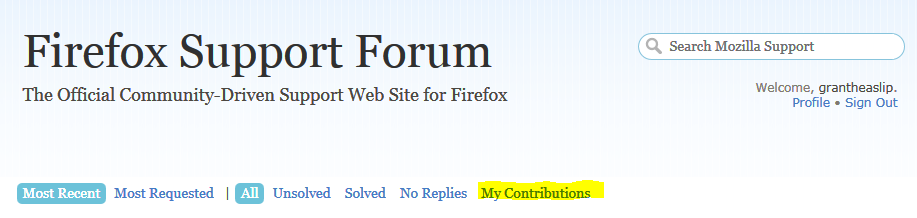
I found My Contributions. That page you gave me the link for does not come up when I sign in, but I have bookmarked it now. Thank you for your help.
I have been to the NoScript forum. They are not very forthcoming. It seems to be agreed that Firefox is safer with it, but since you apparently don't use it I'm thinking it might be an unnecessary hassle. Seems kind of nice to use my browser without constantly having to click to allow.