Solved
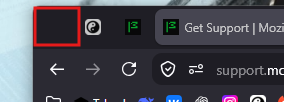
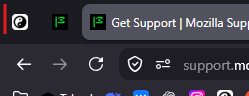
When Firefox is not maximized, an unwanted empty space appears to the left of the tabs.
When Firefox is running in a non-maximized window, an unwanted empty space appears on the left side of the tab bar, before the first tab.
This space is not present when the Firefox window is maximized. It appears automatically whenever the window is restored to a smaller/non-maximized size.
The issue affects the tab bar layout and leaves a noticeable unused area on the left side of the tabs. I would like to know whether this is expected behavior or a UI bug.
Firefox version: 155.0 64-bit Operating system: WINDOWS 11 25H2 64-bit
When Firefox is running in a non-maximized window, an unwanted empty space appears on the left side of the tab bar, before the first tab.
This space is not present when the Firefox window is maximized. It appears automatically whenever the window is restored to a smaller/non-maximized size.
The issue affects the tab bar layout and leaves a noticeable unused area on the left side of the tabs. I would like to know whether this is expected behavior or a UI bug.
Firefox version: 155.0 64-bit
Operating system: WINDOWS 11 25H2 64-bit