


Firefox (146>Beta) keeps Crashing on Windows-XI, especially from third-party servers and while scrolling.

Why is Firefox always crashing on Windows-XI, especially from third-party servers and whenever scrolling? This has been happening for the last nine months (ver.146>Beta), at least. Does my SSD need replaced and/or my Win-XI reinstalled? Either way, this is happening on every Firefox browser that I have, including Windows-XPIII> and Android-16>. This is where my team always swore that Java6>, .Net3>, Python3>, and even Swift3> love to crash all user-interfaces/shells, and make users lose all random access memory. Is there any suggestion to fix this bug of Firefox, or must I replace the SSD?
All Replies (4)
While we can't support 146.0beta you seem to be running current 155.0beta so if that one has any crash reports that's definitely worth looking into for any potential patterns:
- Enter about:crashes in the Firefox address bar and press Enter. A list of Submitted (and Unsubmitted, if any) Crash Reports will appear, similar to the one shown below.
- Copy the 5 most recent Submitted Report IDs that start with bp- and then go back to your forum question and paste those IDs into the "Post a Reply" box.
Note: If a recent Report ID does not start with bp- click on it to submit the report.
(Please don't take a screenshot of your crashes, just copy and paste the IDs. The below image is just an example of what your Firefox screen should look like.)

More information and further troubleshooting steps can be found in the Troubleshoot Firefox crashes (closing or quitting unexpectedly) article.
Remind me to search the BP's. I need to get off.
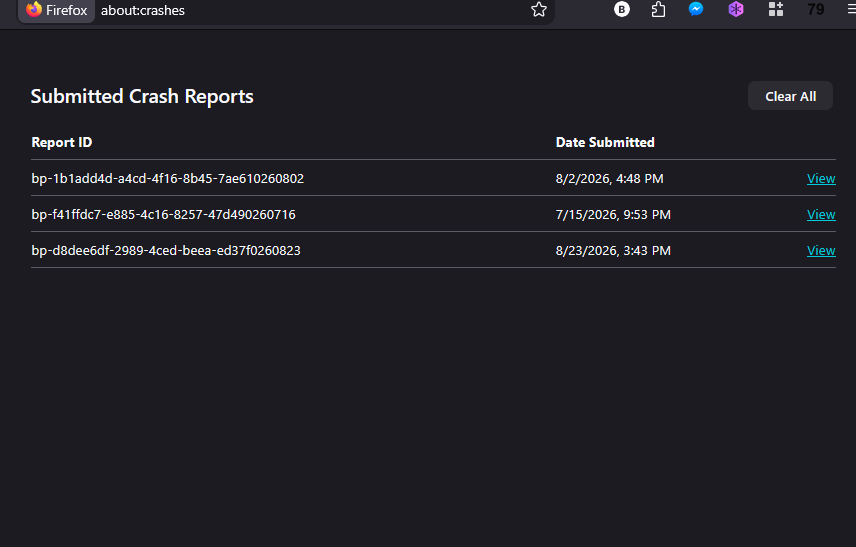
bp-1b1add4d-a4cd-4f16-8b45-7ae610260802 bp-f41ffdc7-e885-4c16-8257-47d490260716 bp-d8dee6df-2989-4ced-beea-ed37f0260823
There's no recent crash on v155 logged above. There was one slow shutdown terminated on v154, and two out–of–memory crashes on v153 couple months ago: according to 97% used RAM it looked simply as exhausted system resources.