


How do I install Thunderbird

I have an old iMac running macOS High Sierra. After a power surge last night, I have been unable to access any mail accounts. Apparently this is because my iMac cannot use two-factor authorization. The recommended fix is to use Mozilla Thunderbird. I downloaded this, but when I double-click the .dmg file, I get a corrupt image message. I am wondering if this is because I have a 32-bit machine.
All Replies (3)
I do not know Mac, but I do know that older computers need older releases. Check this site to see if what you need is there: https://thunderbird.macupdate.com/app/mac/11942/thunderbird/old-versions
I know Mozilla dropped support of 32-bit macOS long ago with Firefox 53.0 and on however after some initial searching it seems like the Thunderbird community did not easily list when they dropped 32-bit macOS.
https://support.mozilla.org/en-US/kb/installing-thunderbird-on-mac
macOS High Sierra is the old EOL macOS 10.13. Firefox and Thunderbird versions from 116.0 and on requires macOS 10.15 (ten.fifteen) or later to run.
So the most version Thunderbird you may be able to run is Tb 115.18.0 https://archive.mozilla.org/pub/thunderbird/releases/115.18.0/mac/
https://www.thunderbird.net/en-US/thunderbird/115.18.0esr/system-requirements/ Mac computer with an Intel x86 or Apple Silicon processor
Mozilla is still supporting macOS 10.12, 10.13, 10.14 with updates to the old Firefox 115 ESR https://support.mozilla.org/en-US/kb/firefox-users-macos-1012-1013-1014-moving-to-extended-support
Modified by James
I have an old iMac running macOS High Sierra. After a power surge last night, I have been unable to access any mail accounts.
Did you already use Thunderbird before the power surge or did you use Apple Mail as an email client?
Apparently this is because my iMac cannot use two-factor authorization.
This is certainly not the reason.
The recommended fix is to use Mozilla Thunderbird.
Who does recommend this fix?
I downloaded this, but when I double-click the .dmg file, I get a corrupt image message. I am wondering if this is because I have a 32-bit machine.
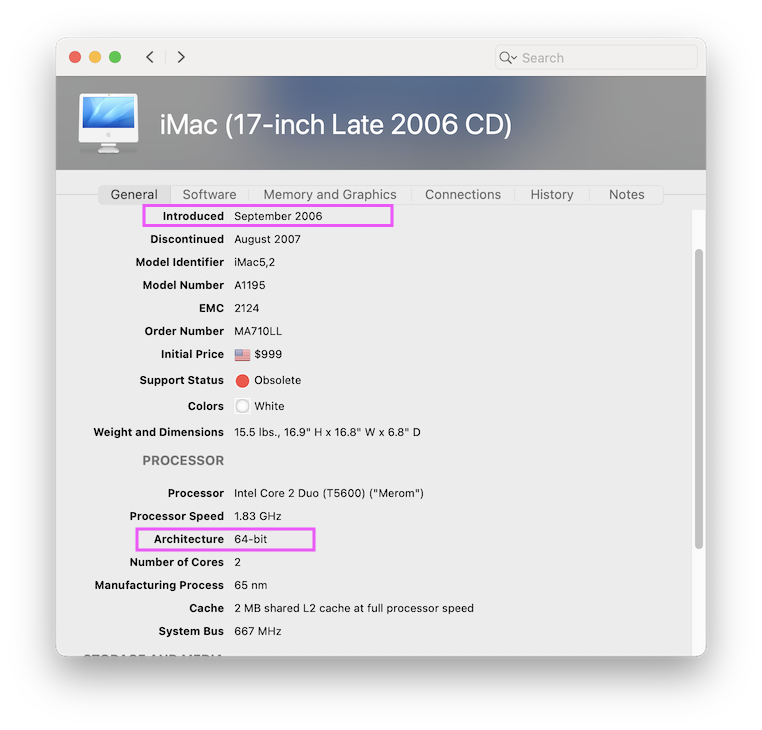
For which Thunderbird version did you download a installer disk image ? If you downloaded the actual Thunderbird 152.0.dmg installer and double-clicked the .dmg file to install Thunderbird your system certainly told you that this version is not compatible with your actual macOS version. You don't have a 32 bit Mac since Apple switched from the 32 bit to the 64 bit architecture already 20 years ago (see screen shot from "Mactracker.app" https://mactracker.ca/)
Modified by Mapenzi