


How do I disable the forced and ABRUPT obligatory Firefox updates?
I don't know who was the absolute [edited] to have the idea of forcing updates while the user is still working on the browser by shutting the browser down. Can someone else help me understand how to stop this nonsense??
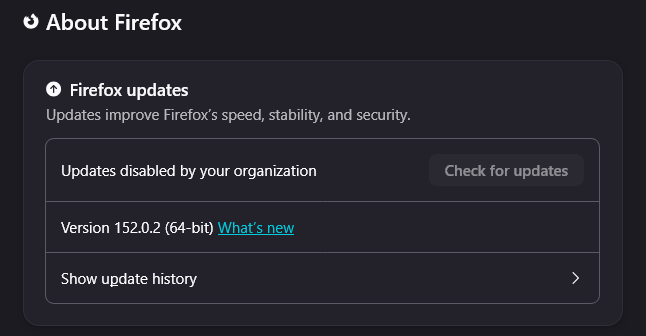
And yes, I had the option "Check for updates but let you choose to install them" selected, and I'm still being molested by this forced restart """feature"""!
Every time I'm in the middle of an important work session, Firefox will suddenly refuse to open new tabs and prevent the ones that are already open from connecting and receiving updates. It erase private tabs and messes up everything!
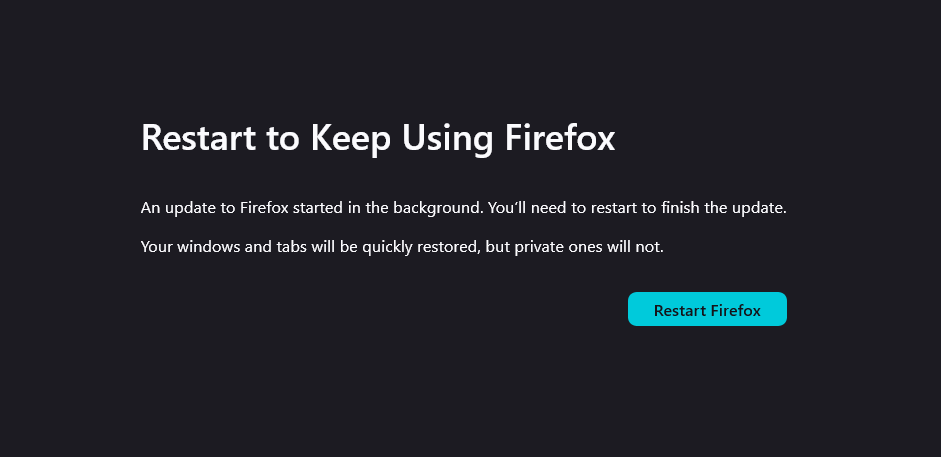
I was in a call with my boss, and it got dropped because Firefox decided to update?? And DEMANDED that I close the browser IMMEDIATELY to continue using it????? What the hell???????????
I've only been running into this problem in the past few months, and I'm honestly shocked by how little uproar I'm seeing online about this bug. This is by far the worst think I've ever seen in a browser.
Anyway, I appreciate any help. I saw a trick to permanently disable updates, but I don't want to disable them. I just want them to be installed either when I CHOOSE or when the bloody browser is NOT in use!
Modified by Denys
All Replies (9)
Hello
A similar discussion https://connect.mozilla.org/t5/discussions/firefox-background-updates/td-p/127410
Just to understand the description, does it mean that a "Restart to keep using Firefox" about:restartrequired tab/process dead end is shown on its own, i.e. you running instance is being updated externally?
I assume this is not an enterprise install where the updates would be distributed by your company, as you'd be in touch with your IT instead in such case.
Quick check: You might be running multiple profiles at once in different windows. Make sure ALL of the profiles have the same setting to not update, so that any one of them is not starting the update process on its own (which then renders the other profile unusable until restarted). Even then just launching a separate profile after it pulled the update before while running earlier might trigger the "oh cool now I'm restarting" update trigger which is basically "Firefox updates when launching new profile, even when other profile is open" bugzilla.mozilla.org/1758669 that eventually got included under "Second instance of Firefox will apply update downloaded by still running first" bugzilla.mozilla.org/1480452 in general.
If none of the above sounds like your situation, e.g. you're positively definitely not running separate profiles/instances, there's something off that needs looking into.
Hello
https://support.mozilla.org/en-US/questions/1589820
A space for users to give product feedback https://support.mozilla.org/en-US/kb/what-mozilla-connect
jbr said
I assume this is not an enterprise install where the updates would be distributed by your company, as you'd be in touch with your IT instead in such case.
Thank you for you thoughtful response, jbr!
It's not a enterprise install, I'm on my personal computer. I only run 1 (one) profile.
I'm also on a Windows 11, if that's relevant info.
But you gave me a great insight. I have Avast installed and as part of their protection, they do interfere with my browser activity. So they could be the ones forcing the update.
I'm going to reach out to Avast, but since their customer support is disgustingly inefficient, I doubt I'll get any help. Since Mozilla couldn't help me either, I just disabled all updates for now. I can't afford to have this happen again.
So, I managed to remove every trace of Avast from my browser and permanently disabled updates with the HKEY_LOCAL_MACHINE\Software\Policies\Mozilla\Firefox trick. BUT I'M STILL BEING VIOLATED WITH THE OBLIGATORY UPDATES!!!!!
Please, please... can anyone help me?? WTF is going on??? I don't want to use freaking Chrome!
Hello
https://support.mozilla.org/en-US/questions/1590154#answer-1828917 Maybe, you can try, it doesn't cost anything to try Use the Troubleshooting Information page to help fix Firefox issues https://support.mozilla.org/en-US/kb/use-troubleshooting-information-page-fix-firefox For illustration https://support.mozilla.org/en-US/questions/1587266#answer-1826940
The enterprise policy is to not let users upgrade on their own, but roll out updates centrally in a managed way. Which kinda sounded like your case — hence why I was asking, because this sounds wild for an end–user install. "Something" is running the updates for you, while you're running the app.
Normally this "something" is e.g. a start of another Firefox process (so you'll hear about these issues from folks running multiple profiles at once… or running headless Firefox jobs for automation and scripting purposes alongside their own copy) — but if you only use ONE profile, neither of the known issues apply and this is a bizarre issue.
Linux folks might get that from unattended updates from their system packager, would it be possible that you somehow got the updater run on Windows Scheduled Tasks? https://connect.mozilla.org/t5/ideas/get-rid-of-the-quot-restart-required-quot-in-firefox/idc-p/95019/highlight/true#M50277
Install Firefox on Linux https://support.mozilla.org/en-US/kb/install-firefox-linux As for me, System Firefox installation (for advanced users) that's my installation. A illustration https://support.mozilla.org/en-US/questions/1589435#answer-1828765
Anyone else struggling with forced updates? https://www.reddit.com/r/firefox/comments/1ujbeu6/anyone_else_struggling_with_forced_updates
Also in case I forgot to link this thread: https://support.mozilla.org/en-US/questions/1587819#answer-1825871 — there are steps to check for potential scheduler entry that might be firing up these processes.