


Emojis not working in WhatsApp Web in Firefox since a recent Firefox update

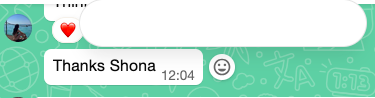
I use WhatsApp web with Firefox 151.0.3 on a Macbook Air. In WhatsApp web, you should be able to emoji over a message sent by someone else. One clicks on the smile icon at the side of the message, the emoji pallet appear above and select one of a handful of emojis. Since a recent update, the pallet no longer opens. It's just white space, the cursor does not change allowing you to pick one of the emojis. See screenshot. Is there a fix for this please?
All Replies (9)
Hi Shona,
I cannot reproduce this on Firefox 151.0.4. We just released 151.0.4 recently. Would you please update and see if it might help?
Unfortunately not. I'm now on v152.0 and it's the same
Thanks Shona, this is now tracked as bugzilla.mozilla.org/2045263 which is supposedly the same issue — Meta was notified.
Thanks - any idea if we're likely to get a resolution? I was prompted for another Firefox update today but post that, it's still happening
Oh it's not believed at this moment to be influenced by the browser really, there's something in the website code missing and it might be served either based on the user timeline or their session history etc. — you might have some success if you try signing in using a Private Window, to perhaps try with a clean slate for the site, but generally this might be something they'd need to fix (they have been contacted with the technical details already) 🤞

I was directed to this post as a possible similar issue to what I posted last night. Difference is I am running Firefox 154.00 and an Apple laptop. I also just a blank black area where I can select an emoji on Facebook I just can' see them.
I personally believe it is Firefox issue. I opened Facebook using two other different browsers and had no issues seeing the emojis.

Try clearing WhatsApp Web's cache/cookies for web.whatsapp.com in Firefox and reloading — this is usually a rendering glitch after a Firefox or WhatsApp update. If that doesn't help, try disabling hardware acceleration in Firefox Settings > General > Performance, since blank/white popup panels are often a GPU rendering issue.
The investigation into the site rendering is captured in the linked bug earlier.
It would help to understand if the same happens in Private Window (where the site doesn't have earlier data stored), and/or also when restarting into Troubleshoot Mode from Help menu (where any addon interaction is eliminated from the equation). Thanks!
jbr said
The investigation into the site rendering is captured in the linked bug earlier. It would help to understand if the same happens in Private Window (where the site doesn't have earlier data stored), and/or also when restarting into Troubleshoot Mode from Help menu (where any addon interaction is eliminated from the equation). Thanks!
Private window does not change anything in relation to this issue.