


In viewing a message folder the Subject column alignment differs although it appears out of user control
The spacing of the Subject column label is inconsistent and apparently not under the control of a user. In the graphic with yellow notations, the leading space for Subject is much larger than any of the other column labels shown.
Also, in the graphic with red notations, the leading space for Subject is even larger; I "applied columns to ... Folder ..." yet both folders are not the same as the leading blank space for the Subject column header is different from the "copy from" folder.
I cannot find anywhere that this is controllable by the user. Please advise on both issues: too much space on the Subject column before the word Subject and the inconsistency of the Apply Columns To feature.
Thank you.


All Replies (5)

Hover with the mouse over the vertical divider line of the Subject column. This will turn the mouse pointer into a double-headed arrow. You can now drag the line to adjust the width of the column to your liking.
DSGraham a écrit
The spacing of the Subject column label is inconsistent and apparently not under the control of a user. In the graphic with yellow notations, the leading space for Subject is much larger than any of the other column labels shown.
The spacing between the vertical line (separating folder pane and thread pane) and the Subject column label depends on whether you sort your messages by threaded or unthreaded: go to View > Sort by > Threaded/Unthreaded When you sort them by "Threaded" the spacing is greater because of the additional expand/collaps icons being displayed before the subjects (see image)
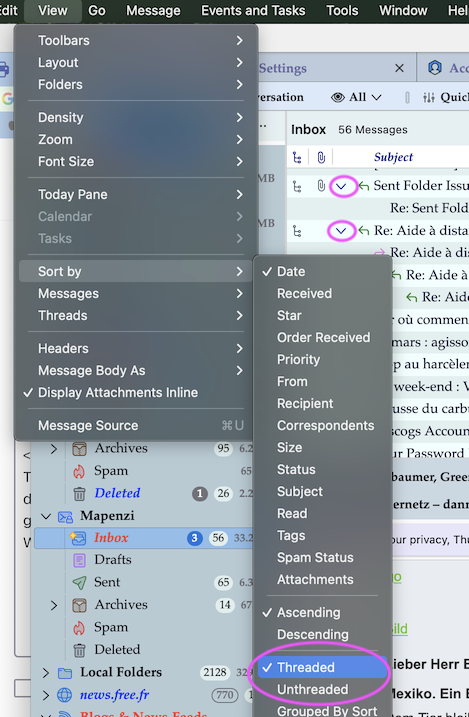
Mapenzi knows! Thanks, the Threaded / Unthreaded solved one of the "too much space" issues. What remains is extremely trivial as it pretty much is esthetics only even when View / Sort is set to Unthreaded: there is still more space between the left column divider vertical "|" and the word Subject than any of the other column headers such as From. There may be a reason and certainly this is not a functional shortcoming of any kind. Just curious as to what appears to be an inconsistency!

DSGraham said
Mapenzi knows! Thanks, the Threaded / Unthreaded solved one of the "too much space" issues.
If you don't use the "Starred" column, disable it and you'll have even less empty space before Subject.
Modified by Mapenzi

DSGraham said
there is still more space between the left column divider vertical "|" and the word Subject than any of the other column headers such as From.
That space in the column is used for indicators that a message has been forwarded or replied to.