


Help configuring alternate/secondary identities

I have connected a Google Workspace (Gmail) account to Thunderbird, let's call it scott.harper@myorg.org. I am able to send, receive, and reply from this account as expected.
In my Google Workspace configuration, I have an alias address forwarded to my account, let's call it info@myorg.org. I receive messages addressed to "info" just fine. But when I send or reply to messages addressed to "info", I'm running into a problem.
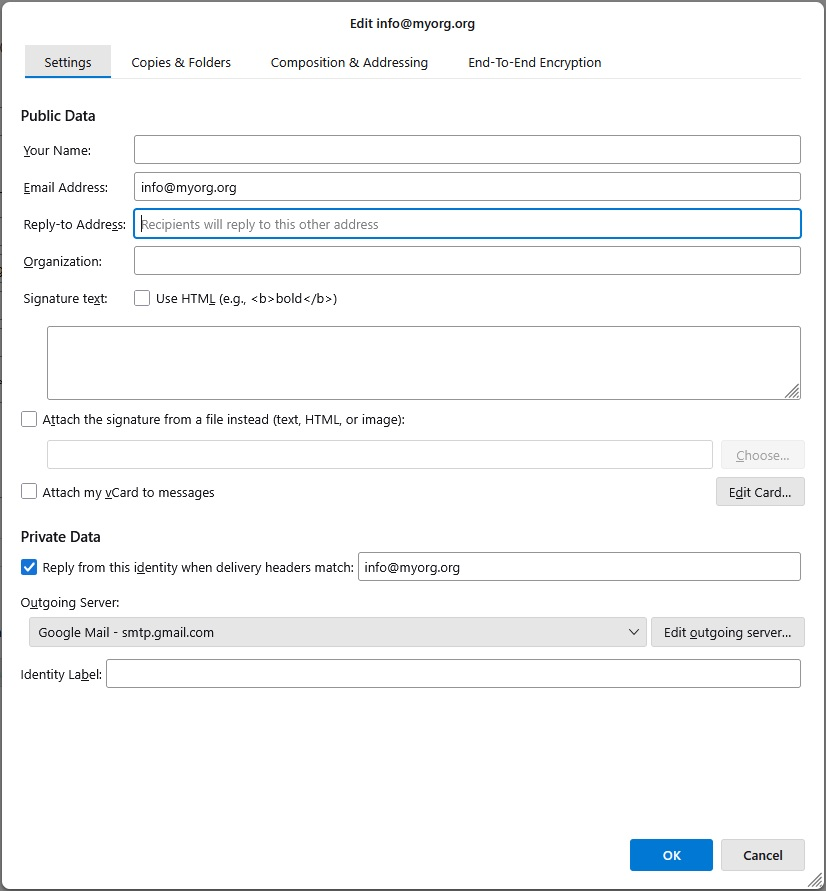
In the Account Setting I opened Manage Identities, and added info@myorg.org as an alternate identity. I then edited the Private Data for that identity so that the "Reply from this identity when delivery headers match" option is checked, and set to match info@myorg.org. See attached image.
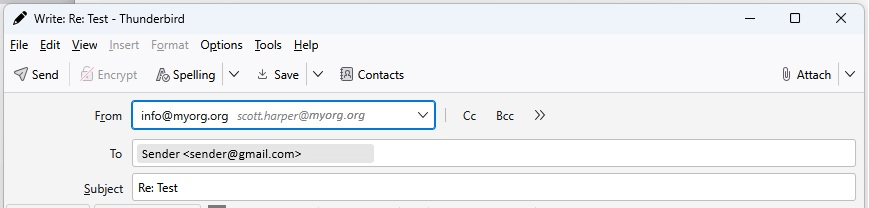
When I reply to an incoming message, the From field appears to be (sort of) correct... it shows from info@myorg.org, but next to it (in italics) is the primary account identity, scott.harper@myorg.org. See the other attached image. This is also the case when I compose a new message and select the info identity.
In both cases, when the message arrives at the destination inbox, it is from scott.harper@myorg.org instead of "info".
I'm assuming I don't have the matching rule, or some other setting configured correctly. Would appreciate any other tips/ideas.
All Replies (1)
re :I have an alias address forwarded to my account,
I'm presuming you mean if you reply using the alias = 'info' then you have instructed google to auto forward the email to 'scott' ?
As far as I can tell, Google Workspace will have users primary email address which in your case is the 'scott' email address. It can have up to 30 alias email addresses. You can send emails using those 'alias' email address to recipients. Messages sent to the email alias are automatically routed to the user's primary email account's inbox. The 'alias' email address is not a separate account. So in the primary 'scott' account you will see the account 'Inbox' containing emails sent to both the Primary email address and also any alias email address.
Therefore in Thunderbird, you will have the one 'scott' email address account and receive all emails for that email address and all the alias into that one Inbox.
In the image you posted showing the 'Manage Identities' for the 'info' email address. There is a line called 'Reply-to Address'; Type the info@email address in here. Click on 'OK'
Do a test sending using the 'info' to another email address. If you want you can send an 'info' email to me using the following email address - it's written phonetically to avoid spam bots as this is a public website, eg: where you see 'at', it means '@' email: mail at anje dot co dot uk
In the Subject please type TB Test Scott so I can what out for it. I will respond informing you what I saw in the 'From' of received message and what I see when I click on 'Reply'.
Please note: that email address is purely for this testing. All other correspondence will need to be via this forum question.
Additional info which you may find useful:
I also notice you have the SMTP set up to use 'Google Mail - smtp.gmail.com'
But that offers no information as to which username=email address is actually sending the email.
I'm presuming that smtp server is actually sending via 'scott' email address.
It's always advisable to edit the 'Description' in the SMTP so that whatever email address is set up as username is also entered in the 'Description' field. Then you know what account is actually sending the email.
In Account Settings
- Left pane - scroll to the very bottom and look below 'Local Folders'
- click on 'Outgoing Server (SMTP)'
- On the right it will list all your outgoing smtp servers.
- select 'Google Mail - smtp.gmail.com'
- click on 'Edit'
- Username : I'm guessing it's the scott email address
- Description: - whatever email address is entered in 'username' type it here as well.
- click on 'OK
Then if you ever have another Gmail account (not an alias for original account), you will have a second Google smtp for that account. It will look identical in all respects as server settings are the same, but it will have a different username, so entering the username in the Description will help to ensure you have correct smtp for the account.