


Order of manually sorted folders keeps changing after restarting Thunderbird.

I have multiple email adresses for different purposes, but all of the incoming emails are sent to the Local Folders inbox, where I have separate folders to save emails for the each purpose. I am able to manually sort the folders in the order that I prefer, however each time I shut down Thunderbird and then restart it, the folders end up in seemingly different random order each time. Is there a way to ensure the manually sorted order of the folders does not change?
All Replies (6)

There appears to be no way to prevent those folders from becoming unsorted. If you are using TB v140esr, there is also no way to reorder them with a menu choice; you would have to update to v150 for that.
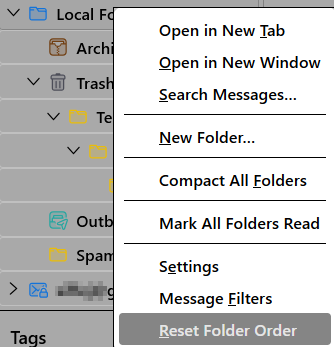
I am using TB v150.0.1. Using the reorder menu choice sorts the folders in alphabetical order instead of returniung them to my desired manually sorted order. If there is a manual folder sort function available, then there should be functionality to ensure that once sorted, the folders stay in that order.
Arunas Pabedinskas said
I am using TB v150.0.1. Using the reorder menu choice sorts the folders in alphabetical order instead of returniung them to my desired manually sorted order. If there is a manual folder sort function available, then there should be functionality to ensure that once sorted, the folders stay in that order.
Sorry, I misunderstood. Once you sort your folders, they should stay that way after restarting. How many folders and subfolders do you have under Local Folders?
I have 10 or so folders under Local Folders and several hundred subfolders and sub-subfolders under the main folders to which I have added numbers to the folder names to keep in the desired order. I am frustrated enough with the folders always rearranging themsleves after I mannually sort them into the preferred order, so I don't have the energy to start manually sorting subfolders.
Arunas Pabedinskas said
I have 10 or so folders under Local Folders and several hundred subfolders and sub-subfolders under the main folders to which I have added numbers to the folder names to keep in the desired order. I am frustrated enough with the folders always rearranging themsleves after I mannually sort them into the preferred order, so I don't have the energy to start manually sorting subfolders.
Sort a few folders, then start TB in Troubleshoot mode. Do the folders remain sorted?
The order of the manually sorted folders in Local Folders seems to be holding for now, but the manually sorted order of any subfolders keeps resetting to what it was before I sorted them, even after I sort them in trobleshooting mode and run Repair Folder. It would only make sense that there is somewhere in one or more TB settings files that the order of manually sorted folders and subfolders is stored and can be checked to ensure that the manually sorted orders have been saved correctly. If not, then unless you never shut down TB, the manualy sort folders function is an utterly useless function.