How to Select a Firefox Perofile

I had a problem where FF 140.0 would not update, and in trying to get FF yo update, I used a re-install tool to which I was pointed in my problem report. This caused FF to wipe out my configuration, and I lost all my windows and tabs. I have gone to
\Appdata\Roaming\Mozilla\Firefox\Proifiles\abnfpged.default
cleared all of the data therein, and restored that directory from a backup I made last Monday. But I cannot get FF to use that directory. "about:profiles" shows only two profiles, but the Profiles directory has five profiles:
03/10/2026 09:39 AM <DIR> qf00ka5x.default 03/10/2026 09:39 AM <DIR> v842ceue.default-release 04/11/2026 09:16 PM <DIR> .. 04/11/2026 09:16 PM <DIR> . 04/12/2026 03:08 PM <DIR> abnfpged.default 04/12/2026 06:29 PM <DIR> jdfj91sd.default-release-1775960183850 04/12/2026 06:48 PM <DIR> f1jq4mlq.default
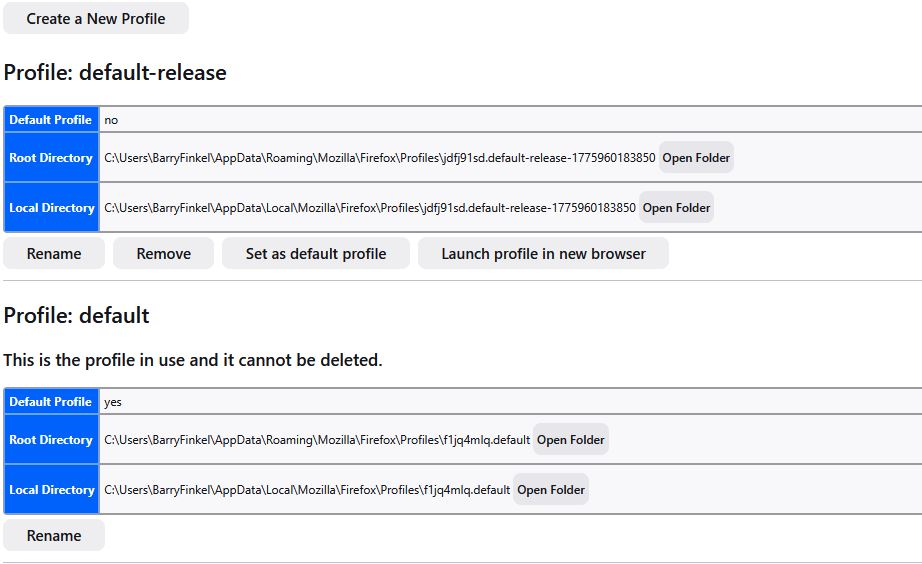
Only the profiles beginning with "j" and "f1" are seen in the "about:profiles" screenshot I have attached. And I have attached a screenshot of my profiles.ini file. Also, in the abnfpged.default directory I restored, where is the list of all of my open windows and tabs? FF used to keep that in a sessionstore.jsonlz4 file, but that file is only written when FF closes. I tried to save a copy when I was having problems, but I stored the copy in the same directory, which FF changed during the re-install process. Here is my profiles,.ini file:
[Install308046B0AF4A39CB] Default=Profiles/jdfj91sd.default-release-1775960183850 Locked=1
[Profile1] Name=default IsRelative=1 Path=Profiles/f1jq4mlq.default
[Profile0] Name=default-release IsRelative=1 Path=Profiles/jdfj91sd.default-release-1775960183850
[Install641D10338ABA448D] Default=Profiles/abnfpged.default Default=1 IsRelative=1 Locked=1
[General]
- StartWithLastProfile=1
Version=2
[BackgroundTasksProfiles] MozillaBackgroundTask-308046B0AF4A39CB-defaultagent=lnvi5jn5.MozillaBackgroundTask-308046B0AF4A39CB-defaultagent
I have not worked with the ;profiles.ini file in many years, as my FF configuration has not had problems. Thanks.
Chosen Solution
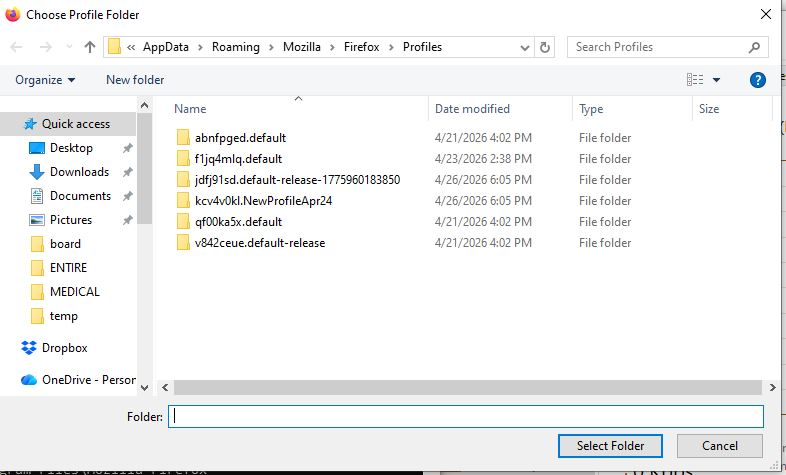
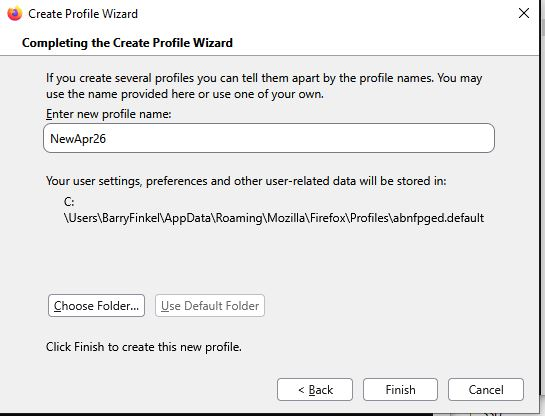
You need to start the Profile Manager by using the "-P" parameter and click "Create Profile" and click Next to proceed to the page where you can create a new profile. On this page , click the Chose Folder button and browse to one of the folders that aren't registered to register this profile and make it appear in about:profiles and in profiles.ini. If you click to accept the name Firefox proposes then you get a new profile. You can remove profiles you created accidentally and delete/remove the files to ensure that the profiles are removed in "AppData\Roaming" and "AppData\Local", but make sure that you do not do this with profiles that store valuable personal data that you haven't backed up.
All Replies (18)
One typo correction in what I wrote yesterday - I was running 149.0 (not 140.0). Now I am running 149.0.2 [in a different profile than the one I lost over the weekend]. I really want to get my old profile back. Thanks.

A profile may be missing from the about:profiles page because Firefox has lost track of it, even though the profile folder still exists. You can create a new profile using the [Choose Folder] option in the Create Profile Wizard to select that profile folder, to recover the data it contains. For details, see the Profile Manager - Create, remove or switch Firefox profiles article.
This is a continuation of /questions/1575745 Cannot Upgrade from Firefox 149.0 (That question is solved, since you did update from Firefox 149.0 to 149.0.2)
Modified by AliceWyman
You will normally find these files in the sessionstore-backups folder:
- previous.jsonlz4 (cleanBackup: copy of sessionstore.jsonlz4 from previous session that was loaded successfully)
- recovery.jsonlz4 (latest version of sessionstore.jsonlz4 written during runtime)
- recovery.baklz4 (previous version of sessionstore.jsonlz4 written during runtime)
- upgrade.jsonlz4-<build_id> (backups created during a Firefox update)
You can try to restore the upgrade.jsonlz4 file from the last update or use a utility to browse Windows System Restore points to see if you can find a recent sessionstore.jsonlz4 file.
You can copy a file with Firefox closed from the sessionstore-backups folder to the main profile folder and rename the file to sessionstore.jsonlz4 to replace the current file.
- make sure to backup the current sessionstore.jsonlz4
You can look at this tool to inspect a compressed jsonlz4 sessionstore file. This tool works locally, no uploading is done.
I am getting VERY CONFUSED. I had a new profile (in use while I attempt to resurrect my old profile), and when I did an Exit and restarted FF, I got a session with ONE tab; the various tabs from my previous session were LOST. Why??? I thought that when I did an Exit and then restarted FF, my previous session would be used.
Exactly what do I enter while creating a new profile so that my restored profile abnfpged.default is used? And I prefer not to do something that will corrupt that restored profile. And what is the difference between "default" and "default profile"?
The "Create Profile Wizard" will create a new profile "default user" with a random set of characters as a name in my Profiles directory. I do not know what to specify in the name field, and I do not want to create a new profile in the Profiles directory that has the new random-character name.
My restored profile IS in the Profiles directory, and I have placed in in the Profiles.ini file. But I cannot get FF to give me the option to use that profile as my default profile. I have modified my Profiles.ini file; here is the current version:
--- [Install308046B0AF4A39CB] Default=Profiles/jdfj91sd.default-release-1775960183850 Locked=1
[Profile2] Name=default-release Path=Profiles/abnfpged.default Locked=1
[Profile1] IsRelative=1 Path=Profiles/f1jq4mlq.default
[Profile0] Name=default IsRelative=1 Path=Profiles/jdfj91sd.default-release-1775960183850
[Install641D10338ABA448D] Default=1 IsRelative=1 Locked=1
[General] Version=2
[BackgroundTasksProfiles] MozillaBackgroundTask-308046B0AF4A39CB-defaultagent=lnvi5jn5.MozillaBackgroundTask-308046B0AF4A39CB-defaultagent ---
I assume that it SHOULD be easy to modify this so that FF starts with by abnfpged profile, but I have not found the "trick". As I wrote above, it has been many years since I worked with my Profiles.ini file. I am a retired IT professional, so I should be able to modify the Profiles.ini file to do what I want.
Can someone tell me what I have to do to the Profiles.ini file? In the past few days, I have never seen FF list my abnfpged profile as an option. Thanks.
No one has responded to my last reply. I had a collection of tabs open this afternoon, and I shut down to reboot and check a disk connection. When I re-started FF, ALL of my tabs were missing. WITH ANY PROFILE, HOW DO I SAVE MY TABS WHEN I EXIT FIREFOX???
It could be a bug - for example, see Bug 2029161 - Open tabs are lost after upgrading Firefox, cannot restore
If you don't get a better answer here,... and if you have "Open previous windows and tabs" selected in Firefox Settings General panel under Startup...then you can file a new SessionRestore bug report
Modified by AliceWyman
P.S. For more information about Session Restore, see these articles:
I enabled the setting "Open previous windows and tabs". I had forgotten about that setting because I had used the abnfpged profile for MANY years until it was destroyed. That should solve one current problem. But it still does not tell me how to get that restored profile to be my default profile again .
To get back the abnfpged profile if it is missing in about:profiles but still available in \Appdata\Roaming\Mozilla\Firefox\Proifiles\abnfpged.default, see my first reply, above, on creating a new profile and choosing that folder to use as the new profile.
See the Profile Manager - Create, remove or switch Firefox profiles article Create a profile section on creating a new profile, using the [Choose folder] option to select the abnfpged.default folder. Here is a screenshot showing how to create a new profile, from the Profile Manager article:
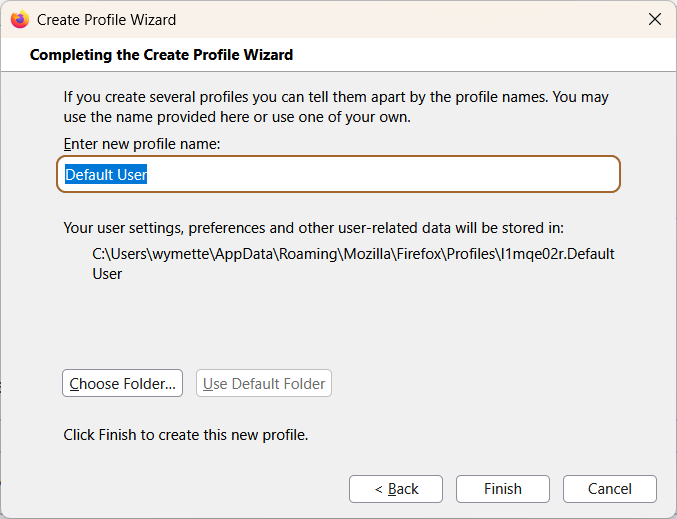
Once you have recreated the profile (give it any name ... Default User is fine). It should be set as the default profile but you can always set it as the default from the about:profiles page.
I am still confused. I can create a new profile, as per the example screenshot above. This will create, in the Profiles directory, a new directory named l1mqe02r.Default.User when I click "Finish". Then what do I do? I now have a new profile, but (I assume) that I am still using the current profile. I can Exit Firefox, and my session will be stored in the current profile. What is in the new profile I have just created? When I re-start FF, what profile will be used - the one I was using, or the new one I just created? Either one does NOT solve my problem. I have a restored profile that I want to use.
C:\Users\BarryFinkel\AppData\Roaming\Mozilla\Firefox\Profiles>dir
Volume in drive C is Win10-Boot
Volume Serial Number is F8E6-91B2
Directory of C:\Users\BarryFinkel\AppData\Roaming\Mozilla\Firefox\Profiles
04/11/2026 09:16 PM <DIR> . 04/11/2026 09:16 PM <DIR> .. 04/21/2026 04:02 PM <DIR> abnfpged.default 04/21/2026 04:02 PM <DIR> f1jq4mlq.default 04/22/2026 02:56 PM <DIR> jdfj91sd.default-release-1775960183850 04/21/2026 04:02 PM <DIR> qf00ka5x.default 04/21/2026 04:02 PM <DIR> v842ceue.default-release
              0 File(s)              0 bytes
              7 Dir(s)  12,265,365,504 bytes free
C:\Users\BarryFinkel\AppData\Roaming\Mozilla\Firefox\Profiles>
Note that all of these have recent dates. On the "about:profiles" tab all I see currently is the profile that begins with "j"; I do not see any of the other four profiles. Many years ago I remember editing the Profiles.ini file; I do not remember if it was for Firefox or Thunderbird. I have tried editing my Profiles.ini file, but I have not yet gotten FF to start with my abnfpged profile.
If I restart FF with -P will I get a list of all five profiles, where I can choose the abnfpged?
C:\Users\BarryFinkel\AppData\Roaming\Mozilla\Firefox>cat profiles.ini
_[ I n s t a l l 3 0 8 0 4 6 B 0 A F 4 A 3 9 C B ]
D e f a u l t = P r o f i l e s / j d f j 9 1 s d . d e f a u l t - r e l e a s e - 1 7 7 5 9 6 0 1 8 3 8 5 0
L o c k e d = 1
[ P r o f i l e 2 ]
N a m e = d e f a u l t - r e l e a s e
P a t h = P r o f i l e s / a b n f p g e d . d e f a u l t
L o c k e d = 1
[ P r o f i l e 1 ]
I s R e l a t i v e = 1
P a t h = P r o f i l e s / f 1 j q 4 m l q . d e f a u l t
[ P r o f i l e 0 ]
N a m e = d e f a u l t
I s R e l a t i v e = 1
P a t h = P r o f i l e s / j d f j 9 1 s d . d e f a u l t - r e l e a s e - 1 7 7 5 9 6 0 1 8 3 8 5 0
[ I n s t a l l 6 4 1 D 1 0 3 3 8 A B A 4 4 8 D ]
D e f a u l t = 1
I s R e l a t i v e = 1
L o c k e d = 1
[ G e n e r a l ]
V e r s i o n = 2
[ B a c k g r o u n d T a s k s P r o f i l e s ]
M o z i l l a B a c k g r o u n d T a s k - 3 0 8 0 4 6 B 0 A F 4 A 3 9 C B - d e f a u l t a g e n t = l n v i 5 j n 5 . M o z i l l a B a c k g r o u n d T a s k - 3 0 8 0 4 6 B 0 A F 4 A 3 9 C B - d e f a u l t a g e n t
C:\Users\BarryFinkel\AppData\Roaming\Mozilla\Firefox>
Thanks,
Why are you referencing or updating the profiles.ini file? When you use the Create Profile Wizard, you choose the profile folder you wish to use from the Profiles folder that opens, ... which I assume is the abnfpged.default folder
When I use the "about:profiles" tab, I do not see the abnfpged profile listed. I see ONLY one profile today - jdfj91sd.default-release-1775960183850. The other profiles that exist in my Profiles directory are not listed, and I have no idea why they are not listed. If I had seen the abnfpged profile listed, then I would have chosen it.
You don't see the abnfpged profile or othe missing profiles in the "about:profiles" tab because Firefox has lost track of them. You'll see the abnfpged profile when you use the "Create Profile Wizard" and use the [Choose Folder] button, which opens the location where profile folders are stored by default ....in your case, is the C:\Users\BarryFinkel\AppData\Roaming\Mozilla\Firefox\Profiles folder.
I am still confused. How can FF have lost track of my previous profiles, as they are all stored in the default directory? I used the "Create New Profile" dialog to create a new profile named "NewProfileApr24", and the result was a new directory in the Profiles directory named "kcv4v0kl.NewProfileApr24". Now what? I now have six profile directories:
C:\Users\BarryFinkel\AppData\Roaming\Mozilla\Firefox\Profiles>dir
Volume in drive C is Win10-Boot
Volume Serial Number is F8E6-91B2
Directory of C:\Users\BarryFinkel\AppData\Roaming\Mozilla\Firefox\Profiles
04/24/2026 10:26 AM <DIR> . 04/24/2026 10:26 AM <DIR> .. 04/21/2026 04:02 PM <DIR> abnfpged.default 04/23/2026 02:38 PM <DIR> f1jq4mlq.default 04/24/2026 10:25 AM <DIR> jdfj91sd.default-release-1775960183850 04/24/2026 10:26 AM <DIR> kcv4v0kl.NewProfileApr24 04/21/2026 04:02 PM <DIR> qf00ka5x.default 04/21/2026 04:02 PM <DIR> v842ceue.default-release
              0 File(s)              0 bytes
              8 Dir(s)  13,160,116,224 bytes free
C:\Users\BarryFinkel\AppData\Roaming\Mozilla\Firefox\Profiles>
The about:profiles tab shows the one I am using, jdfj91sd.default-release-1775960183850, and the new one, NewProfileApr24. I have the option of removing the new one, renaming the new one, or restarting FF with that new profile. How do I get my abnfpged profile back in use? Do I (outside of the profile manager) (1) delete this new directory, (2) then rename my restored abnfpged.defaulr directory to this new name, and finally (3) use the profile manager to use the new kcv4v0kl.NewProfileApr24 profile?
I don't know how else to explain how to create a new profile using an existing profile folder that does not appear in about:profiles. Maybe someone else can help
I am NOT interested in creating a new profile in the existing default directory; I know how to do that. What I want to do is to get FF to use an EXISTING profile in my default directory. For some unknown reason (and I have not looked at the code) the "about:profiles" tab never lists all of the profiles I have in my default directory. As far as I can tell, the only ways to do what I want are to (1) create a new directory and (under-the-covers) rename my desired directory to have this new name (as I wrote in my previous reply), or (2) modify the Profiles.ini file to use my desired directory. I have not been successful in modifying my Profiles.ini file in the parent directory.
Chosen Solution
You need to start the Profile Manager by using the "-P" parameter and click "Create Profile" and click Next to proceed to the page where you can create a new profile. On this page , click the Chose Folder button and browse to one of the folders that aren't registered to register this profile and make it appear in about:profiles and in profiles.ini. If you click to accept the name Firefox proposes then you get a new profile. You can remove profiles you created accidentally and delete/remove the files to ensure that the profiles are removed in "AppData\Roaming" and "AppData\Local", but make sure that you do not do this with profiles that store valuable personal data that you haven't backed up.
My problem started when a FF update would not install, and one suggestion I received caused my profile to be corrupted so that I no longer had my multiple windows and tabs. I did use cor-el's suggestion to start FF with a profile that I had restored from a three-day-old backup. That suggestion worked. I have no idea why the initial FF update did not install, but the suggestion I followed got the update to install (but destroyed my profile).