


How to turn on the VPN

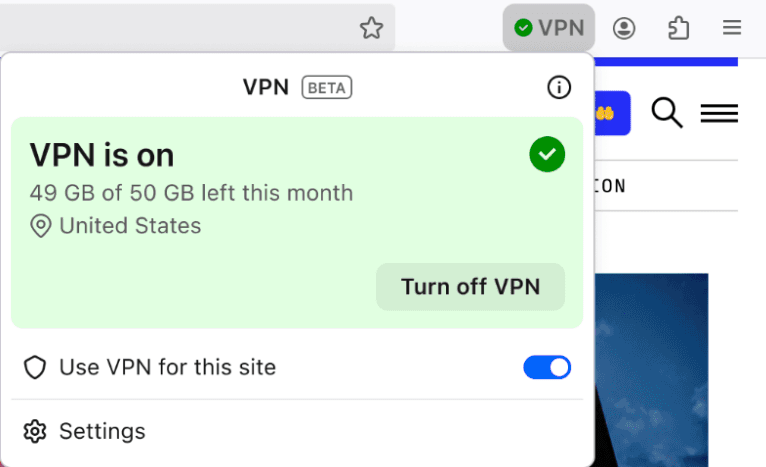
How do you turn on and off the VPN? Is there an icon on the firefox tool bar that shows the VPN is on and where its connected to?
All Replies (3)

If you're asking about the new built-in VPN mentioned in the Firefox 149 release notes, this feature is being rolled out in stages so it might not be available to you.
If you're part of the progressive rollout then you would see a VPN setup prompt in the top-right corner of your Firefox toolbar and, after clicking "Next" in the prompt and signing in to your Mozilla account, you would see the VPN panel to turn the feature on and off, as shown in this image, taken from the release notes:
For details and more information,. see this article: Use built-in VPN in Firefox
Modified by AliceWyman
Alice ..
Thank you for your quick response. Perhaps I misread the release notes. I didn't know it was in a limited beta role out.
I assume there will be another major release with the full rollout.
How would I join the beta program in the future?
The built-in VPN will likely be rolled out to all Firefox users but the first locales will be the US, UK, Germany and France. I don't know of any Beta program you can join for priority access to the VPN built into Firefox 149. You could try asking in this Mozilla Connect discussion and feedback thread: https://connect.mozilla.org/t5/discussions/introducing-firefox-s-built-in-vpn-ip-protection-now-in-the/td-p/120550 Introducing Firefox’s Built-in VPN: IP protection, now in the browser
If you want to try upcoming Firefox features in general, you could install a test build such as Firefox Beta, described here: https://www.firefox.com/en-US/channel/desktop/. Be sure to install the Beta version in a new program folder location using the Custom installation method, if you want to keep both Firefox versions. See Custom installation of Firefox on Windows.
Modified by AliceWyman