


cannot import MBOX only local

Hi. I am trying to create a local only thunderbird where I only access locally stored MBOX's. I have added the ImportExport tools but it only shows the option to import EML files and for the life of me I cannot set up a local folder. I also added the Local Folder tool but it didn't seem to do anything.
Chosen solution
You need an account for thunderbird to work properly. If all you want Thunderbird for is to view mbox files, I suggest either a free mbox viewer available athttps://sourceforge.net/projects/mbox-viewer/ or use the free online mbox viewer at https://www.mbox-viewer.com/
Read this answer in context 👍 1All Replies (4)
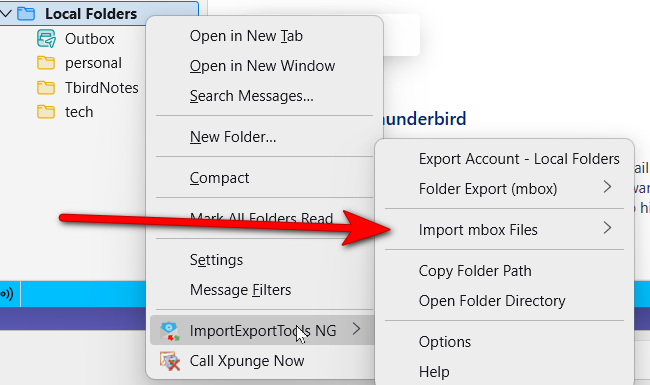
See attached screenshot. When you highlight Local Folders and rightclick, this menu should appear. Please advise what menu options show for you. thank you.
I do not have the local folders tab at all!! Also I don't know how you got a picture in here in this thread! Here is a linke to a screenshot: https://imgur.com/a/ZCy4NUu]
Chosen Solution
You need an account for thunderbird to work properly. If all you want Thunderbird for is to view mbox files, I suggest either a free mbox viewer available athttps://sourceforge.net/projects/mbox-viewer/ or use the free online mbox viewer at https://www.mbox-viewer.com/

Maybe you read these instructions: https://github.com/thunderbird/import-export-tools-ng/issues/608
I could not make them work in my version of Thunderbird either.
It seems that Thunderbird requires a server account. I just created a new profile with a dummy server account. I was then able to create local folders. You can tell Thunderbird never to check the dummy account for new mail. I don't know if there will be any issues.
Where did you find an option to import messages with ImportExportToolsNG? Until I create a server account, I cannot find one.
As soon as you create a new profile, if you want to import mbox files, you must set the message storage format to be "file per folder (mbox)".
≡ menu > Settings > General > Indexing (at the bottom)
"File per folder (mbox)" is the default setting, so you probably have it already. But then I have no explanation for why ImportExportTools NG will import only eml files. If the strorage format is "file per message (maildir)", ImportExportToolsNG will not import mbox files. Switch to "file per folder (mbox)", if you can. If you cannot, you may have to create a new profile and set that that setting before creating any accounts.
If you need to create a new profile and delete the other one later: ≡ menu > Help > Troubleshooting information > about:profiles