


Tools>Message Filters>Filters for:

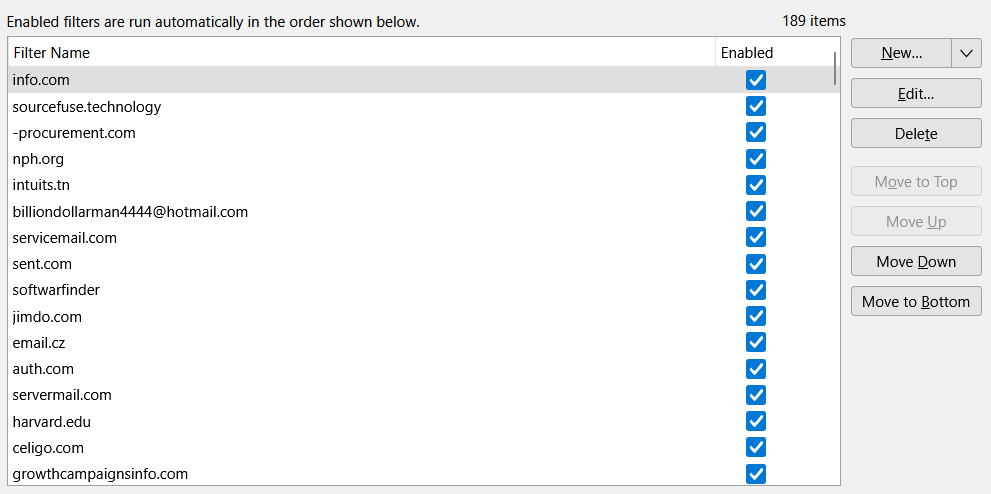
I see there are 3rd Party Message Filters. However, I'm not looking for those. I'm looking at the Tools> Message Filters>Filter name for:, where you can add Email Details>choose what part of the email, and then move Message to. I want to be able to view the Filter name alphabetically in the Folder(s)...without having to sort so many of them individually.
Example:
- Filter name: 123@domain.com - Match: From - Move Message to: Spam - Message Filters (alphabetically)
Any help would be appreciated.
All Replies (5)

Here is an add-on that claims to be able to sort message filters alphabeticaly. I can't vouch for it's effectiveness.
https://addons.thunderbird.net/en-us/thunderbird/addon/quickfilters/
I will mention that trying to block spam, if that's what you're trying to do, by creating many filters on specific domain names, is about the least effective and efficient method. Spammers usually use new domain names with every campaign and rarely reusing previous ones.
Hi Lin,
Thanks for the info, however, that App/Add-on works just for Email Folder Inbox Filtering only, and not my specific need/request.
That said, if this is the least effective, what would you recommend? Perhaps I'm going about this totally wrong?
I guess I don't really understand what you're looking for if this addon doesn't do it. I don't find anything else similar.
Like I mentioned, spammers rarely reuse domain names, so any new filter like that you create probably won't find anything else. Doesn't hurt anything outside of a trivial performance hit, but just ineffective.
A better tool is Thunderbird's built-in Adaptive Junk Controls, which use 'smarts' to learn to distinguish spam from legit email. You have to spend some time training it what is good and bad, and it's not 100% effective, but I find it does a good job. I do have some manual filters for those recognizable miscreant repeat offenders, but the Adaptive filters do the heavy lifting.
Here's an article about how it works and how to use it:
https://support.mozilla.org/en-US/kb/thunderbird-and-junk-spam-messages
Select the filter and click edit and you see the criteria. I think that is what you asked for. I have no idea what you are talking about with third party message filters, or most of the other stuff mentioned here really.
Message filters are executed generally in the order they appear in the list, an alphabetical sort of the filters could turn a carefully crafted collection of filters into rubbish in one click.
Perhaps read the support documentation of filters here https://support.mozilla.org/kb/organize-your-messages-using-filters
I have no idea what your "use case" is but perhaps you need to share it so someone might understand what it is you are trying to achieve. Rest assured alphabetical order in not a good idea from a functional standpoint and the details of all filters is contained in the edit box of that filter.
Thunderbird does store a text file msssagefilters.dat for each account and it is laid out similarly to what you envision in your initial posting, sans alphabetic sorting, but one small error in that file will cause the entire thing to fail and it may crash Thunderbird as the program does not expect the file to be edited externally.