


Display Font Unreadable

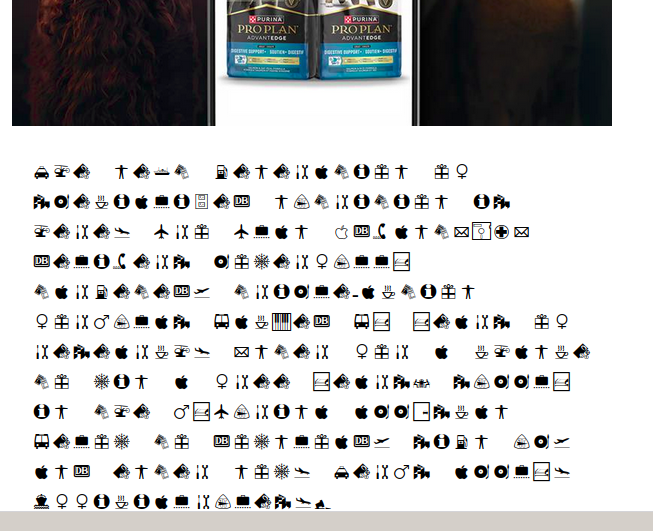
I can't seem to get Thunderbird on Linux Mint to work. Everything font related is a mess. I don't know what default Thunderbird uses when it doesn't know a font but the setting is unreadable. I've messed with a ton of font settings but nothing seems to change anything. Note if I copy the garbage and paste it into a notepad, it is totally readable but there appears to be no way to change this default in Thunderbird. Please help.
All Replies (15)
This is a multi-part message in MIME format.
--ptirs0u9S2uq=_?:
Content-Type: text/plain;
	charset="utf-8"
Content-Transfer-Encoding: 8bit
Purina® ͏ ͏ ͏ ͏ ͏ ͏ ͏ ͏ ͏ ͏ ͏ ͏ ͏ ͏ ͏ ͏ ͏ ͏ ͏ ......
Modified by cherry7
This is a multi-part message in MIME format. --ptirs0u9S2uq=_?: Content-Type: text/plain; charset="utf-8" Content-Transfer-Encoding: 8bit
then the graphics. The characters shown are all the same. This won't let me enter them as they just come up empty but, the strings are like this if you remove the spaces...
Purina® & # 8 4 7 ; & z w n j ; & # 8 4 7 ; & z w n j ; ...
Every character has the same thing however they don't display that way.

"No font is specified in the HTML?"
Not that I can see. Just header, mime content and some images.
Like I said, TB uses the graphics when it doesn't know what to do. Why that font? Where can I change it? Nobody seems to know.
I have no special knowledge about how Thunderbird uses fonts. I was hoping that my questions would reveal useful information.
All I can think is that a font file is corrupted. If you can find it and replace it, maybe the problem will be solved.
I am sorry that I could not help more. Maybe other people can.
"I am sorry that I could not help more. Maybe other people can.
I appreciate your help. It is weird. I may just go with a different email client.
Thanks again!
Hello there Cherry7
Let s start again with all your issues now. Having weird characters , missing buttons , misding advance options.
A second look for you. Is that issue still there?can i ask? All these symptoms are really matching our answers to you. Our diagnostic answers to you is that you have an ui corruption.(Users Interface). Often caused by faulty updates, faulty hardware acceleration and even more as failed themes, Incorrect character encoding.
Fix Reset toolbars in safe mode.
Reset the xjulstore.json file. Go to the profile folder>help troubleshooting information>profile folder>open folder. Close thunderbird. Find the xjulstore.json and rename it to xjulstore.jason.old . Restart thunderbird.
Also hardware accelerations can be the culprit here , and are adjustable for intern chips as onboard solder x iris set (as well .) And as last , the use of troubleshoot mode is effective. Even if there is 1 add-on installed.
Greetings googlethunderbird
Use https://support.mozilla.org/en-US/kb/troubleshoot-mode-thunderbird
Modified by Googlethunderbird.
Hello there cherry 7
Having multiple updates a year can have caused this.(as a preview) (Or)Long term wrong usage of the thunderbird software to. That s my answer.
I think i did helped you well.
Have a good day.
Greetings Googlethunderbird.
Modified by Googlethunderbird.
No. I don't even run Chrome on this box. I do have a lot of fonts for my graphic arts work but I don't think I have that font. I'll go through them and see. If I find it, I'll uninstall it and see what happens.
It is odd that the ONLY application that displays this is Thunderbird and, it only does it occasionally, not all the time.
cherry7 said
No. I don't even run Chrome on this box. I do have a lot of fonts for my graphic arts work but I don't think I have that font. I'll go through them and see. If I find it, I'll uninstall it and see what happens.
Userchrome.css is not related to Chrome, at least not in Thunderbird.
I don't know what font you are referring to.
OK, the offending font is "Inter", I0001076.TTF. It is in my home dir private font directory, ~/.fonts/TrueType/2000_fonts/. I have absolutely no clue as to how Thunderbird is even finding this font and why it picked this one out of the 2000+ fonts I have in that directory. In addition to that, it is disabled in Font Manager. Using grep, it isn't in any Thunderbird file or config file. Anyway, uninstalling that font seems to have resolved the issue. Of course, I still have no idea why it happened or how to find out how it happened. The fix was to just remove the font which isn't a problem as I don't need it. The new font is a very readable sans serif font. I don't know what font but it isn't Helvetica or Arial.
I appreciate all the pointers and help and suggestions. Now to figure out the tiny font in the message composition window and I'll have a working Thunderbird again!
Thanks again
What is happening as far as I can see here is that Thunderbird is using font fallbacks using font families. These can product the most bizarre outcomes but Thunderbird will be getting it's information on installed font from your operating system, and the document.
But inter as far as I can see is not a dingbat font. But one optimised for computer screens.
This will be the plain text versions send for those that can not view HTML. So everyone is chasing in the wrong place for the HTML declarations.
Miltipart mime messages usually start with a plain text part which most clients ignore as they use the following HTML part. Other like Pine which are deliberately sans HTML rendering capabilities can still view these messages.
I would suggest posting a link to the entire massage source. I use pastebin and paste the message source there https://pastebin.com/ because once I have a free account there I can delete the information I post when it suits me. I may never delete it, but I like having the choice.
Hello there Cherry7
Thank you Matt. For having that good answer. Thanks Matt for that additional good answer. After some fiddling in good answers, the best ones remain out of harm's way. At one point it seemed like a meeting conversation for people. With no answers. I do thank Matt for getting us out of this subject. And hopefully it will be solved one day.
Thank for your time whit this subject.
Greetings googlethunderbird.
I tried to post the source here however, the site doesn't allow that since everything started with an & symbol.
TB does this randomly but TB always selected the random font from a private archive directory of over 2000 fonts. Again, no rhyme or reason. It is still selecting some font from somewhere, but it is not one of the ones in settings or the normal system font directory (/usr/share/fonts). Why it drills down in my private files to find a random font, nobody knows. Again, only TB does this. None of the web browsers do this and none of my editors do this.
There is nothing in any of the messages that I can think of that would make TB even make it want to go to my private font archive directory and pick one font out of 2000+ fonts as its default and then always use that font. It does this on multiple messages from different senders so it isn't one message or sender related.
Anyway, I'm closing this issue. What happened under the hood of TB is dark magic to me. At least it has now selected an attractive sans-serif font that I can live with.
Others are also posting about the tiny font issue in the composition window so I'll follow those threads and see if a solution ever evolves.
Thanks again for all the suggestions.
Modified by cherry7