


IMAP connection from Smartermail server can not save to sent folder
Good morning,
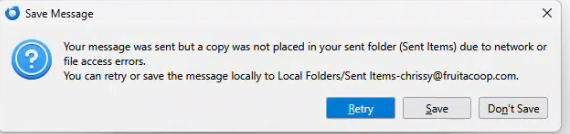
I have a Thunderbird desktop client connected to an email on a Smartermail server via IMAP. Receiving mail just fine, but sent mail stalled on the send then gives the following error.
Your message was sent but a copy was not placed in your sent folder (Sent Items) due to network or file access errors. You can retry or save the message locally to Local Folders/Sent Items-chrissy@fruitacoop.com.
I can switch it to save to a local sent folder, but that is not a viable permanent solution. I have searched and followed all suggested troubleshooting steps I could find in the community forums without success.
Steps tried: - completely removed the account and added it back - completely removed Thunderbird and all app data, reinstalled - Tried many suggested "copies and folders" configurations
All unsuccessful. If anyone has had this issue and has any insight into a soluution, I would be forever grateful.
All Replies (10)
For whatever it's worth, my insight is that the message you received is usually correct. For one of my accounts, that happens for a while and in a few days it goes away. Thunderbird has no control of your internet connectivity. Anyway, that's just my experience.
That is what I had originally hoped, but this has been going on for a few weeks consistently for several users in the same building.

My experience is similar to David's. I had that problem again yesterday when my network was acting badly.
Tony, are those several users in the same building on the same network?
Yes they are, but there are dozens of users on the same network with the same email + client config and only a handful of them are experiencing this issue.
I would look first at something on the network that is common to those users, e.g., a wi-fi access point.
Anti-virus is also suspected sometimes in these situations. https://support.mozilla.org/en-US/questions/1548119
For the affected users, the error happens regardless of which network they are connected to. It happens on their home network as well when they bring their work computers home.
I did completely disable AV and tested with no success.
I would run Thunderbird in troubleshooting mode and see if the problem persists. Under the "help" menu.
Also: run Windows in safe mode with networking and see if the problem persists.
Both these steps are troubleshooting steps. They will not fix the problem, but might give us useful information.
Client Troubleshooting mode and Windows safe mode both had the same issue.
New discovery, developer tools > error console throws this error after send attempts.
DOMException: Could not remove `C:\Users\chris\AppData\Local\Temp\nsemail-1.eml' (NS_ERROR_FILE_IS_LOCKED)
Currently trying to track down a reliable breakdown of this error.
Tony said
Client Troubleshooting mode and Windows safe mode both had the same issue. New discovery, developer tools > error console throws this error after send attempts. DOMException: Could not remove `C:\Users\chris\AppData\Local\Temp\nsemail-1.eml' (NS_ERROR_FILE_IS_LOCKED) Currently trying to track down a reliable breakdown of this error.
I'm sorry that I cannot help.