


I want Archives to save emails in seperate files
Hi,
I need some help! Thunderbird used to have archive settings in which I could choose to save my e-mails locally in my archive folders with 1 file per 1 email and not everything that's in a folder saved to a single file.
How can I get this back? Is there some hidden settings that can be accessed to get it done?
I need every email in one file! I'm going nuts trying to sort years of e-mail duplicates. If I can have a file per message, then I can at least use my PC duplicate file program to compare file content and find the similar ones. But with everything of one folder in the same archive file I'll be cursed to have to manually go through thousands of e-mails by hand! So if there is a way to return the previous archive format (*wdseml files??, it seems?) then I want to know how to set that setting.
Alternatively a local folder duplicate e-mail cleaning tool? There used to be some but I couldn't get it to work now!
All Replies (12)
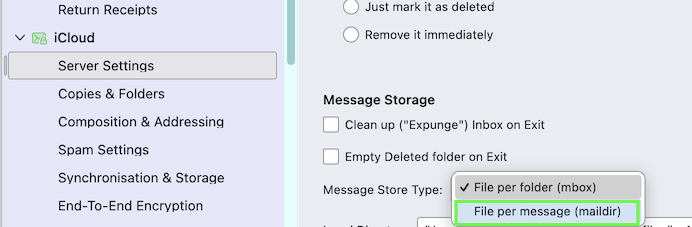
If you want to store your messages (received, sent, archived, ...) in the "file per message" format - also called maildir format - you have to go to Account Settings > account name > Server Settings > Message Storage and select "File per message (maildir)"

Mapenzi said
If you want to store your messages (received, sent, archived, ...) in the "file per message" format - also called maildir format - you have to go to Account Settings > account name > Server Settings > Message Storage and select "File per message (maildir)"
That setting can be set only for new accounts. :(
I found two add-ons that remove duplicates. One seems to be better. People say that getting it to start is tricky. Maybe that's the one that you have and there is a way to get it to work for you.
You could create a new profile, set maildir as the storage format, transfer your messages to the new profile, re-create your accounts. Maildir implementation is still considered at least somewhat buggy and risky. I have been using it in a very simple set-up without problems.
But you don't have to do that to use an external de-duplicator or file comparison tool. You can use the add-on ImportExportToolsNG to export messages in eml format.
Modified by Rick
Rick said
That setting can be set only for new accounts. :(
Depends on which Thunderbird version you are using. Here in Thunderbird 148.0 ..... (see image)
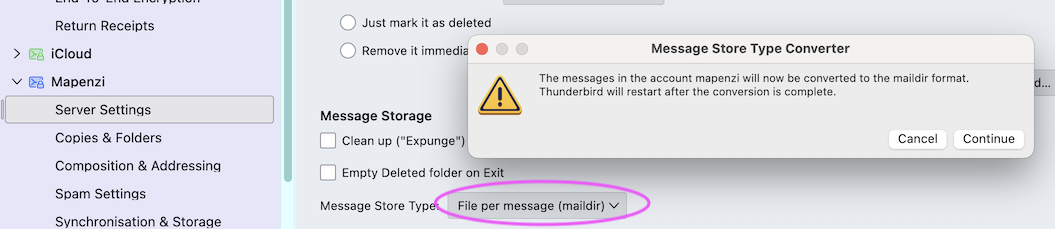
Oh, good. I did not know that. I am still on 140. Thanks. Sorry about the contradiction.
Mapenzi said
Rick said
That setting can be set only for new accounts. :(Depends on which Thunderbird version you are using. Here in Thunderbird 148.0 ..... (see image)
No, I cannot use that setting. It is greyed out for me! (;~;) It is set, but not selectable. And the messages are saved as *eml for the outlook ones and there's *wdseml files, too, in the profile folders, but plus *msf files of each folder. But then there's strangely also folders there, that I had long deleted from that account! As an [FOLDER NAME].mozmsgs folder! (0_0?)
Meanwhile in my local archive, there's not *msf files only (and subfolders) after using the ImportExportToolsNG tool to export the whole Local Folder once and transfer it to a fresh location, so that the files that are in there are only "fresh" files without any leftovers that may be leftovers from old versions, as that whole thing is a transfer from my previous notebook!
I really need to set it up so that I press the A (for archive) button and the messages are sent over to the local folder to separate files.
So ... should I basically remove all my IMAP accounts from Thunderbird, then re-add them? That seems so weird. It does the right thing in the profile folders but then does not do the same for local folder archives!
Wait ... the Local Folder settings say (mbox). Again greyed out, so I cannot select it! o(T~T)o Why??
K_no_uta said
Wait ... the Local Folder settings say (mbox). Again greyed out, so I cannot select it! o(T~T)o Why??
Because you do not have version 148 or whichever version first allowed changing the storage format on existing accounts.
Your options seem to be:
- Use an add-on.
- Update to 148 (which may bring new problems, especially if you use certain e-mail service providers).
- Start with a new profile so you can set the storage format before setting up accounts.
- Use ImportExportToolsNG to export eml files and compare and/or de-duplicate outside Thunderbird.
After 2 or 3, you can set messages to be archived in individual files in local folders.
K_no_uta said
Wait ... the Local Folder settings say (mbox). Again greyed out, so I cannot select it! o(T~T)o Why??
Because the "converter" feature has not yet been introduced in TB 140-esr channel. You didn't mention which version you installed
Rick said
K_no_uta said
Wait ... the Local Folder settings say (mbox). Again greyed out, so I cannot select it! o(T~T)o Why??Because you do not have version 148 or whichever version first allowed changing the storage format on existing accounts.
Your options seem to be:
- Use an add-on.
- Update to 148 (which may bring new problems, especially if you use certain e-mail service providers).
- Start with a new profile so you can set the storage format before setting up accounts.
- Use ImportExportToolsNG to export eml files and compare and/or de-duplicate outside Thunderbird.
After 2 or 3, you can set messages to be archived in individual files in local folders.
How do I "Start with a new Profile, please? :'D I cannot seem to find any settings that allow me to do so. Should I just move my Profile folder elsewhere and let thunderbird set up a new one upon opening it again?
Mapenzi said
K_no_uta said
Wait ... the Local Folder settings say (mbox). Again greyed out, so I cannot select it! o(T~T)o Why??Because the "converter" feature has not yet been introduced in TB 140-esr channel. You didn't mention which version you installed
Oh, weird, I thought I had put it into the form of the question XD 140.8.0esr (64-Bit) and it says it's fully updated. Where did you get your 148 from and what e-mail providers does it struggle with X'D
Oh and if I simply wait, will I get updated to that version eventually? Cause then I'll just wait, cause I have my hands full evacuating my e-mails cause the damn yahoo decided to reduce our storage capacity this summer, so if I don't move my e-mails now, I won't be able to receive new ones!
All that said, this is so weird. Because my emails clearly used to be saved as single e-mails in my local forlders and then that suddenly seemed to have changed!
Modified by K_no_uta
Information about release channels: https://support.mozilla.org/en-US/kb/choosing-thunderbird-release-channel
You could switch to 148 on the monthly release channel now or you could upgrade to the next major esr version later in the year.
There seems to be authentication issues between 148 and Yahoo and others, e.g., AOL, that use Yahoo for e-mail services. I do not know the details.
Rick said
Information about release channels: https://support.mozilla.org/en-US/kb/choosing-thunderbird-release-channel You could switch to 148 on the monthly release channel now or you could upgrade to the next major esr version later in the year. There seems to be authentication issues between 148 and Yahoo and others, e.g., AOL, that use Yahoo for e-mail services. I do not know the details.
Thank you! Looks like I won't be doing that. I saw that release channel isn't available for Linux and I am planning to switch to Linux as I've had it, with MicroSlop and it's intrusive nonsense! :'D And if Yahoo has issues, then that's double the reason to wait with the version update :'D
I'll just leave this sorting work for when I transfer to that. Turns out there's lots of "dead" imap folders of previous account setups in my profile, cluttering everything. So I'll switch to Linux first, Install Thunderbird freshly from scratch and use the ImportExportToolsNG, to only export/import my current Local E-Mails after assuring that the archive works as intended and saves *maildir files and those settings are no longer greyed out for me!!
Since I plan to run MicroSlop and Linux next to each other for a while, so I can figure out if everything works where I need it to, I'll still have my old setup and it's backup at hand if anything doesn't work!
Thanks a lot for your help to both of you!
Modified by K_no_uta